14 Best Smart Home Controllers with SmartThings, Compared
As an Amazon Associate we earn from qualifying purchases. Links on this page are affiliate links.
Finding the right smart home controller with SmartThings helps you unify your connected accessories under one reliable setup. We compared 14 products based strictly on the specifications published on their listings. The Aeotec Smart Home Hub with Zigbee and Matter earns the top spot because it bridges Zigbee and Matter devices with both Ethernet and Wi-Fi connectivity.
This guide helps you decide which hardware controller, sensor, or physical trigger matches your specific smart home setup and wireless protocols.
Quick picks
The best fit for you
- You need a central controller for Zigbee and Matter Aeotec Smart Home Hub with Zigbee and Matter It connects Matter and Zigbee devices into SmartThings using local automation processing over Ethernet or Wi-Fi.
- You need a physical button for moisture-prone areas Frient Zigbee Waterproof Smart Button Its IP65 water-resistant casing protects the Zigbee button inside humid environments like kitchens and bathrooms.
- You need a button working with Apple HomeKit Arre Matter and Thread Smart Button It features Matter connectivity over Thread to trigger automations across both Apple HomeKit and SmartThings ecosystems.
- You want a scene trigger using standard AAA batteries THIRDREALITY Zigbee Smart Button It provides three-action Zigbee scene control running on replaceable AAA batteries without requiring hardwired installation.
Our 14 picks

Aeotec Smart Home Hub with Zigbee and Matter
Best for: multi-protocol SmartThings home automations
- Smart Home Compatibility
- Alexa, SmartThings (what this guide is about)
- Connectivity
- Matter, Z-Wave Plus, Zigbee, Wi-Fi
- Network Interface
- Ethernet, Wi-Fi
- Dimensions
- 5 × 5 × 1 inches
- Weight
- 1.1 pounds
View on Amazon: Aeotec Smart Home Hub with Zigbee and Matter
This central controller connects your smart devices through the SmartThings platform. It supports Zigbee, Matter, Wi-Fi, and Z-Wave Plus protocols, allowing you to link lighting, sensors, and switches into one network. You can connect it via wired Ethernet or wireless Wi-Fi to automate routines locally or manage hardware on Android and iOS. It suits you if you need a single hardware base for diverse multi-protocol smart devices.
Pros
- Supports Zigbee, Matter, and Wi-Fi connectivity
- Provides both wired Ethernet and wireless Wi-Fi setup options
- Executes many routine automations locally for faster response
- Integrates with Amazon Alexa and Google Home voice platforms
Cons
- Z-Wave Plus support is limited to the V3 model style
- Designed only for use in North America
Good fit if
- You need a central SmartThings hub that bridges Matter, Zigbee, and Wi-Fi devices.
- You prefer connecting your smart hub through a wired Ethernet cable or Wi-Fi.
- You manage your home setup using Android, iOS, or iPadOS devices.
Skip if
- You live outside North America.
- You need guaranteed Z-Wave Plus support without verifying the hardware style variation.
Verdict: Aeotec Smart Home Hub serves as a central controller that links Matter, Zigbee, and SmartThings devices over Ethernet or Wi-Fi. It provides local automation processing alongside broad voice assistant compatibility for North American smart setups.

THIRDREALITY Zigbee Smart Button
Best for: simple three-action physical scene control
- Smart Home Compatibility
- SmartThings, Home Assistant (what this guide is about)
- Connectivity
- Zigbee 3.0
- Power Source
- 2 AAA Batteries
- Circuit Type
- 3-Way
- Dimensions
- 1.01 × 0.52 × 3.52 inches
- Weight
- 1.44 ounces
The THIRDREALITY Zigbee Smart Button gives you wireless control over your SmartThings ecosystem. It operates on the Zigbee 3.0 standard, requiring a compatible Zigbee hub to trigger routines and scenes. Powered by two standard AAA batteries with an estimated three-year lifespan, the button supports three actions: press, double press, and long hold. Included magnetic strips and tape offer mounting flexibility. It suits you if you need simple, physical routine triggers.
Pros
- Supports three distinct triggers: press, double press, and long hold
- Uses standard AAA batteries with up to 3-year runtime
- Includes both magnetic mounting strips and double-sided tape
- Zigbee 3.0 standard compatible with SmartThings and Home Assistant
Cons
- Requires a separate Zigbee hub to function
- Requires an optional Smart Bridge MZ1 for Apple HomeKit integration
Good fit if
- You already own a compatible Zigbee hub like SmartThings or Aeotec.
- You want three distinct actions configured on a single physical button.
- You prefer using standard AAA batteries rather than coin cells.
Skip if
- You do not own a Zigbee hub and lack a compatible smart home bridge.
- You need direct Apple HomeKit support without buying an additional bridge.
Verdict: THIRDREALITY Zigbee Smart Button delivers reliable three-action control across SmartThings networks using standard AAA batteries. It provides a simple physical trigger for your scenes without complex wiring.

THIRDREALITY Zigbee Door and Window Contact Sensor
Best for: SmartThings setups needing replaceable AAA battery sensors
- Smart Home Compatibility
- SmartThings, Home Assistant (what this guide is about)
- Connectivity
- Zigbee
- Operating Environment
- Indoor
- Power Source
- Two AAA 1.5V Alkaline batteries
- Hub Requirement
- Hub Required
- Dimensions
- 1.97 × 0.83 × 2.36 inches
View on Amazon: THIRDREALITY Zigbee Door and Window Contact Sensor
The THIRDREALITY Zigbee Contact Sensor monitors doors and windows using standard Zigbee connectivity. It pairs with SmartThings hubs, compatible Echo devices, and Home Assistant. Power comes from two AAA alkaline batteries rated for up to two years of life. Measuring 2.36 inches tall and weighing 0.13 pounds, it suits you if you already run a compatible Zigbee hub and need indoor entry monitoring for your home automations.
Pros
- Runs on standard AAA alkaline batteries
- Up to two years of battery life
- Direct Zigbee pairing with SmartThings, Aeotec, and Echo hubs
- Supports over-the-air firmware updates
Cons
- Requires a separate compatible Zigbee hub to operate
- Cannot be installed on metal doors or windows
- Restricted to indoor use only
Good fit if
- You have an existing Zigbee-capable hub such as SmartThings or Home Assistant.
- You want a contact sensor that uses replaceable AAA batteries.
- You plan to monitor standard non-metal indoor doors or windows.
Skip if
- You need a contact sensor for an outdoor gate or exterior structure.
- You want to mount the hardware onto a metal door or window frame.
- You do not own a compatible Zigbee hub or smart speaker.
Verdict: THIRDREALITY Zigbee Door and Window Contact Sensor offers simple Zigbee integration and replaceable AAA power for SmartThings setups. It provides dependable entry monitoring as long as you have a compatible Zigbee coordinator and avoid metal surfaces.

Arre Matter and Thread Smart Button
Best for: Apple Home and SmartThings dual setups
- Smart Home Compatibility
- Apple HomeKit, SmartThings (what this guide is about)
- Connectivity
- Matter, Thread
- Dimensions
- 1.57 × 1.57 × 0.43 inches
- Weight
- 4 ounces
The Arre Matter and Thread Smart Button gives you physical control over both Samsung SmartThings and Apple Home setups. Measuring 1.57 by 1.57 inches and 0.43 inches thick, this compact controller supports single-press, double-press, and long-press inputs to trigger automations. It uses Thread connectivity via Matter certification for low-latency communication. You will need an existing Thread border router to integrate it into your smart home system.
Pros
- Supports single press, double press, and long press actions
- Connects natively using Matter over Thread protocols
- Compatible with both Apple Home and Samsung SmartThings
- Includes decorative and glow-in-the-dark sticker pack
Cons
- Requires a separate Thread border router to operate
- Does not support Zigbee or Z-Wave networks
Good fit if
- You run Apple Home alongside Samsung SmartThings.
- You already have a Thread border router installed.
- You want single, double, and long press trigger options on one switch.
Skip if
- You do not own a Thread border router.
- You rely strictly on standard Zigbee or Z-Wave networks.
Verdict: Arre Matter and Thread Smart Button delivers reliable multi-platform control across Apple Home and SmartThings via Thread. It functions as a compact three-action remote provided you operate a compatible Thread border router.

Eve Door & Window Matter Contact Sensor
Best for: local Matter over Thread door monitoring
- Smart Home Compatibility
- Alexa, Google Home, SmartThings (what this guide is about)
- Connectivity
- Matter over Thread
- Dimensions
- 0.91 × 2.05 × 0.94 inches
- Weight
- 0.53 ounces
You can monitor doors and windows using the Eve Door & Window sensor over Matter and Thread. Measuring 2.05 by 0.94 by 0.91 inches, this compact unit tracks open and closed states locally without cloud registration or tracking. It integrates into your SmartThings setup using a SmartThings Hub v3, letting you trigger automations when portals open. It suits you if you prioritize local data communication and Matter compatibility across your smart home devices.
Pros
- Matter and Thread support for cross-platform local communication
- Operates locally with no cloud dependency, registration, or tracking
- Compact footprint measuring 2.05 by 0.94 by 0.91 inches
- Triggers automations based on open and closed contact states
Cons
- Requires a SmartThings Hub v3 for SmartThings integration
- Time and duration statistics are limited to the iOS Eve app
Good fit if
- You own a SmartThings Hub v3 and want Matter over Thread connectivity.
- You want contact sensors that operate locally without cloud accounts or tracking.
- You need a small sensor measuring roughly two inches in length.
Skip if
- You use an older SmartThings hub that lacks Matter support.
- You use Android and want time and duration history statistics.
Verdict: Eve Door & Window Matter Contact Sensor delivers direct, cloud-free open and closed monitoring for your SmartThings Hub v3 over Thread. It gives you fast local automation triggers while maintaining total data privacy.

Eve Door & Window 3-Pack Matter Sensor
Best for: private multi-door automation using Matter over Thread
- Smart Home Compatibility
- Alexa, Google Home, SmartThings (what this guide is about)
- Connectivity
- Matter over Thread
- Dimensions
- 0.91 × 2.05 × 0.94 inches
- Weight
- 4.96 ounces
The Eve Door & Window Matter 3-Pack gives you three wireless contact sensors for monitoring doors and windows. Each unit uses Matter over Thread for local network communication without cloud dependency or mandatory registration. You can track open or closed states, trigger SmartThings automations, and view duration statistics via the iOS Eve app. This bundle suits you if you want private, hub-connected contact sensing across multiple entry points.
Pros
- Matter-enabled connectivity over Thread network technology
- Local operation without Eve cloud dependency, tracking, or registration
- Three-sensor pack with compact 2.05 by 0.94 by 0.91-inch dimensions
- Works across SmartThings, Alexa, and Google Home platforms
Cons
- Requires a platform hub such as the SmartThings Hub v3
- Duration and time statistics require the iOS Eve app
- Operating system must be at least iOS 16.4 or Android 8.1
Good fit if
- You run a SmartThings Hub v3 or compatible Thread border router.
- You want multi-door contact sensing with zero cloud dependency.
- You plan to trigger local automations when doors or windows open.
Skip if
- You lack a supported hub like the SmartThings Hub v3.
- You use Android and require historical duration statistics.
Verdict: Eve Door & Window Matter 3-Pack delivers secure local contact sensing across three access points using Matter over Thread. It connects directly to your SmartThings Hub v3 for reliable automated routines without cloud tracking.

THIRDREALITY MZ1 Zigbee to Matter Bridge
Best for: bridging THIRDREALITY Zigbee sensors to Matter
- Smart Home Compatibility
- Google Home, SmartThings, Home Assistant (what this guide is about)
- Connectivity
- Zigbee, Matter
- Network Interface
- 2.4 GHz Wi-Fi
- Power Source
- USB-C
- Dimensions
- 3.14 × 1.57 × 2.71 inches
- Weight
- 1.45 ounces
The THIRDREALITY Smart Bridge MZ1 connects THIRDREALITY Zigbee end devices to your Matter-compatible smart home ecosystem, including SmartThings. It operates over a 2.4 GHz Wi-Fi network and powers via a USB-C interface. Measuring 3.14 by 1.57 by 2.71 inches and weighing under 0.1 pounds, this compact white bridge fits into tight spaces. It suits you if you need to bridge proprietary Zigbee sensors into your SmartThings setup.
Pros
- Bridges Zigbee end devices to Matter
- Compatible with SmartThings, Apple HomeKit, and Google Home
- Uses a standard USB-C power interface
- Supports OTA updates via the 3R-Installer app
Cons
- Operates exclusively on 2.4 GHz Wi-Fi networks
- Specifically designed to bridge THIRDREALITY Zigbee devices
Good fit if
- You use SmartThings and want to bring THIRDREALITY Zigbee hardware into Matter.
- You have an available 2.4 GHz Wi-Fi network and a USB-C power source.
Skip if
- You rely solely on a 5 GHz Wi-Fi network.
- You need to connect non-THIRDREALITY Zigbee end devices.
Verdict: THIRDREALITY Smart Bridge MZ1 brings your THIRDREALITY Zigbee devices into SmartThings via Matter connectivity. It delivers simple OTA updates and a compact USB-C footprint for 2.4 GHz Wi-Fi setups.
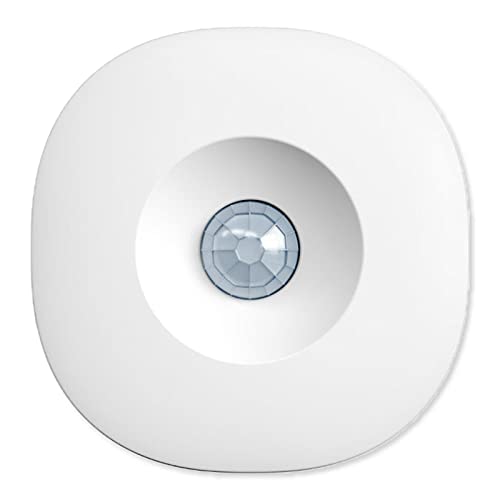
Aeotec SmartThings Zigbee Motion Sensor
Best for: SmartThings room occupancy automations
- Smart Home Compatibility
- SmartThings (what this guide is about)
- Connectivity
- Zigbee
This is a dedicated Zigbee motion detector designed for SmartThings setups. It monitors movement with a 120-degree viewing angle and detects activity up to 15 feet away. The included magnetic ball mount lets you tilt and adjust sensor orientation easily. You can trigger automated routines to control connected lights and appliances when movement occurs. It suits you if you need reliable room-level motion triggers across your existing Zigbee smart home ecosystem.
Pros
- Detection coverage up to 15 feet with a 120-degree view angle
- Adjustable magnetic ball mount for flexible positioning
- Zigbee connectivity compatible with SmartThings and other Zigbee hubs
- Automates connected devices based on room occupancy
Cons
- Requires an Aeotec or compatible Zigbee smart home hub to function
- Detection range is limited to 15 feet
Good fit if
- You already own a compatible Zigbee hub or SmartThings hub.
- You want a magnetic mount to aim motion detection at specific areas.
- You need 120-degree motion sensing up to 15 feet to trigger home automations.
Skip if
- You do not have a compatible Zigbee or SmartThings hub.
- You need detection coverage beyond a 15-foot range.
Verdict: Aeotec SmartThings Zigbee Motion Sensor provides adjustable 120-degree motion tracking up to 15 feet using a magnetic mount. It integrates cleanly into Zigbee setups to trigger home automations.

Aeotec Zigbee Multipurpose Sensor
Best for: multi-sensor monitoring in SmartThings Zigbee setups
- Smart Home Compatibility
- SmartThings (what this guide is about)
- Connectivity
- Zigbee
The Aeotec Zigbee Multipurpose Sensor is an all-in-one detection device designed for your SmartThings network. It monitors open or close status, vibration, tilt angle, orientation, and ambient temperature from a single white unit. You can place it on doors, windows, cabinets, or drawers to track movement and status changes. It suits you if you need multi-variable monitoring through a compatible Zigbee hub or an Aeotec Smart Home Hub.
Pros
- Monitors open/close, vibration, orientation, tilt angle, and temperature
- Uses Zigbee wireless connectivity
- Compatible with SmartThings, Amazon Alexa, and Google via a Zigbee hub
- Delivers phone notifications when doors, windows, or drawers open
Cons
- Requires a standalone Zigbee hub or SmartThings hub to operate
- Offered only in white
Good fit if
- You have an Aeotec Smart Home Hub or compatible Zigbee hub.
- You want combined contact, vibration, tilt, and temperature tracking in one device.
- You need status notifications for doors, windows, cabinets, or drawers.
Skip if
- You do not own or plan to install a Zigbee-enabled hub.
- You only require basic contact sensing without extra sensor readings.
Verdict: Aeotec Zigbee Multipurpose Sensor delivers comprehensive tracking by combining contact, tilt, vibration, and temperature detection into one Zigbee device. It is a capable choice if you manage your automation rules within a SmartThings environment.
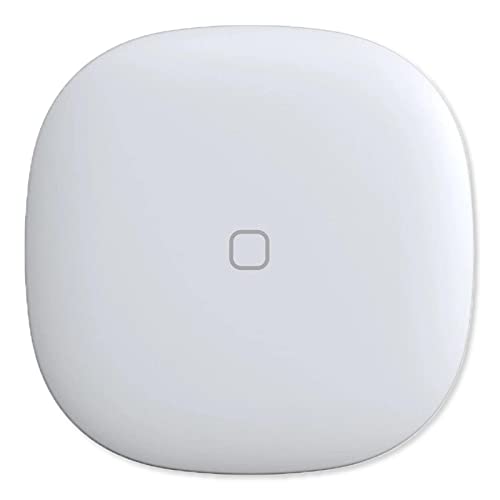
Aeotec SmartThings Zigbee Button
Best for: SmartThings users wanting push-button control and temperature tracking
- Smart Home Compatibility
- SmartThings (what this guide is about)
- Connectivity
- Zigbee
The Aeotec SmartThings Zigbee Button gives you direct physical control over compatible smart home appliances and lights. It connects via Zigbee and integrates directly into the SmartThings platform. Beside single-touch trigger automation, it includes an integrated temperature sensor to report room conditions. Magnetic mounting and 3M adhesive strips allow flexible placement anywhere in your home. This controller suits you if you need a compact, dual-purpose switch and climate monitor.
Pros
- Integrated temperature sensor
- Dual mounting options via magnet or 3M adhesive strip
- Direct compatibility with SmartThings via Zigbee
- Controls compatible lights, appliances, and smart home devices
Cons
- Requires a compatible Zigbee or smart home hub
- Lacks native Matter or Thread support
Good fit if
- You need a physical button to trigger SmartThings automations and appliances.
- You want temperature tracking built directly into your remote control.
- You prefer magnetic or adhesive mounting without hardwiring.
Skip if
- You do not own a compatible Zigbee smart home hub.
- You need native Matter or Thread connectivity.
Verdict: Aeotec SmartThings Zigbee Button pairs simple physical device triggering with an onboard temperature sensor. It provides a compact control point for any Zigbee-enabled SmartThings setup.

YEELIGHT E1 Matter Hub and Thread Border Router
Best for: Yeelight smart lighting and local automations
- Smart Home Compatibility
- Alexa, Google Home, SmartThings (what this guide is about)
- Connectivity
- Matter, Thread, Wi-Fi
- Network Interface
- Ethernet, Wi-Fi
View on Amazon: YEELIGHT E1 Matter Hub and Thread Border Router
The YEELIGHT E1 is a Matter controller and Thread border router designed to bridge smart hardware into SmartThings, Alexa, and Google Home. It connects to your local network via Wi-Fi or Ethernet and coordinates up to 150 sub-devices with local offline automation. If you manage Matter-enabled Yeelight gear or compatible third-party color-tunable lights, this hub gives you a dedicated Thread border router and LAN API integration for your multi-platform smart setup.
Pros
- Built-in Thread Border Router with LAN API support
- Ethernet and Wi-Fi network connectivity options
- Manages up to 150 sub-devices
- Local automation processing for offline operation
Cons
- Third-party device support limited to color-capable and adjustable color temperature lights
- Non-Yeelight Matter devices outside of lighting are unsupported
Good fit if
- You want local offline automation with Ethernet and Thread Border Router capabilities.
- You manage Yeelight Matter devices or compatible color-tunable lights across SmartThings.
Skip if
- You need to pair third-party Matter devices other than color-adjustable lighting.
- You require non-lighting smart home accessories from brands other than Yeelight.
Verdict: YEELIGHT E1 Matter Hub and Thread Border Router bridges up to 150 sub-devices into SmartThings with local automation and Ethernet reliability. Third-party compatibility remains restricted to color-adjustable lights, making it ideal primarily for Yeelight setups.

Samsung SmartThings Hub 3rd Generation
Best for: simple Zigbee smart home automation setups
- Smart Home Compatibility
- Alexa, Google Home, SmartThings (what this guide is about)
- Connectivity
- Zigbee, Z-Wave, Cloud to Cloud
- Dimensions
- 5 × 5 × 1.2 inches
- Weight
- 8 ounces
This central controller manages connected hardware across your living space. Measuring 5 by 5 inches and weighing half a pound, the compact white unit supports Zigbee connectivity alongside direct integration with SmartThings, Amazon Alexa, and Google Home ecosystems. You use a single mobile application to link automation routines to door sensors and presence triggers. It suits you if you want a dedicated coordinator for compatible Zigbee smart devices.
Pros
- Supports Zigbee wireless connectivity
- Works with SmartThings, Amazon Alexa, and Google Home
- Compact 5 by 5 by 1.2-inch footprint
- Lightweight 0.5-pound casing
Cons
- Connectivity specification lists Zigbee only without Z-Wave support
- Requires a smartphone application for setup and control
Good fit if
- You use SmartThings, Amazon Alexa, or Google Home to run home automations.
- You want a compact 5-inch hub to connect Zigbee accessories.
Skip if
- You need native Z-Wave protocol support for existing home devices.
- You prefer configuring automation routines without a mobile phone app.
Verdict: Samsung SmartThings Hub 3rd Generation coordinates Zigbee accessories and ties them directly into SmartThings, Alexa, and Google Home setups. Its 0.5-pound compact build makes it an unobtrusive foundation for household automation.

Frient Zigbee Waterproof Smart Button
Best for: moisture-prone areas like kitchens and bathrooms
- Smart Home Compatibility
- SmartThings, Home Assistant (what this guide is about)
- Connectivity
- Zigbee
- Operating Environment
- IP65
- Power Source
- Battery-powered
- Dimensions
- 1.57 × 0.43 × 2.09 inches
- Weight
- 0.71 ounces
The Frient Zigbee Smart Button is a compact wireless scene controller designed for home automation systems. It connects over Zigbee to your SmartThings hub, letting you trigger automations, run scenes, or toggle appliances. Its IP65 water-resistant build makes it safe for damp environments like kitchens and bathrooms, while battery power provides up to three years of operation. If you need a durable, tape-mounted physical switch for high-moisture rooms, this fits your setup.
Pros
- IP65 water-resistant rating for damp environments
- Up to 3 years of battery life
- Zigbee connectivity compatible with SmartThings and Home Assistant
- Tape mounting allows flexible placement
Cons
- Requires a separate compatible Zigbee hub
- Feature support varies depending on the connected hub
Good fit if
- You need a water-resistant automation button for kitchens or bathrooms.
- You already have a Zigbee-certified hub such as SmartThings.
- You want a lightweight button with adhesive tape mounting.
Skip if
- You do not own and do not plan to buy a Zigbee hub.
- You need native Wi-Fi or Thread connectivity without a bridge.
Verdict: Frient Zigbee Smart Button delivers reliable Zigbee automation triggers in an IP65 water-resistant casing suitable for damp areas. It integrates directly with your SmartThings setup as long as you have a compatible Zigbee hub.
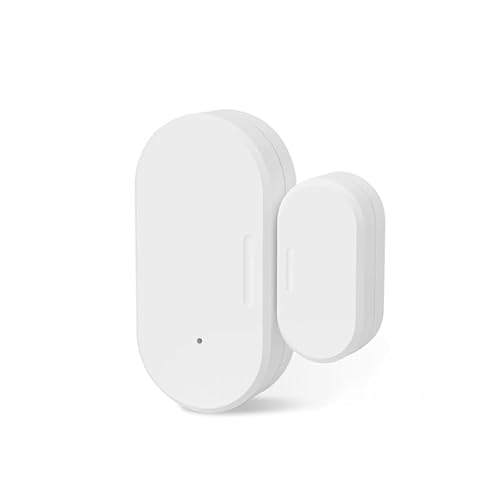
Besisglas Zigbee Door and Window Sensor
Best for: indoor entry monitoring on Zigbee systems
- Smart Home Compatibility
- SmartThings, Home Assistant (what this guide is about)
- Connectivity
- Zigbee 3.0
- Operating Environment
- Indoor
- Power Source
- Built-in batteries
- Dimensions
- 0.79 × 0.95 × 2.74 inches
- Weight
- 1.13 ounces
The Besisglas Zigbee Door Window Sensor is a compact wireless contact sensor for home automation. You can integrate it directly with SmartThings, Home Assistant, or compatible Zigbee 3.0 hubs. It measures 2.74 inches high by 0.95 inches wide and runs on built-in batteries with a 2-year lifespan. This sensor suits you if you need reliable entry detection to trigger automations, lighting, or alerts across your connected smart home.
Pros
- Zigbee 3.0 protocol support
- Up to 2-year battery life with built-in batteries
- Direct compatibility with SmartThings and Home Assistant
- Compact dimensions under 2.8 inches tall
Cons
- Requires a separate Zigbee hub to operate
- Cannot be installed on iron doors or windows
- Restricted to indoor use only
Good fit if
- You use SmartThings, Home Assistant, or an Echo with a built-in Zigbee hub.
- You need an indoor contact sensor with a multi-year battery life.
- You want to trigger Alexa routines when doors or windows open.
Skip if
- You do not own a compatible Zigbee hub.
- You plan to mount the sensor on an iron door or frame.
- You require an outdoor-rated contact sensor.
Verdict: Besisglas Zigbee Door Window Sensor delivers straightforward indoor entry monitoring for Zigbee 3.0 setups including SmartThings. It provides long battery life for automated routines across compatible hubs.
Specifications side by side
| Spec | Aeotec Smart Home Hub with Zigbee and Matter | THIRDREALITY Zigbee Smart Button | THIRDREALITY Zigbee Door and Window Contact Sensor | Arre Matter and Thread Smart Button | Eve Door & Window Matter Contact Sensor | Eve Door & Window 3-Pack Matter Sensor | THIRDREALITY MZ1 Zigbee to Matter Bridge | Aeotec SmartThings Zigbee Motion Sensor | Aeotec Zigbee Multipurpose Sensor | Aeotec SmartThings Zigbee Button | YEELIGHT E1 Matter Hub and Thread Border Router | Samsung SmartThings Hub 3rd Generation | Frient Zigbee Waterproof Smart Button | Besisglas Zigbee Door and Window Sensor |
|---|---|---|---|---|---|---|---|---|---|---|---|---|---|---|
| Connectivity | Matter, Z-Wave Plus, Zigbee, Wi-Fi | Zigbee 3.0 | Zigbee | Matter, Thread | Matter over Thread | Matter over Thread | Zigbee, Matter | Zigbee | Zigbee | Zigbee | Matter, Thread, Wi-Fi | Zigbee, Z-Wave, Cloud to Cloud | Zigbee | Zigbee 3.0 |
| Smart Home Compatibility | SmartThings, Amazon Alexa, Google Home | Home Assistant, HomeKit, SmartThings | Home Assistant, SmartThings, Alexa | Matter, Apple Home, SmartThings | Apple Home, Alexa, Google, SmartThings | Apple Home, Alexa, Google, SmartThings | Apple HomeKit, Google, SmartThings | SmartThings | Google, Amazon Alexa, SmartThings | not specified | Apple Home, Alexa, Google Home | Alexa, Google Home | Homey, Home Assistant, SmartThings | Home Assistant, SmartThings, Alexa |
| Network Interface | Ethernet, Wi-Fi | not specified | not specified | not specified | not specified | not specified | 2.4 GHz Wi-Fi | not specified | not specified | not specified | Ethernet, Wi-Fi | not specified | not specified | not specified |
| Operating Environment | not specified | not specified | Indoor | not specified | not specified | not specified | not specified | not specified | not specified | not specified | not specified | not specified | IP65 | Indoor |
| Power Source | not specified | 2 AAA Batteries | Two AAA 1.5V Alkaline batteries | not specified | not specified | not specified | USB-C | not specified | not specified | not specified | not specified | not specified | Battery-powered | Built-in batteries |
| Circuit Type | not specified | 3-Way | not specified | not specified | not specified | not specified | not specified | not specified | not specified | not specified | not specified | not specified | not specified | not specified |
| Hub Requirement | not specified | not specified | Hub Required | not specified | not specified | not specified | not specified | not specified | not specified | not specified | not specified | not specified | not specified | not specified |
| Dimensions | 5 × 5 × 1 inches | 1.01 × 0.52 × 3.52 inches | 1.97 × 0.83 × 2.36 inches | 1.57 × 1.57 × 0.43 inches | 0.91 × 2.05 × 0.94 inches | 0.91 × 2.05 × 0.94 inches | 3.14 × 1.57 × 2.71 inches | not specified | not specified | not specified | not specified | 5 × 5 × 1.2 inches | 1.57 × 0.43 × 2.09 inches | 0.79 × 0.95 × 2.74 inches |
| Weight | 1.1 pounds | 1.44 ounces | 2.08 ounces | 4 ounces | 0.53 ounces | 4.96 ounces | 1.45 ounces | not specified | not specified | not specified | not specified | 8 ounces | 0.71 ounces | 1.13 ounces |
| Color | White | White | White | not specified | White | White | White | White | White | White, Gray | White | White | not specified | White |
| Model | GP-AEOHUBV3US | 850001595575 | P1DSA2 | ASB3194 | 20EBN9901 | 20EBN9901 | 3RMB01033WBZ | GP-AEOMSSUS | Aeotec Multipurpose Sensor | GP-AEOBTNUS | YP-0751 | GP-U999SJVLGDA | 20203200 | Zigbee Door X01 |
| Size | not specified | 1x3.54x0.59 | not specified | not specified | 1 Pack | 3 Pack | not specified | not specified | not specified | not specified | not specified | 1 Count (Pack of 1) | not specified | not specified |
If you require backup power to keep your automation controller running during outages, review specifications for the best generators for home.
Key Specs for SmartThings Controllers
-
Check Battery Power Types
When you select wireless sensors and controllers, inspect the battery specifications to plan ongoing upkeep. Certain accessories rely on standard AAA batteries, while others require specialized cells. Devices powered by standard AAA cells allow quick, accessible replacements whenever power runs low. If you manage remote entry points or high-traffic doors, standard battery sizes simplify routine maintenance across your home. The THIRDREALITY Zigbee Door and Window Contact Sensor uses replaceable AAA batteries for continuous operation. Check the product specifications to confirm the exact battery type before you install sensors throughout your home.
-
Compare Physical Control Triggers
Smart buttons offer different trigger options to control scenes without opening the SmartThings mobile app. Review the listed circuit types and action capabilities before buying a remote button. Basic buttons might register a single press, whereas advanced models provide three distinct actions per unit. A three-action button lets you configure separate routines for a single press, a double press, or a long hold. The THIRDREALITY Zigbee Smart Button delivers three-action control to trigger multiple routines from one compact switch. Verify the available action modes so the button matches your daily routine needs.
-
Evaluate Combined Sensing Types
Assess whether your automation plans require dedicated contact sensing or several environmental measurements in one unit. Standard sensors only identify open or closed positions on windows and doors. In contrast, multi-functional sensors combine contact tracking with tilt detection, vibration monitoring, and ambient temperature readings. Choosing a multi-sensor reduces the total number of individual devices you need to mount in a single area. The Aeotec Zigbee Multipurpose Sensor includes contact, tilt, vibration, and temperature tracking within a single housing. Review sensor capability specs to ensure you capture every measurement your SmartThings routines require.
-
Check Smart Home Compatibility
Review the smart home platform compatibility if you operate mixed systems alongside SmartThings. While some devices integrate only with SmartThings, others support multiple platforms simultaneously. If members of your household rely on voice controls or secondary apps, look for accessories that list Apple HomeKit, Alexa, or Google Home support. The Arre Matter and Thread Smart Button provides dual compatibility with Apple HomeKit and SmartThings over Thread. Check the published specifications under smart home compatibility so your controller functions across every assistant and mobile dashboard you use in your living space.
-
Verify Motion Detection Coverage
Examine coverage angle and range specifications when selecting motion sensors for room occupancy automations. Narrow detection zones work well for narrow hallways, but open living areas require wider angles and longer detection ranges. Reviewing the detection specs ensures the sensor triggers lighting or HVAC routines as soon as you enter the room. The Aeotec SmartThings Zigbee Motion Sensor tracks motion across a 120-degree field of view up to 15 feet away. Compare the specified distance and angle against the dimensions of your intended room to avoid dead zones in your setup.
-
Confirm Maximum Sub-Device Limits
Inspect the sub-device capacity on bridge controllers if you plan to expand your smart home installation over time. Central bridges connect individual sub-devices to your home network, but each unit has an upper limit on how many accessories it can manage. If you automate large lighting arrays or numerous sensors, selecting a hub with high capacity avoids adding redundant hardware later. The YEELIGHT E1 Matter Hub and Thread Border Router supports up to 150 sub-devices using local automation processing. Check the stated device limits to ensure the controller accommodates your planned accessories.
Frequently asked questions
What is the difference between a SmartThings hub and a SmartThings button or sensor?
A SmartThings hub acts as the core coordinator for your network, while buttons and sensors serve as input triggers. Hubs like the Aeotec Smart Home Hub GP-AEOHUBV3US manage protocol communication across Wi-Fi or Ethernet. Peripheral devices, such as buttons or door sensors, send status signals directly to the hub to initiate your configured automations.
Can you use Matter devices with a SmartThings setup?
You can connect Matter devices to SmartThings if you have a compatible controller or Thread border router. Accessories such as the Eve Door & Window contact sensor and Arre smart button operate over Matter. Adding these components allows direct, local communication with compatible hubs, keeping your automation triggers active without relying on continuous cloud services.
Do Zigbee sensors work with SmartThings without a dedicated hub?
Zigbee sensors cannot communicate directly with your phone or home Wi-Fi network without a dedicated coordinator. Hardware like the THIRDREALITY Zigbee Door and Window Contact Sensor requires a compatible Zigbee hub to bridge signals into the SmartThings platform. Without a coordinator such as a SmartThings hub or bridge, the sensor cannot transmit open or closed events.
What types of actions can a SmartThings smart button trigger?
Smart buttons configured in SmartThings trigger routines through distinct physical inputs like single presses, double presses, or long holds. The THIRDREALITY Zigbee Smart Button and the Arre Matter button both offer three-action control. You assign specific scenes to each action within your SmartThings app, such as turning off connected lighting or activating preset security modes.
How does the THIRDREALITY MZ1 bridge integrate Zigbee devices into SmartThings?
The THIRDREALITY MZ1 bridge pairs with Zigbee sub-devices and exposes them to SmartThings through the Matter standard. Connecting over 2.4 GHz Wi-Fi, it allows your SmartThings platform to manage supported Zigbee hardware even if your primary hub lacks a Zigbee radio. It also supports over-the-air updates to keep connected accessories running smoothly.
Which voice platforms work alongside SmartThings controllers?
Most SmartThings controllers and accessories support voice integration through Amazon Alexa or Google Assistant. For example, the Aeotec Smart Home Hub links directly to Alexa, while devices like the Arre Smart Button integrate across both Apple HomeKit and SmartThings. This cross-compatibility lets you trigger configured routines using voice commands through your preferred smart speaker setup.
What sensing capabilities does the Aeotec Zigbee Multipurpose Sensor provide?
The Aeotec Zigbee Multipurpose Sensor tracks four distinct metrics within a single housing: open and closed status, angle tilt, physical vibration, and ambient temperature. You can use these combined data points inside SmartThings to design layered automations, such as detecting door movement, monitoring garage door positions, or tracking climate changes across rooms.