AEOTEC Smart Home Hub Zigbee Review: Who It Fits and Who Should Skip It
As an Amazon Associate we earn from qualifying purchases. Links on this page are affiliate links.
This aeotec smart home hub review covers a central controller that bridges multiple smart home standards. The device supports both Zigbee and Matter protocols, allowing you to connect a wide range of compatible devices. It also includes Z-Wave Plus in the V3 model, expanding your network options further. You can manage automations through the SmartThings app, which runs on Android, iOS, or iPadOS. The hub connects to your network via Wi-Fi or Ethernet, ensuring stable communication. Its compact white design fits easily into most home setups without drawing attention. This guide explains how these specifications translate into practical use for your smart home.
What stands out
- Supports Matter, Z-Wave Plus, and Zigbee protocols for broad device compatibility.
- Connects via Wi-Fi or wired Ethernet for reliable network access.
- Integrates with Amazon Alexa and Google Home for voice control.
- Runs many automations locally within the SmartThings app for faster response.
Who it fits
Good fit for
You should consider this hub if you already use the SmartThings ecosystem or want to adopt Matter devices. The inclusion of Zigbee and Matter support makes it ideal for users with newer smart bulbs or sensors. If you prefer wired stability, the Ethernet port is a strong benefit. The V3 model suits those who also need Z-Wave Plus connectivity for legacy devices. It is a solid choice for North American users looking for a single gateway to manage lighting, comfort, and energy devices through one app interface.
Who should skip it
Skip this option if you require a hub that does not rely on the SmartThings app for management. The device is designed specifically for the SmartThings platform, so you cannot use it with other major hubs like Home Assistant natively. If you need Z-Wave support, ensure you select the V3 model, as the V4 variant lacks it. Users outside North America may face compatibility issues due to regional certifications. Additionally, if you prefer a simple plug-and-play experience without app configuration, this hub may feel overly complex for your needs.
Verdict: The Aeotec Smart Home Hub is a versatile controller for users invested in the SmartThings ecosystem. Its support for Matter, Zigbee, and optional Z-Wave Plus makes it a practical central hub for diverse smart home setups.
Key specs explained
Connectivity: Matter, Z-Wave Plus, Zigbee, Wi-Fi
These protocols let the hub talk to many device types. Matter ensures future-proofing with newer smart products. Zigbee and Z-Wave Plus connect low-power sensors and switches. Wi-Fi links the hub to your internet. You benefit from a single controller for diverse gear. Compare this to hubs supporting only one standard, which limit your device choices.
Network Interface: Ethernet, Wi-Fi
You can plug in via cable or connect wirelessly. Ethernet offers a stable, reliable link for critical automation tasks. Wi-Fi provides flexible placement without running cables. This dual support suits renters and homeowners alike. When shopping for controls, check if your hub requires a wired connection or offers wireless freedom for easier installation.
Smart Home Compatibility: SmartThings, Amazon Alexa, Google Home
The hub integrates with the SmartThings app for management. It also works with Alexa and Google Home for voice commands. You can control devices using simple voice instructions. This broad compatibility means you can switch or mix voice assistants. Look for hubs that support your preferred app and voice platform to ensure seamless daily operation.
Dimensions: 5 x 5 x 1 inches
This compact footprint fits on shelves or desks. The low profile keeps it unobtrusive in your home. You can place it in tight spaces without taking up much room. When comparing smart home hubs, consider size constraints. A small device blends into decor while still providing robust connectivity for your entire smart home setup.
Design and Build Details
According to the listing, the Aeotec Smart Home Hub measures 5 inches wide, 5 inches long, and 1 inch high. The V4 variation is slightly thinner at 0.9 inches. The device weighs 1.1 pounds. This compact footprint allows you to place it on a shelf, desk, or flat surface without taking up much room. The white finish provides a neutral look that blends into most home environments. The low profile means it sits close to the surface, which can be useful if you have limited vertical space. The weight suggests a solid build, though the listing does not specify the materials used. You can position it anywhere with a power source and network connection. The slim design reduces the visual impact in your living space. You do not need to worry about it dominating a corner or cabinet. The dimensions are consistent across the main model, with minor variations in the newer V4 version. This consistency helps you plan your setup layout easily. The hub’s physical form is simple and functional. It lacks complex buttons or displays in the description, focusing on internal connectivity. This minimalist approach keeps the device unobtrusive. You can hide it behind furniture or place it openly without concern. The size is manageable for most indoor locations. The weight ensures it stays in place without sliding. The design prioritizes integration over aesthetics. It is built to work quietly in the background. The white color matches common electronics and home decor. This choice makes it less noticeable in your smart home setup. The listing confirms these physical attributes clearly.
Setup and Everyday Use Guide
You set up the Aeotec hub using the SmartThings app on Android, iOS, or iPadOS. The listing states you can connect the device via Wi-Fi or wired Ethernet. This dual option lets you choose the most stable connection for your home network. You can complete the initial configuration in minutes, according to the product details.
Once online, the hub acts as a central controller for your smart home devices. It supports Matter, Zigbee, and Z-Wave Plus (in the V3 model). This wide compatibility allows you to link thousands of devices from various brands. You can manage lighting, sensors, switches, and energy monitors from a single interface. The hub is also certified for use with Amazon Alexa and Google Home, giving you voice control options.
For daily use, you build custom automations through the SmartThings app. You can coordinate lights, sensors, and other compatible devices to run automatically throughout your day. The listing notes that many of these automations now run locally. Local execution improves speed and reliability, meaning your routines continue even if your internet connection drops. You manage and monitor all connected devices through the app, creating a cohesive environment for comfort and energy efficiency. The white device sits quietly on a shelf or desk, handling the heavy lifting of device communication behind the scenes.
Before You Buy This Hub
You need the SmartThings app on Android, iOS, or iPadOS to manage this hub. The listing confirms it works with Amazon Alexa and Google Home for voice control. You must check that your existing Zigbee and Matter devices are compatible with the SmartThings ecosystem. If you want Z-Wave Plus support, you must select the V3 model released in 2020. The V4 version from 2025 lacks this protocol. This hub acts as a central bridge. It fits well alongside other smart home controls by unifying different standards. You benefit from local automations for better speed. Ensure your network supports both Wi-Fi and Ethernet if you prefer wired stability. This device is designed for North American use. You should verify your device list matches the supported protocols before purchasing. It serves as a robust foundation for a connected home environment.
Check before you buy
- Confirm your devices support Zigbee or Matter protocols
- Choose the V3 model if you need Z-Wave Plus
- Ensure you have the SmartThings app installed
- Verify your network supports Wi-Fi or Ethernet
The product at a glance
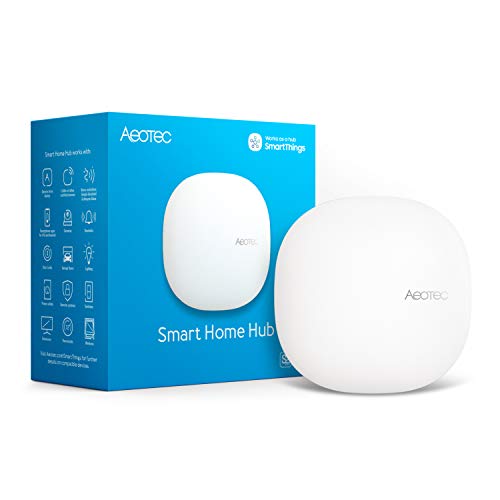
Aeotec Smart Home Hub with Zigbee and Matter
Best for: Users needing Matter and Z-Wave Plus support
- Connectivity
- Matter, Z-Wave Plus, Zigbee, Wi-Fi
- Smart Home Compatibility
- SmartThings, Amazon Alexa, Google Home
- Network Interface
- Ethernet, Wi-Fi
- Dimensions
- 5 × 5 × 1 inches
- Weight
- 1.1 pounds
View on Amazon: Aeotec Smart Home Hub with Zigbee and Matter Affiliate link
The Aeotec Smart Home Hub V3 acts as a central gateway for your connected devices. It supports Matter, Zigbee, and Z-Wave Plus protocols, allowing you to link thousands of compatible items. You can manage automations via the SmartThings app on iOS, Android, or iPadOS. The unit connects via Wi-Fi or Ethernet and works with Alexa and Google Home. It measures 5 by 5 by 1 inches and weighs 1.1 pounds.
Pros
- Supports Matter, Zigbee, and Z-Wave Plus V3
- Runs many automations locally for speed
- Connects via Wi-Fi or Ethernet
- Compatible with Alexa and Google Home
Cons
- Z-Wave Plus support limited to the V3 model
- No physical remote control included
- Requires the SmartThings app for setup
Good fit if
- You want a hub that supports Matter and Z-Wave Plus
- You prefer wired Ethernet connectivity for stability
- You already use the SmartThings app for automation
Skip if
- You need a hub without Z-Wave capability
- You want to avoid the SmartThings app ecosystem
- You require a compact design smaller than 5 inches
Verdict: Aeotec Smart Home Hub V3 is a solid choice for users who need Matter and Z-Wave Plus support in a single device. It fits buyers who value local automation execution and flexible network connections.
Specifications side by side
| Spec | Aeotec Smart Home Hub with Zigbee and Matter |
|---|---|
| Connectivity | Matter, Z-Wave Plus, Zigbee, Wi-Fi |
| Smart Home Compatibility | SmartThings, Amazon Alexa, Google Home |
| Network Interface | Ethernet, Wi-Fi |
| Dimensions | 5 × 5 × 1 inches |
| Weight | 1.1 pounds |
| Color | White |
| Model | GP-AEOHUBV3US |
Frequently asked questions
Does this hub work with Alexa?
Yes, the Aeotec Smart Home Hub is compatible with Amazon Alexa. You can use voice commands to control your connected devices through the Alexa ecosystem. This integration allows you to manage your smart home without leaving the Alexa app or using dedicated voice commands for each product.
Can I use this hub with Google Home?
The listing confirms that the device works with Google Home for voice control. You can link the hub to your Google account to enable voice commands. This allows you to control your connected Zigbee and Matter devices using Google Assistant on your phone or smart speakers.
What is the size of the Aeotec hub?
The device measures 5 inches wide, 5 inches long, and 1 inch high. It weighs 1.1 pounds. This compact footprint allows you to place it on a shelf or desk without taking up much space. The white finish helps it blend into most home decor styles.
Does the hub support Z-Wave devices?
Yes, the V3 model includes Z-Wave Plus support. This allows you to connect Z-Wave sensors, switches, and other compatible devices to the hub. You benefit from a robust mesh network that extends the range of your low-power devices throughout your home.
Is the hub compatible with Matter devices?
Yes, the Aeotec Smart Home Hub supports the Matter protocol. This ensures future-proofing with newer smart products that adhere to the standard. You can connect Matter-enabled devices easily, ensuring they work seamlessly with the hub and other compatible ecosystems.
How do I connect the hub to the internet?
You can connect the device via Wi-Fi or wired Ethernet. This dual option lets you choose the most stable connection for your setup. A wired Ethernet connection provides a reliable link, while Wi-Fi offers flexibility for placement away from your router.
What app is needed to set up the hub?
You need the SmartThings app on Android, iOS, or iPadOS to manage this hub. The app guides you through the initial setup and device pairing. You can use it to create automations, monitor device status, and control your smart home from your mobile device.