Best MoesGo Smart Home Controllers: 2 Models Compared
As an Amazon Associate we earn from qualifying purchases. Links on this page are affiliate links.
You can simplify your home setup with the best MoesGo smart home controllers. This guide compares 2 models based strictly on their published specifications. MoesGo offers compact devices like single-gang switches and IR hubs. The MoesGo 1 Gang WiFi Light Switch leads this list. It is the top pick for single-gang switches without neutral wires. These devices provide basic voice control and scheduling on 2.4GHz networks. The WiFi IR Control Hub adds voice control to legacy infrared appliances. Each product fits specific wiring or compatibility needs. You get practical options for integrating older devices into your smart home ecosystem.
Quick picks
| # | Product | Best for | Price |
|---|---|---|---|
| 1 | MoesGo 1 Gang WiFi Light Switch Best overall | single-gang switches without neutral wires | Check price of MoesGo 1 Gang WiFi Light Switch on Amazon |
| 2 | MoesGo WiFi IR Control Hub Also great | controlling legacy infrared appliances via voice | Check price of MoesGo WiFi IR Control Hub on Amazon |
Our 2 picks

MoesGo 1 Gang WiFi Light Switch
Best for: single-gang switches without neutral wires
- Connectivity
- WiFi, RF433
- Smart Home Compatibility
- Alexa, Google Home
- Network Interface
- 2.4GHz WiFi
- Power Source
- Single live wire
- Wiring Requirement
- No Neutral Required
- Dimensions
- 4.72 × 2.91 × 1.5 inches
View on Amazon: MoesGo 1 Gang WiFi Light Switch Affiliate link
This MoesGo smart switch replaces standard wall controls without needing a neutral wire. It connects via 2.4GHz Wi-Fi and works with Alexa and Google Home for voice commands. You can schedule on/off times or control it remotely through the Smart Life app. The black touch panel fits standard single-gang boxes. It requires a minimum load of 5 watts to function correctly.
Pros
- No neutral wire required for installation
- Compatible with Alexa and Google Home
- Supports timer and countdown scheduling
- Remote control via Smart Life app
Cons
- Only supports 2.4GHz Wi-Fi networks
- Requires a minimum 5-watt load
- Single gang size limits control options
Good fit if
- You have no neutral wire in your wall box
- You want voice control with Alexa or Google Home
- You need simple scheduling for lights
Skip if
- You only have 5GHz Wi-Fi available
- You need to control more than one light
- You have low-wattage LED bulbs under 5 watts
Verdict: MoesGo 1 Gang WiFi Light Switch Black is a practical upgrade for single-gang locations without neutral wires. It suits users who need basic voice control and scheduling on 2.4GHz networks.
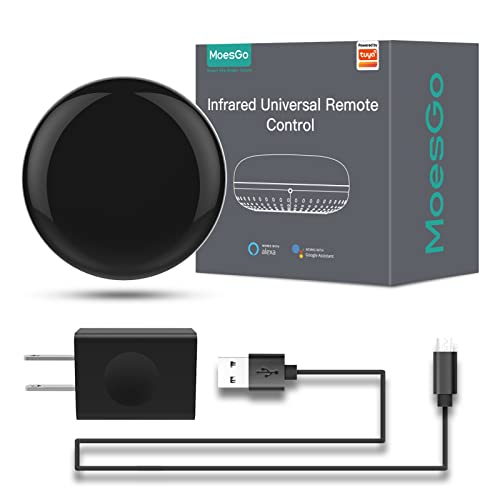
MoesGo WiFi IR Control Hub
Best for: controlling legacy infrared appliances via voice
- Connectivity
- Wi-Fi, IR (38K kHz)
- Smart Home Compatibility
- Alexa, Google Home
- Network Interface
- 2.4GHz Wi-Fi
- Power Source
- USB 2.0 cable, US adapter
- Dimensions
- 3.3 × 2.7 × 1.7 inches
View on Amazon: MoesGo WiFi IR Control Hub Affiliate link
This MoesGo hub acts as a universal infrared remote for air conditioners, TVs, and fans. It connects via 2.4G Wi-Fi and works with the Smart Life or Tuya app for remote control. You can use voice commands with Amazon Echo or Google Home. The device learns signals from original remotes to control additional items like LED fireplaces. It is designed for single-room use since infrared signals do not pass through walls.
Pros
- Supports voice control via Amazon Echo and Google Home
- Includes DIY copy function to learn signals from original remotes
- Allows device sharing with family members through the app
- Comes with a UL certified US adapter and USB 2.0 cable
Cons
- Only supports 2.4G Wi-Fi connections
- Infrared signals are blocked by walls, limiting use to a single room
- Does not support RF devices, only 38K kHz infrared
Good fit if
- You want to control non-smart appliances like older air conditioners or TVs
- You prefer voice control using Google Home or Amazon Echo
- You need to share device access with family members
Skip if
- You require RF433 compatibility for your devices
- You need to control devices in multiple rooms through walls
- You only have 5G Wi-Fi networks available
Verdict: MoesGo WiFi IR Control Hub is a practical solution for adding voice control to standard infrared appliances in a single room. It fits users who want to integrate older devices into their smart home ecosystem without replacing them.
Specifications side by side
| Spec | MoesGo 1 Gang WiFi Light Switch | MoesGo WiFi IR Control Hub |
|---|---|---|
| Connectivity | WiFi, RF433 | Wi-Fi, IR (38K kHz) |
| Smart Home Compatibility | Alexa, Google Home | Alexa, Google Home |
| Network Interface | 2.4GHz WiFi | 2.4GHz Wi-Fi |
| Power Source | Single live wire | USB 2.0 cable, US adapter |
| Wiring Requirement | No Neutral Required | not stated |
| Dimensions | 4.72 × 2.91 × 1.5 inches | 3.3 × 2.7 × 1.7 inches |
| Weight | 4.8 ounces | not stated |
| Size | 1 Gang(No neutral required) | not stated |
| Color | Black | Black |
| Model | 9f3c0ac1-9c0e-46d0-82dd-ef61044eeb03 | SRW-US |
MoesGo Smart Controllers Compared
The MoesGo lineup splits into two distinct categories based on connectivity and wiring. The MoesGo 1 Gang WiFi Light Switch handles single-gang locations without neutral wires. It connects via Wi-Fi and supports basic voice control. This model suits users needing a direct switch replacement for standard lighting circuits. It operates on 2.4GHz networks and fits tight spaces. The second group centers on the MoesGo WiFi IR Control Hub. This device adds voice control to legacy infrared appliances. It integrates with Google Home and Tuya platforms. You use it to manage older devices in a single room without replacing them. Both options rely on Wi-Fi for network stability.
Where MoesGo Fits Your Home
MoesGo targets specific, small-scale automation needs. The range includes a single-gang light switch for locations without neutral wires. It also offers an IR hub to control legacy devices via voice commands. You get basic Wi-Fi connectivity for both units. The selection focuses on lighting and infrared integration. You will not find multi-gang switches, thermostats, or sensors in this list. The brand suits users who want to add simple voice control to existing fixtures or older appliances. It does not offer a comprehensive whole-home ecosystem. You must check each room's wiring before buying the switch.
Choosing the Right MoesGo Controller
-
Check Wiring Requirements
You must verify your wall box wiring before buying. The MoesGo 1 Gang WiFi Light Switch requires no neutral wire. This makes it suitable for older homes where neutral lines are absent. If your location has a neutral wire, this switch still works but is not required. Always inspect the existing wires inside your switch box first. Choosing the wrong type can prevent installation. This spec is critical for single-gang locations. It determines whether you can proceed with the purchase or need a different model.
-
Verify Wi-Fi Compatibility
Both listed devices connect via standard Wi-Fi networks. You need a 2.4GHz network for reliable operation. Modern routers often broadcast dual bands. Ensure your phone or hub connects to the correct band during setup. The MoesGo 1 Gang WiFi Light Switch and the IR Hub both rely on this connection. If your network only supports 5GHz, these devices will not work. Check your router settings before starting installation. This connectivity spec is fundamental for all smart home automation tasks you plan to perform.
-
Match Smart Home Ecosystems
Confirm your preferred voice assistant supports the device. The MoesGo WiFi IR Control Hub lists Google Home and Tuya compatibility. This means you can control legacy infrared appliances through voice commands on Google devices. The light switch also supports basic voice control. You should verify that your specific app or hub integrates with Tuya. This ensures seamless automation routines. Check the compatibility list for your existing smart home system. Mismatched ecosystems will prevent remote control and scheduling features from functioning correctly.
-
Assess Physical Dimensions
Measure your wall plate space before purchasing. The MoesGo 1 Gang WiFi Light Switch measures 2.91 inches in width. It fits standard single-gang electrical boxes. The WiFi IR Control Hub is slightly smaller at 2.7 inches wide. You need to ensure the device fits behind your existing faceplate or wall mount. Depth and height also matter for clearance. Check the provided dimensions against your installation site. This prevents fitting issues after delivery. Proper sizing ensures a clean and secure installation without modification to your wall structure.
-
Define Control Needs
Decide if you need direct switching or infrared control. The MoesGo 1 Gang WiFi Light Switch controls lights directly. It is best for single-gang locations without neutral wires. The MoesGo WiFi IR Control Hub controls legacy infrared appliances. It adds voice control to older devices like TVs or AC units. You do not replace these appliances. You simply add a hub. Choose the switch for lighting automation. Choose the hub for integrating non-smart devices. Your decision depends on whether you are upgrading switches or adding voice control to existing electronics.
Frequently asked questions
Do MoesGo smart controllers work with Alexa?
The MoesGo WiFi IR Control Hub supports Google Home and Tuya. It does not explicitly list Alexa compatibility in its published specifications. The 1 Gang WiFi Light Switch mentions basic voice control but does not name specific assistants. You should verify your preferred platform before purchasing.
Can I use these controllers without a neutral wire?
Yes, the MoesGo 1 Gang WiFi Light Switch is designed for locations without neutral wires. This feature makes it suitable for older homes where neutral lines are often absent. The WiFi IR Control Hub does not specify its wiring requirements in the provided data. Check your wall box before installation.
What network frequency do MoesGo devices require?
Both listed MoesGo controllers connect via Wi-Fi. The 1 Gang WiFi Light Switch explicitly supports 2.4GHz networks. The WiFi IR Control Hub also uses Wi-Fi but does not specify the frequency band in its specs. Most smart home devices require a 2.4GHz connection for stable performance.
How do I control old appliances with MoesGo?
The MoesGo WiFi IR Control Hub allows you to control legacy infrared appliances via voice commands. It acts as a bridge for older devices that do not have smart capabilities. You can integrate these standard infrared appliances into your smart home ecosystem without replacing them with new units.
Are MoesGo controllers compatible with Tuya?
The MoesGo WiFi IR Control Hub lists Tuya as a compatible smart home platform. This allows you to manage the hub through the Tuya ecosystem. The 1 Gang WiFi Light Switch does not explicitly mention Tuya compatibility in its published attributes. You may need to check the app support for the switch.
What is the size of the MoesGo 1 Gang switch?
The MoesGo 1 Gang WiFi Light Switch measures 2.91 inches in width, 1.5 inches in height, and 4.72 inches in length. It weighs 4.8 ounces. These dimensions help you determine if it fits standard single-gang wall boxes. The black finish matches common decor styles.
Does the MoesGo IR hub have a display?
The provided specifications for the MoesGo WiFi IR Control Hub do not mention a display. It is a compact hub measuring 2.7 inches in width and 1.7 inches in height. You likely control it entirely through your smartphone or voice assistant app rather than a physical screen.
Can I schedule lights with the MoesGo switch?
The MoesGo 1 Gang WiFi Light Switch supports basic scheduling features. This allows you to set specific times for your lights to turn on or off. It is a practical upgrade for automating daily routines. You can manage these schedules through the connected app on your mobile device.