MoesGo WiFi IR Control Hub Review: Specs, Pros and Cons
As an Amazon Associate we earn from qualifying purchases. Links on this page are affiliate links.
This moesgo wifi ir control hub review covers a compact device designed to bridge the gap between legacy appliances and modern smart homes. The MoesGo WiFi IR Control Hub acts as an all-in-one infrared remote, supporting only 38 kHz IR signals. It connects exclusively via 2.4G Wi-Fi. You can manage air conditioners, TVs, and fans from anywhere using the Smart Life or Tuya app. The unit measures 2.7 by 1.7 by 3.3 inches. It fits neatly on a shelf or table. This hub brings voice control to devices that lack built-in smart features. It is a straightforward solution for retrofitting older equipment.
What stands out
- Supports 38 kHz IR signals for air conditioners, TVs, and fans
- Compatible with Amazon Echo, Google Home, and Smart Life/Tuya app
- DIY copy function learns codes from original remotes for custom devices
- Includes USB 2.0 cable and UL certified US adapter
Who it fits
Good fit for
You should consider this hub if you have older appliances that respond to infrared remotes. It is ideal for users who want to group devices like AC units and TVs under one smart interface. The DIY learning feature helps if your specific device brand is not in the default library. It suits renters or homeowners who cannot replace existing hardware. The app sharing feature works well for families who all need access to control the same devices remotely.
Who should skip it
Skip this product if your devices use radio frequency (RF) signals instead of infrared. This hub does not support RF commands. You must also have a 2.4G Wi-Fi network, as it is not compatible with 5G connections. If your appliances are in different rooms, infrared signals will likely be blocked by walls. You should look for a different solution if you need whole-home coverage without line-of-sight requirements. It is not suitable for smart devices that connect via Bluetooth or Zigbee.
Verdict: The MoesGo WiFi IR Control Hub is a practical tool for bringing voice and app control to infrared appliances. It works best in single-room setups where line-of-sight is maintained.
Key specs for MoesGo hub
Connectivity: Wi-Fi (2.4G only)
This device connects to your home network using only the 2.4 GHz Wi-Fi band. You must ensure your router supports this frequency, as 5 GHz networks will not work. This is standard for many budget smart home hubs. It allows remote control via the Smart Life app from anywhere. Check your router settings to confirm compatibility before installation.
Signal Type: Infrared (38 kHz)
The hub uses infrared light to send commands, similar to a traditional TV remote. It does not support radio frequency (RF) signals. You need line-of-sight between the hub and your appliance for it to work. It is ideal for air conditioners and TVs. It cannot control devices that only use RF, such as some garage door openers.
Smart Home Compatibility: Google Home, Tuya
You can control the hub through the Tuya or Smart Life app. It also works with Amazon Echo and Google Home for voice commands. This lets you use voice control for legacy devices like fans or set-top boxes. It integrates into existing smart ecosystems. Check the app for a list of supported brands to ensure your specific appliance is compatible.
Dimensions: 3.3 x 2.7 x 1.7 inches
The unit is compact, measuring just over three inches in length. It fits easily on a shelf or desk without taking up much space. Its small size allows flexible placement in a single room. Infrared signals do not pass through walls, so position it where it can see your appliances. The compact design makes it unobtrusive in any living area.
Compact Physical Design and Build
According to the listing, the MoesGo WiFi IR Control Hub measures 3.3 inches in length, 2.7 inches in width, and 1.7 inches in height. The device features a black finish. These dimensions make it a small unit that sits easily on a shelf or desk. It does not require much space in your home setup. The compact size allows you to place it near the devices you want to control without cluttering your living area.
The package includes a USB 2.0 cable and a UL certified US adapter. This means you need access to a power outlet near your router or network device. The infrared signal works best in a single room because walls can block the transmission. You should place the hub where it has a clear line of sight to your air conditioner, TV, or fan. This layout constraint is important for reliable operation.
The design focuses on functionality rather than elaborate aesthetics. The simple black casing blends into most home environments. You can share device access with family members through the app, so the physical unit does not need to be constantly accessed. The build supports its role as a central hub for legacy appliances. It bridges the gap between older devices and your modern smart home network.
Setup and everyday use guide
Setting up the MoesGo WiFi IR Control Hub begins with connecting the included USB 2.0 cable and the UL certified US adapter. You plug the device into a power source and connect it to your home network. The listing specifies that the hub only supports 2.4G Wi-Fi connections. You must ensure your router broadcasts on this frequency, as 5 GHz networks are not compatible. Once connected, you download the Smart Life or Tuya app on your smartphone. The app allows you to control home devices from anywhere with an internet connection. You can also share device access with family members through the app interface. For daily use, the hub acts as an infrared remote for air conditioners, TVs, fans, and media players. It exclusively supports 38 kHz IR signals and does not work with RF devices. You can use voice commands via Amazon Echo or Google Home to adjust temperatures or change channels. The hub also features a DIY copy function. This allows you to control additional devices, such as LED fireplaces or ceiling fans, by learning signals from original remotes. Keep in mind that infrared signals may be blocked by walls. The device works best when placed in a single room with a clear line of sight to your appliances. The compact black design fits easily on a shelf or desk. You rely on the Smart Life app to check for compatible brands and devices before purchasing.
Before You Buy This Hub
You should verify your existing smart home ecosystem before purchasing. The listing confirms compatibility with Amazon Echo and Google Home via the Smart Life or Tuya app. You must ensure your Wi-Fi router broadcasts a 2.4 GHz network, as 5 GHz connections are not supported. Since this device relies on infrared signals, it works best in a single room. Walls can block the signal, so you may need multiple units for larger spaces. You should also check the Smart Life app for supported brands to confirm your TV, AC, or fan is compatible. The DIY copy function helps with devices not in the database, but you will need the original remote to program it. This hub complements smart thermostats by controlling other legacy appliances. It does not replace a thermostat but adds voice control to your existing HVAC or entertainment systems. Keep the USB cable and adapter accessible for setup.
Check before you buy
- Confirm your Wi-Fi router supports 2.4 GHz networks only
- Check the Smart Life app for your device brand compatibility
- Ensure your target devices use standard 38 kHz infrared signals
- Verify you have the original remotes for DIY programming
The product at a glance
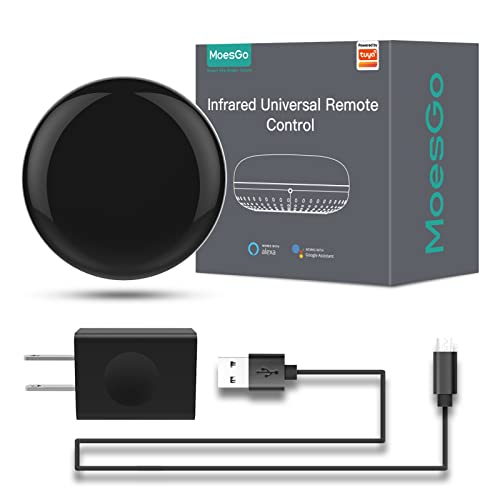
MoesGo WiFi IR Control Hub
Best for: controlling single-room IR appliances via voice
- Connectivity
- Wi-Fi, IR (38K kHz)
- Smart Home Compatibility
- Alexa, Google Home
- Network Interface
- 2.4GHz Wi-Fi
- Power Source
- USB 2.0 cable, US adapter
- Dimensions
- 3.3 × 2.7 × 1.7 inches
View on Amazon: MoesGo WiFi IR Control Hub Affiliate link
The MoesGo WiFi IR Control Hub acts as a universal remote for IR devices like air conditioners, TVs, and fans. It connects via 2.4G Wi-Fi and works with the Smart Life or Tuya app for remote control. You can also use voice commands through Amazon Echo or Google Home. The unit includes a DIY copy function to learn signals from existing remotes. It is designed for single-room use, as infrared signals do not pass through walls.
Pros
- Supports voice control via Amazon Echo and Google Home
- Includes DIY copy function to learn signals from original remotes
- Allows device sharing with family members through the Smart Life app
- Includes UL certified US adapter and USB cable
Cons
- Only supports 2.4G Wi-Fi connections
- Infrared signals cannot pass through walls, limiting use to single rooms
- Does not support RF devices or 5G Wi-Fi
Good fit if
- You want to control older IR appliances with voice commands
- You need to manage devices in a single room
- You already use the Smart Life or Tuya app
Skip if
- You need to control devices through walls
- You require RF device compatibility
- Your network only supports 5G Wi-Fi
Verdict: MoesGo WiFi IR Control Hub is a practical solution for adding voice control to existing infrared appliances in a single room. It fits users who want to centralize control of fans, TVs, and AC units using the Smart Life app.
Specifications side by side
| Spec | MoesGo WiFi IR Control Hub |
|---|---|
| Connectivity | Wi-Fi, IR (38K kHz) |
| Smart Home Compatibility | Alexa, Google Home |
| Network Interface | 2.4GHz Wi-Fi |
| Power Source | USB 2.0 cable, US adapter |
| Dimensions | 3.3 × 2.7 × 1.7 inches |
| Color | Black |
| Model | SRW-US |
Frequently asked questions
Does the MoesGo WiFi IR Control Hub work with Alexa?
Yes, it supports Amazon Echo devices. The listing confirms compatibility with Amazon Echo and Google Home. You control it through the Smart Life or Tuya app, which bridges the connection between your voice commands and the infrared signals sent to your appliances.
What is the size of the MoesGo hub?
The unit measures 3.3 inches in length, 2.7 inches in width, and 1.7 inches in height. It features a black finish. These compact dimensions allow it to sit easily on a shelf or desk without taking up much space in your room.
Can I use this hub to control multiple rooms?
No, it is designed for a single room. The device acts as an all-in-one infrared remote for one area. You place it where it can line of sight with the appliances you want to control, such as a TV or air conditioner in that specific space.
Does it support 5 GHz Wi-Fi networks?
No, it connects exclusively via the 2.4 GHz Wi-Fi band. You must ensure your router broadcasts a 2.4 GHz network. The 5 GHz frequency will not work with this device, so you need to connect it to the correct network band during setup.
What app do I need to set it up?
You need the Smart Life or Tuya app. These apps manage the device and allow you to integrate it with your smart home ecosystem. You use the app to connect the hub to your Wi-Fi and assign commands to your existing infrared appliances.
What type of power cable does it use?
It uses a USB 2.0 cable. You plug this cable into the included UL certified US adapter. Then, you connect the adapter to a standard power outlet to provide electricity to the hub for continuous operation and infrared signal transmission.
Is the MoesGo hub compatible with Google Home?
Yes, it works with Google Home. The specifications list Google Home as a compatible smart home platform. You can use voice commands through Google Assistant to control your infrared devices once the hub is set up and linked via the Smart Life or Tuya app.