AEOTEC SmartThings Zigbee Button Review: Specs, Pros and Cons
As an Amazon Associate we earn from qualifying purchases. Links on this page are affiliate links.
This aeotec smartthings button review focuses on the Aeotec SmartThings Zigbee Button, a compact remote control for your home automation setup. It operates via the Zigbee protocol, requiring a compatible Smart Home Hub to function. The device features an integrated temperature sensor, allowing you to monitor ambient conditions alongside your commands. You can control lights, appliances, and other connected devices with a simple press. The unit mounts easily using either a magnet or a 3M adhesive strip. Its design is available in white or gray, keeping it discreet in your home. This guide explains how these specifications translate to everyday use.
What stands out
- Zigbee connectivity for reliable hub integration
- Integrated temperature sensor for ambient monitoring
- Magnetic or adhesive mounting options
- Compact design in white or gray
Who it fits
Good fit for
You should consider this button if you already use a SmartThings hub and want a simple, physical trigger for your automations. The Zigbee connection ensures stable communication without draining Wi-Fi bandwidth. If you value local control and quick response times for lights or switches, this device fits your needs. The built-in temperature sensor adds utility for routines that adjust based on room warmth. Its small form factor and easy mounting make it suitable for placement anywhere in your home.
Who should skip it
Skip this product if you do not have a SmartThings hub or a compatible Zigbee controller. It does not connect directly to Wi-Fi or Bluetooth, so it cannot operate independently. If you prefer voice control only or want a device that works with multiple ecosystems without a specific hub, look elsewhere. The reliance on a hub adds complexity for those seeking a plug-and-play solution. Additionally, if you need a device with a display or screen for feedback, this button offers only tactile input.
Verdict: The Aeotec SmartThings Zigbee Button is a reliable, hub-dependent remote for users invested in the SmartThings ecosystem. Its Zigbee connectivity and temperature sensor make it a practical addition for specific automations.
Key specs for this button
Connectivity: Zigbee
This device uses the Zigbee radio protocol rather than Wi-Fi or Bluetooth. You must have a compatible Smart Home Hub to connect it. This path uses less power than Wi-Fi, which helps battery life. It creates a mesh network with other devices. You benefit from stable connections in homes with many gadgets. Compare this to Wi-Fi remotes that need strong router signals.
Smart Home Compatibility: SmartThings
The button is built to work directly with the SmartThings ecosystem. You use the SmartThings app to set up routines and assign actions. It triggers lights, locks, or appliances when pressed. This integration reduces setup friction if you already use SmartThings. You avoid third-party bridges. Check your hub supports this specific brand if you use other platforms.
Integrated temperature sensor
A built-in sensor measures the ambient air temperature near the button. You can use this data for automation, like turning on fans if a room gets hot. It adds value beyond simple remote control. You get environmental data from a small device. Compare this to basic buttons that only send on/off signals. This feature helps with climate control routines.
Mounting: magnet or 3M adhesive
You can attach the unit using a magnet or a 3M adhesive strip. This allows flexible placement on metal surfaces or smooth walls. You do not need screws or tools for installation. You can reposition the button easily if needed. This supports a clean look without visible hardware. Consider your wall type when choosing between magnet and adhesive for stability.
Color: White, Gray
The device comes in white or gray finishes. These neutral colors help the button blend into most home decors. You can choose the shade that matches your existing switches or trim. It does not stand out as a bright gadget. This visual flexibility is useful for permanent installations. Check your interior style to pick the best match for your space.
Design and build quality
The Aeotec SmartThings Zigbee Button features a compact and simple design. According to the listing, the unit is available in white or gray finishes. This neutral color palette allows the device to blend into most interior walls without drawing attention. The small form factor is intentional, keeping the profile low so it does not obstruct surrounding objects or furniture.
Mounting options provide flexibility for your setup. The product includes a magnet and a 3M adhesive strip for easy installation. You can attach the button to metal surfaces using the magnet or stick it to smooth, non-porous walls with the adhesive. This dual approach means you can place the remote in various locations without permanent alteration to your home. You can also reposition it as your automation needs change.
The control interface consists of a single button. This minimalist layout reduces the chance of accidental presses while keeping operation straightforward. You can assign different actions to single taps or long holds within your hub software. The integrated temperature sensor is housed within this same compact shell. This design choice keeps the device unobtrusive while still providing ambient data for your smart home routines.
Setup and everyday use
Setting up the Aeotec SmartThings Zigbee Button begins with ensuring you have a compatible Smart Home Hub. The device relies on the Zigbee protocol for communication. It does not connect directly to your Wi-Fi network or via Bluetooth. You must pair the button with your hub through the SmartThings platform. This integration allows the button to send signals to other devices in your network.
The listing highlights easy mounting options. You can attach the unit using a magnet or a 3M adhesive strip. This flexibility lets you place the button in various locations without permanent installation. The compact design supports this portable setup approach.
In daily use, the button serves as a remote control. You press it to trigger compatible lights, home appliances, or other smart devices. The action is immediate once the hub processes the Zigbee signal. The integrated temperature sensor adds context to your automation routines. You can use these readings to adjust heating or cooling systems automatically.
This device suits users who want a simple, physical trigger for their smart home. It is ideal for quick actions without needing to unlock a phone or open an app. The reliance on a hub means it works best in homes with an established Zigbee network. The white or gray finish keeps the device unobtrusive on walls or furniture.
Before You Buy This Button
Before you add this Aeotec SmartThings Zigbee Button to your setup, verify your hub compatibility. The device requires a Smart Home Hub that supports Zigbee. It does not connect via Wi-Fi or Bluetooth. You must ensure your existing hub can pair with Zigbee devices. Check if your hub integrates with SmartThings, as the button is optimized for that ecosystem. Battery maintenance is minimal but necessary. You will need to replace batteries periodically to keep the unit operational. The integrated temperature sensor adds value if you lack other sensors in the room. Consider where you place the button. The magnetic mount or adhesive strip allows flexible positioning. However, ensure the surface is clean for strong adhesion. This button complements smart thermostats by offering manual override or scene triggering. It fits well in homes using hub-based automation. Avoid relying on it for critical safety controls without backup methods. Review your current smart home architecture to confirm seamless integration.
Check before you buy
- Confirm your Smart Home Hub supports Zigbee protocol
- Verify compatibility with the SmartThings ecosystem
- Check battery replacement availability for long-term use
- Ensure your hub can pair with new devices
The product at a glance
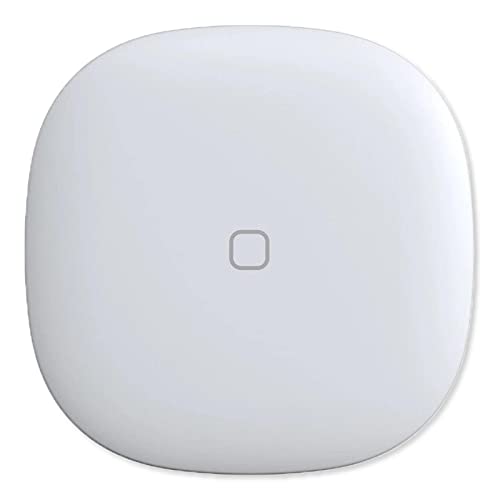
Aeotec SmartThings Zigbee Button
Best for: SmartThings hub users needing temp monitoring
- Connectivity
- Zigbee
- Smart Home Compatibility
- SmartThings
View on Amazon: Aeotec SmartThings Zigbee Button Affiliate link
This Aeotec button is a compact Zigbee remote that works with SmartThings hubs. It features an integrated temperature sensor for environmental monitoring. You can mount it easily using a magnet or adhesive strip. The white or gray design keeps it unobtrusive. It lets you control compatible lights and appliances with a single press. This device suits users who want a simple, wired-free control option.
Pros
- Zigbee connectivity for reliable hub communication
- Integrated temperature sensor for room monitoring
- Magnetic or adhesive mounting options
- Compact white or gray design
Cons
- Requires a SmartThings compatible hub to function
- Limited to Zigbee protocol, no Wi-Fi or Bluetooth
- No built-in display to show status or readings
Good fit if
- You already use a SmartThings hub
- You want to monitor room temperature
- You need a simple one-touch trigger
Skip if
- You do not have a Zigbee hub
- You want to control devices without a hub
- You prefer Wi-Fi or Bluetooth devices
Verdict: Aeotec SmartThings Zigbee Button is a practical remote for SmartThings users who need temperature monitoring and simple automation triggers. It fits those who already have the required hub and want a minimal, unobtrusive control device.
Specifications side by side
| Spec | Aeotec SmartThings Zigbee Button |
|---|---|
| Connectivity | Zigbee |
| Smart Home Compatibility | SmartThings |
| Color | White, Gray |
| Model | GP-AEOBTNUS |
Frequently asked questions
Does the Aeotec SmartThings Zigbee Button work without a hub?
No, this device requires a compatible Smart Home Hub to function. It uses the Zigbee protocol for communication rather than connecting directly to Wi-Fi or Bluetooth. You must ensure your existing hub supports Zigbee devices to pair and control this button effectively within your automation setup.
What colors is the Aeotec SmartThings Zigbee Button available in?
The listing specifies that the unit is available in white and gray finishes. These neutral color options allow the device to blend into most interior walls without drawing visual attention. This minimal aesthetic supports its role as an unobtrusive control device in your home environment.
Is this button compatible with all smart home platforms?
This device is specifically designed for SmartThings hub users. The published compatibility data lists only SmartThings as the supported platform. You should verify that your hub is part of the SmartThings ecosystem before purchasing, as it does not natively support other major smart home brands.
What is the model number for this Aeotec button?
The specific model number for this device is GP-AEOBTNUS. This identifier helps you locate the correct manual and pairing instructions. It distinguishes this US version from other regional variants of the Aeotec SmartThings Zigbee Button available in the market.
Does this button have a built-in temperature sensor?
Yes, the device features an integrated temperature sensor. This allows you to monitor room conditions alongside using the button as an automation trigger. You can utilize this data to create routines that respond to environmental changes, adding functionality beyond simple remote control.
How does the Zigbee connection affect battery life?
Zigbee connectivity typically offers better power efficiency than Wi-Fi. This protocol uses less energy, which helps extend the battery life of the button. You can rely on longer intervals between battery changes compared to devices that maintain constant Wi-Fi connections.
Can I use this button for simple automation triggers?
Yes, the device serves as a practical remote for triggering simple automations. You can pair it with your SmartThings hub to initiate specific routines. This makes it suitable for users who want a minimal control device to start or stop various smart home actions.
Who is the best target user for this product?
This button is best for SmartThings hub users who need temperature monitoring and simple automation triggers. It fits those who already have the required hub and want a minimal, unobtrusive control device. It is not ideal for users without a compatible Zigbee-enabled SmartThings hub.