Wi-Fi vs Zigbee Smart Switches: Which Should You Buy?
As an Amazon Associate we earn from qualifying purchases. Links on this page are affiliate links.
You are comparing a wi fi vs zigbee smart switch setup using two popular plugs. Both the Kasa Smart 15A Wi-Fi Plug and the THIRDREALITY Zigbee Smart Plug offer 15A loads and voice control. The main difference lies in connectivity. One uses 2.4GHz Wi-Fi directly. The other relies on Zigbee, often requiring a hub. This affects how you set up and manage your smart home devices.
Key differences
| Aspect | Kasa Smart 15A Wi-Fi Plug | THIRDREALITY Zigbee Smart Plug 4-Pack |
|---|---|---|
| Connectivity | 2.4GHz Wi-Fi | Zigbee |
| Hub Requirement | Not listed | Requires ZigBee Hub |
| Smart Home Compatibility | Alexa, Google Assistant | Apple HomeKit, Google Home, Alexa |
| Certification | UL certified | ETL Certified |
Which one should you choose?
Choose Kasa Smart 15A Wi-Fi Plug if
- You want direct Wi-Fi connection without a hub
- You prefer Alexa or Google Assistant integration
- You need UL certified safety standards
Choose THIRDREALITY Zigbee Smart Plug 4-Pack if
- You use Apple HomeKit
- You already have a Zigbee hub
- You want to avoid Wi-Fi congestion
Verdict: Choose the Kasa plug if you want a simple Wi-Fi setup with Alexa or Google support. Pick the THIRDREALITY plug if you need Apple HomeKit compatibility or want to reduce Wi-Fi network load. Your existing hub and preferred voice assistant should drive this decision.
Wi-Fi vs Zigbee Plug Comparison
Connectivity type
The Kasa Smart 15A Wi-Fi Plug connects directly to your home network using 2.4GHz Wi-Fi. This means you do not need extra hardware to get it online. You simply plug it in and use the Kasa app. The THIRDREALITY Zigbee Smart Plug uses the Zigbee protocol instead. This requires a separate Zigbee hub or a compatible Echo device with a built-in Zigbee radio. If you already have a hub, Zigbee is stable. If not, you must buy one to make the THIRDREALITY plug work.
Hub requirement
Setup differs significantly between the two options. The Kasa plug operates independently of any central hub. It communicates directly with your router. The THIRDREALITY plug requires a Zigbee hub to function. It lists compatibility with devices like SmartThings, Aeotec, Hubitat, and Eero 6. It also works with compatible Echo devices that have a built-in Zigbee radio. Without one of these gateways, the THIRDREALITY plug cannot connect to your smart home system. This adds a layer of complexity and potential cost for the user.
Smart home compatibility
Both plugs support major voice assistants. The Kasa plug works with Amazon Alexa and Google Home Assistant. It relies on the Kasa app for local control. The THIRDREALITY plug supports Apple HomeKit, Google Home, and Amazon Alexa. It achieves this through a Smart Bridge MZ1 or compatible Echo devices. The THIRDREALITY option offers broader platform support, including Apple HomeKit, which the Kasa plug does not list. If you use an Apple Home setup, the THIRDREALITY plug is the more flexible choice for integration.
Safety certification
Safety standards are important for electrical devices. The Kasa Smart 15A Wi-Fi Plug is UL certified. This is a recognized safety standard for products sold in the United States. The THIRDREALITY Zigbee Smart Plug is ETL certified. ETL is also a widely accepted safety certification in the US. Both products meet rigorous safety testing requirements. Neither product lists a warranty period in its key specs, though the Kasa features section mentions a 2-year warranty. Based on certifications alone, both are safe for home use.
Physical dimensions
Size matters when you have multiple outlets. The Kasa plug measures 2.03 inches in width, 1.5 inches in height, and 2.36 inches in length. It weighs 2.13 ounces. The THIRDREALITY plug is slightly smaller in width at 1.5 inches. It is shorter at 1.1 inches in height but longer at 2.6 inches in length. The THIRDREALITY design is described as compact and space-saving. It fits the panel well to improve use efficiency. The Kasa plug is wider but shorter. Both are designed to not block adjacent sockets, but the THIRDREALITY has a narrower profile.
Choose the right smart plug for you
Users wanting simple direct Wi-Fi setup
The Kasa Smart 15A Wi-Fi Plug connects directly to your 2.4GHz Wi-Fi network. You do not need a separate hub or bridge to get it online. This direct connection allows you to control the plug from anywhere using the Kasa app on your smartphone. It is a straightforward choice for those who prefer a single-device solution without extra hardware.
People with many Zigbee devices needing stability
The THIRDREALITY Zigbee Smart Plug uses a Zigbee connection, which can be more stable when you have many smart devices. It requires a Zigbee hub or compatible Echo device to function. This setup avoids Wi-Fi congestion issues. It also works as a repeater to extend your network range. You get reliable control for lamps and fans through your existing hub infrastructure.
HomeKit users requiring broader ecosystem support
The THIRDREALITY plug supports Apple HomeKit when used with the Smart Bridge MZ1. This integration allows you to include the plug in your HomeKit scenes and automations. It also works with Google Home and Alexa. This flexibility is ideal if you want to control the plug through multiple assistants or need it to fit into a specific smart home ecosystem beyond just Wi-Fi.
Quick picks
| # | Product | Best for | Price |
|---|---|---|---|
| 1 | Kasa Smart 15A Wi-Fi Plug | standard appliances on 2.4GHz Wi-Fi networks | Check price of Kasa Smart 15A Wi-Fi Plug on Amazon |
| 2 | THIRDREALITY Zigbee Smart Plug 4-Pack | Zigbee mesh expansion and Wi-Fi relief | Check price of THIRDREALITY Zigbee Smart Plug 4-Pack on Amazon |
The products compared

Kasa Smart 15A Wi-Fi Plug
Best for: standard appliances on 2.4GHz Wi-Fi networks
- Connectivity
- Wi-Fi (what this guide is about)
- Smart Home Compatibility
- Alexa, Google Home
- Hub Requirement
- No Hub Required
- Switch Function
- On/Off Switch
- Maximum Load
- 15A
- Dimensions
- 2.36 × 2.03 × 1.5 inches
View on Amazon: Kasa Smart 15A Wi-Fi Plug Affiliate link
This Kasa EP10 is a compact Wi-Fi smart plug designed for 2.4GHz networks. It supports a maximum load of 15A, making it suitable for standard home appliances. You can control it via the Kasa app or use voice commands with Alexa and Google Assistant. The unit measures 2.03 by 1.5 by 2.36 inches and weighs 2.13 ounces. It includes scheduling features for timers and countdowns. This model is part of a larger lineup that may include energy monitoring variants.
Pros
- Supports 15A maximum load for high-power devices
- Compatible with Alexa and Google Assistant for voice control
- Compact dimensions of 2.03 by 1.5 by 2.36 inches
- Includes timer and countdown scheduling functions
Cons
- Requires 2.4GHz Wi-Fi connection only
- Standard version lacks energy monitoring features
- No Zigbee connectivity for mesh network integration
Good fit if
- You need a compact plug for tight outlet spacing
- You rely on 2.4GHz Wi-Fi for smart home devices
- You want voice control via Alexa or Google Assistant
Skip if
- You require Zigbee connectivity for your smart home
- You need energy monitoring to track power usage
- You have a home network that only supports 5GHz Wi-Fi
Verdict: Kasa Smart Plug EP10 15A Wi-Fi is a practical option for users who need reliable voice control and scheduling on a 2.4GHz network. It fits best in homes where compact size and standard appliance control are the priority.
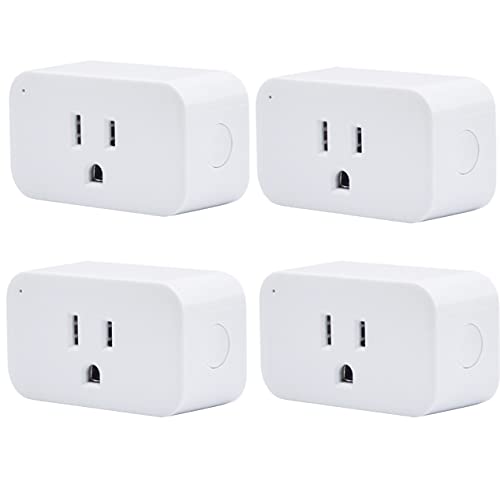
THIRDREALITY Zigbee Smart Plug 4-Pack
Best for: Zigbee mesh expansion and Wi-Fi relief
- Connectivity
- Zigbee (what this guide is about)
- Smart Home Compatibility
- Apple HomeKit, Google Home, Alexa
- Hub Requirement
- Requires ZigBee Hub
- Maximum Load
- 15A
- Dimensions
- 2.6 × 1.5 × 1.1 inches
View on Amazon: THIRDREALITY Zigbee Smart Plug 4-Pack Affiliate link
This Zigbee smart plug set offers a stable connection alternative to Wi-Fi devices, reducing network congestion. It supports 15A loads and includes a repeater function to strengthen your mesh network. The compact design saves wall space. Setup with Echo devices requires no third-party apps. It works with Apple HomeKit, Google Home, and Alexa via a compatible hub.
Pros
- Zigbee connectivity reduces Wi-Fi network interference
- 15A maximum load capacity for high-power devices
- Built-in Zigbee repeater to boost mesh signal
- Compact dimensions (1.5 x 1.1 x 2.6 inches) save outlet space
- Direct pairing with Echo devices without third-party apps
Cons
- Requires a separate Zigbee hub for full smart home integration
- Apple HomeKit support needs the Smart Bridge MZ1 sold separately
- No native Wi-Fi connectivity for standalone use
Good fit if
- You want to reduce Wi-Fi congestion in a crowded network
- You need a Zigbee repeater to extend mesh range
- You already own a compatible Zigbee hub or Echo device
Skip if
- You need native Wi-Fi connectivity without a hub
- You want direct Apple HomeKit support without extra hardware
- You prefer devices that work without any smart home hub
Verdict: THIRDREALITY Zigbee Smart Plug 4 Pack is a solid choice for users building a Zigbee mesh network who need stable, high-load outlets without adding to Wi-Fi traffic.
Specifications side by side
| Spec | Kasa Smart 15A Wi-Fi Plug | THIRDREALITY Zigbee Smart Plug 4-Pack |
|---|---|---|
| Smart Home Compatibility | Alexa, Google Home | Apple HomeKit, Google Home, Alexa |
| Hub Requirement | No Hub Required | Requires ZigBee Hub |
| Connectivity | Wi-Fi 2.4 GHz | Zigbee |
| Switch Function | On/Off Switch | not stated |
| Maximum Load | 15A | 15A |
| Dimensions | 2.36 × 2.03 × 1.5 inches | 2.6 × 1.5 × 1.1 inches |
| Weight | 2.13 ounces | not stated |
| Size | 1-Pack | not stated |
| Color | White | White |
| Model | EP10 | 3RSP019BZ |
Frequently asked questions
Do Wi-Fi smart plugs create network congestion?
Yes, they can. Each Wi-Fi device connects directly to your router. This adds to the total traffic on your 2.4GHz band. The Kasa Smart 15A Wi-Fi Plug uses this direct connection. If you have many devices, this may slow down your network. Zigbee devices use a different protocol that does not add to Wi-Fi traffic.
Do I need a hub for Zigbee smart plugs?
Yes, you do. Zigbee devices cannot connect directly to your router. They require a Zigbee hub or bridge to communicate. The THIRDREALITY Zigbee Smart Plug needs this extra hardware. It connects to the hub, which then talks to your network. This setup allows for a mesh network that can improve reliability.
Which smart plug is better for large mesh networks?
Zigbee plugs are better for mesh networks. The THIRDREALITY Zigbee Smart Plug helps expand your mesh. Each Zigbee device can relay signals for others. This creates a more stable network over a larger area. Wi-Fi plugs like the Kasa Smart 15A do not form a mesh. They connect only to the router.
Can I use these plugs with voice assistants?
Yes, both support voice control. The Kasa Smart 15A Wi-Fi Plug offers reliable voice control via its app. The THIRDREALITY Zigbee Smart Plug also supports voice commands through its hub. You can use these features to turn appliances on or off. Both options provide standard smart home integration for daily use.
How do the sizes of these plugs compare?
The Kasa Smart 15A Wi-Fi Plug measures 2.03 inches wide and 1.5 inches high. It weighs 2.13 ounces. The THIRDREALITY Zigbee Smart Plug is 1.5 inches wide and 1.1 inches high. It comes in a 4-pack. The Kasa plug is slightly larger in height and width. Both fit standard outlets without blocking adjacent sockets.
Is 2.4GHz Wi-Fi sufficient for smart plugs?
Yes, it is sufficient. The Kasa Smart 15A Wi-Fi Plug works on 2.4GHz networks. Most home routers broadcast on this frequency. It provides stable connectivity for standard appliances. You do not need 5GHz Wi-Fi for these devices. This makes setup simple for users with standard home internet connections.
Do Zigbee plugs relieve Wi-Fi traffic?
Yes, they do. The THIRDREALITY Zigbee Smart Plug is designed for Wi-Fi relief. It connects to a hub instead of your router. This keeps your Wi-Fi band free for other devices. It is ideal for homes with many connected gadgets. You get stable operation without adding load to your wireless network.