Wi-Fi vs Z-Wave Smart Switches: Which Should You Buy?
As an Amazon Associate we earn from qualifying purchases. Links on this page are affiliate links.
You are comparing wi fi vs z wave smart switch options to decide which fits your home. Both devices support voice control through Alexa and Google Assistant. The main difference lies in their connection method. One uses direct Wi-Fi, while the other relies on a Z-Wave hub. Understanding these connectivity specs helps you choose the right setup for your existing smart home system.
Key differences
| Aspect | Kasa Smart 15A Wi-Fi Plug | Enbrighten 800 Series Z-Wave Long Range Toggle Switch |
|---|---|---|
| Connectivity | 2.4GHz Wi-Fi | Z-Wave, Z-Wave Long Range |
| Hub Requirement | Not listed | Hub Required |
| Smart Home Compatibility | Alexa, Google Assistant | Amazon Alexa, Google Assistant |
| Switch Function | Smart Plug | On/Off Switch |
Which one should you choose?
Choose Kasa Smart 15A Wi-Fi Plug if
- You want a simple plug-in solution without buying a separate hub.
- You prefer connecting devices directly to your existing 2.4GHz Wi-Fi network.
- You need to control appliances like lamps or fans via a standard outlet.
Choose Enbrighten 800 Series Z-Wave Long Range Toggle Switch if
- You already have a Z-Wave hub like SmartThings or Ring Alarm.
- You need reliable in-wall switch control with multi-switch capabilities.
- You want extended wireless range up to 1,300ft with Z-Wave Long Range.
Verdict: Choose the Wi-Fi plug if you want a straightforward, hub-free setup for controlling individual appliances. Pick the Z-Wave switch if you already have a compatible hub and need a permanent in-wall solution with greater range and multi-switch support.
Wi-Fi vs Z-Wave Switch Specs
connectivity type
The Kasa Smart 15A Wi-Fi Plug connects directly to your 2.4GHz Wi-Fi network. You do not need a separate hub for this device. It establishes a direct link to your router. The Enbrighten 800 Series Z-Wave Long Range Toggle Switch uses Z-Wave technology. It requires a Z-Wave certified hub to function. This hub acts as the central controller for your network. You must have compatible hardware like SmartThings or Ring Alarm. The choice depends on whether you already own a Z-Wave hub or prefer direct Wi-Fi connections.
wireless range
Wireless range is critical for reliable signal strength. The Enbrighten switch supports Z-Wave Long Range capabilities. It offers a wireless range up to 1,300 feet from the controller when paired with compatible hubs. If used as a Z-Wave Classic device, the range drops to 150 feet from the nearest device or hub. The Kasa plug uses standard 2.4GHz Wi-Fi. Its range depends on your router’s coverage and wall interference. The Enbrighten device provides a significantly longer specified range for Z-Wave networks, which can help with larger homes.
installation design
Installation ease varies between these two devices. The Enbrighten switch features a QuickFit design that reduces housing depth by 20 percent. This makes it easier to fit into tight electrical boxes. It also includes SimpleWire technology with auto-detecting line and load terminals. This eliminates wiring guesswork during setup. The Kasa plug is a simple plug-in device. You just plug it into an existing outlet and follow the app instructions. There is no wiring involved for the Kasa unit. The Enbrighten switch requires basic electrical wiring knowledge for installation.
switch configuration
The Enbrighten switch supports multi-switch configurations. It works in single-pole setups or with up to four compatible add-on switches. This allows you to maintain full smart functions from multiple locations. You can also use one standard three-way switch for basic on-off control. The Kasa plug is a standalone outlet. It does not support multi-switch configurations in the same way. You control it individually via the app or voice commands. If you need to control a light from multiple physical locations, the Enbrighten switch offers more flexibility.
power capacity
Power handling is important for the devices you connect. The Kasa Smart Plug has a maximum load of 15A. This allows you to connect higher-power appliances like fans or humidifiers safely. The Enbrighten switch is an on/off switch. Its specific amperage rating is not listed in the provided data. It is designed for standard lighting circuits. You should check the bulb wattage limits for your specific installation. The Kasa plug provides a clear 15A limit, making it suitable for a wider range of electronic appliances.
physical dimensions
Size matters for fit in your home. The Kasa plug measures 2.03 inches wide, 1.5 inches high, and 2.36 inches long. It weighs 2.13 ounces. The Enbrighten switch measures 1.81 inches wide, 1.7 inches high, and 4.2 inches long. The switch is significantly longer due to its internal wiring components. The plug is more compact and does not protrude into the room. If you are replacing an existing wall switch, the Enbrighten switch fits standard wall boxes. The Kasa plug occupies an outlet space on your wall.
Choose the right switch for you
Renters needing simple setup
You need a plug that works immediately. The Kasa Smart 15A Wi-Fi Plug connects directly to your 2.4GHz Wi-Fi network. No extra hub is required. You simply plug it in and use the app. This direct connection makes it ideal for temporary installations or rentals where you cannot add new hardware to your network.
Users wanting extended range
Your home has thick walls or large distances. The Enbrighten 800 Series supports Z-Wave Long Range. This technology offers a wireless range of up to 1,300 feet from the controller. You get reliable signal strength even in larger homes. This long-range capability ensures your switch responds quickly, regardless of its location in the house.
Those installing multiple switches
You are wiring multiple lights together. This Enbrighten switch supports multi-switch configurations. It works with up to four compatible add-on switches. You can maintain full smart functions from all locations. The QuickFit design also reduces housing depth by 20%. This makes it easier to fit into tight electrical boxes during complex installations.
Quick picks
| # | Product | Best for | Price |
|---|---|---|---|
| 1 | Kasa Smart 15A Wi-Fi Plug | Compact Wi-Fi outlets with voice control | Check price of Kasa Smart 15A Wi-Fi Plug on Amazon |
| 2 | Enbrighten 800 Series Z-Wave Long Range Toggle Switch | Z-Wave hub users needing reliable mesh networking | Check price of Enbrighten 800 Series Z-Wave Long Range Toggle Switch on Amazon |
The products compared

Kasa Smart 15A Wi-Fi Plug
Best for: Compact Wi-Fi outlets with voice control
- Connectivity
- Wi-Fi (what this guide is about)
- Smart Home Compatibility
- Alexa, Google Home
- Hub Requirement
- No Hub Required
- Switch Function
- On/Off Switch
- Maximum Load
- 15A
- Dimensions
- 2.36 × 2.03 × 1.5 inches
View on Amazon: Kasa Smart 15A Wi-Fi Plug Affiliate link
This Kasa Smart Plug Ultra Mini (EP10) is a compact Wi-Fi outlet designed for 2.4GHz networks. It supports up to 15A of power and works with Alexa and Google Assistant. You can control it from anywhere using the Kasa app or via voice commands. The unit includes scheduling features for timers and countdowns. It is UL certified and comes with a 2-year warranty. This model is a 1-pack size.
Pros
- Compact 15A load capacity
- 2.4GHz Wi-Fi connectivity
- Compatible with Alexa and Google Assistant
- Built-in scheduling and timer controls
Cons
- Requires 2.4GHz Wi-Fi network only
- No energy monitoring in this specific EP10 model
- Does not support Z-Wave connectivity
Good fit if
- You need a compact plug for tight spaces
- You already use Alexa or Google Home
- You want simple scheduling for lamps or fans
Skip if
- You require Z-Wave long-range connectivity
- You need 5GHz Wi-Fi support
- You want to track energy usage per device
Verdict: Kasa Smart Plug Ultra Mini EP10 is a reliable Wi-Fi outlet for users who prioritize compact size and voice control. It fits homes with 2.4GHz networks and Alexa or Google Assistant setups. It is not suitable for Z-Wave ecosystems or energy monitoring needs.
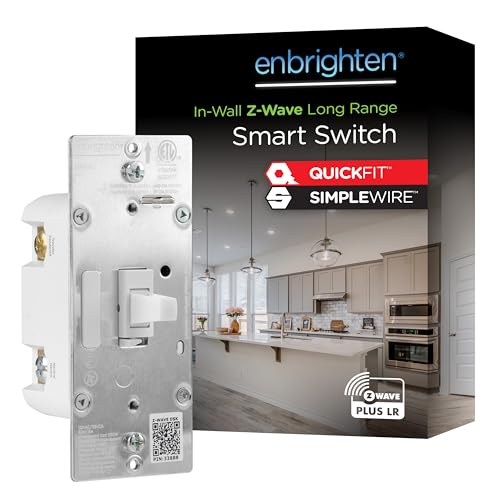
Enbrighten 800 Series Z-Wave Long Range Toggle Switch
Best for: Z-Wave hub users needing reliable mesh networking
- Connectivity
- Z-Wave (what this guide is about)
- Smart Home Compatibility
- Amazon Alexa, Google Assistant
- Switch Function
- On/Off Switch
- Dimensions
- 4.2 × 1.81 × 1.7 inches
View on Amazon: Enbrighten 800 Series Z-Wave Long Range Toggle Switch Affiliate link
This Enbrighten switch uses Z-Wave and Z-Wave Long Range for reliable mesh networking. It requires a compatible hub, such as SmartThings or Ring, to function. The design reduces housing depth by 20% and includes SimpleWire terminals to simplify installation. It supports up to four add-on switches for multi-location control. Voice control works with Amazon Alexa and Google Assistant. The toggle features a customizable eight-color LED guide light.
Pros
- Z-Wave Long Range extends connectivity up to 1,300 feet from the controller.
- QuickFit design reduces housing depth by 20% for easier box installation.
- SimpleWire technology auto-detects line and load terminals to eliminate wiring guesswork.
- Supports single-pole or multi-switch configurations with up to four add-ons.
- Toggle guide light offers eight color options and four operation modes.
Cons
- Requires a Z-Wave certified hub, unlike Wi-Fi-only plugs.
- Z-Wave Long Range range depends on hub support.
- No direct Wi-Fi connectivity for standalone app control.
Good fit if
- You already own a Z-Wave hub like SmartThings or Ring.
- You need switches that fit in tight electrical boxes.
- You want to control multiple switches from one location.
Skip if
- You want to avoid buying a separate hub.
- You prefer Wi-Fi devices that connect directly to your router.
- You need a dimmer rather than an on/off switch.
Verdict: Enbrighten 800 Series Z-Wave Long Range Switch fits users with a Z-Wave hub who need reliable mesh networking and easy installation. It is not suitable for those seeking direct Wi-Fi connectivity without a hub.
Specifications side by side
| Spec | Kasa Smart 15A Wi-Fi Plug | Enbrighten 800 Series Z-Wave Long Range Toggle Switch |
|---|---|---|
| Smart Home Compatibility | Alexa, Google Home | Amazon Alexa, Google Assistant |
| Hub Requirement | No Hub Required | not stated |
| Connectivity | Wi-Fi 2.4 GHz | Z-Wave, Z-Wave Long Range |
| Switch Function | On/Off Switch | On/Off Switch |
| Maximum Load | 15A | not stated |
| Dimensions | 2.36 × 2.03 × 1.5 inches | 4.2 × 1.81 × 1.7 inches |
| Weight | 2.13 ounces | not stated |
| Size | 1-Pack | 800 Series |
| Color | White | White |
| Model | EP10 | 76592 |
Frequently asked questions
Do I need a hub for Z-Wave switches?
Yes, you need a Z-Wave hub to use these devices. The Enbrighten 800 Series Z-Wave Long Range Toggle Switch relies on this hub for connectivity. It does not connect directly to your Wi-Fi router. The hub manages the mesh network for your switches.
Can Wi-Fi switches work without a hub?
Yes, Wi-Fi switches connect directly to your network. The Kasa Smart 15A Wi-Fi Plug links straight to your 2.4GHz Wi-Fi. You do not need a separate hub for this device. It establishes a direct link to your router for control.
Are Z-Wave switches better for mesh networks?
Z-Wave switches are designed for reliable mesh networking. The Enbrighten 800 Series supports this feature for users with a Z-Wave hub. This setup helps maintain signal strength across your home. It is not suitable for those seeking direct Wi-Fi connectivity without a hub.
Which switch is more compact?
The Kasa Smart 15A Wi-Fi Plug is very compact. It measures 2.03 inches wide and 1.5 inches high. This small form factor fits easily into tight spaces. It is ideal for users who prioritize compact size and voice control.
Do these devices support voice assistants?
Yes, both devices support voice control through Alexa and Google Assistant. You can use voice commands to operate the Kasa plug or the Enbrighten switch. This compatibility works with both Wi-Fi and Z-Wave ecosystems.
Is the Kasa plug suitable for Z-Wave homes?
No, the Kasa Smart Plug Ultra Mini EP10 is not suitable for Z-Wave ecosystems. It uses Wi-Fi connectivity only. If your home relies on a Z-Wave hub, this plug will not integrate directly. Choose a Z-Wave device instead.
Can I use the Enbrighten switch with Wi-Fi only?
No, the Enbrighten 800 Series requires a Z-Wave hub. It is not suitable for those seeking direct Wi-Fi connectivity without a hub. You must have a compatible Z-Wave controller to use this toggle switch effectively.