Best Smart Switches with Apple HomeKit: 12 Spec-Based Picks
As an Amazon Associate we earn from qualifying purchases. Links on this page are affiliate links.
Finding the best smart switches with Apple HomeKit requires matching your home electrical wiring, switch dimensions, and device connectivity. This guide evaluates 12 models based strictly on the specifications published on their manufacturer listings. The Kasa Smart Plug Mini with Energy Monitoring ranks first because its 4-pack size provides 15A appliance control and integrated energy monitoring directly over Apple HomeKit.
This comparison helps you decide whether plug-in smart outlets, concealed relay modules, or in-wall light switches match your circuit types and neutral wire configuration.
Quick picks
The best fit for you
- You want multi-room outlet automation with energy tracking. Kasa Smart Plug Mini with Energy Monitoring This 4-pack supports 15A loads and includes built-in energy monitoring without requiring a separate hub.
- You need weather-resistant smart power for outdoor use. Kasa Outdoor 2-Socket Smart Plug It provides two independent outlets rated for outdoor operating environments without requiring an external hub.
- You need to automate three-way lighting circuits. Meross 3-Way Smart Light Switch 2-Pack This switch is built for 3-way circuits and operates over Wi-Fi where neutral wiring is present.
- You want concealed switch automation powered by Matter. TALTBREX Matter 16A Mini Relay Switch Module This 16A relay module fits behind wall switches and connects directly via Matter over Wi-Fi.
Our 12 picks

Kasa Smart Plug Mini with Energy Monitoring
Best for: multi-room energy tracking on Apple HomeKit
- Smart Home Compatibility
- Apple HomeKit (what this guide is about)
- Maximum Load
- 15A, 1800W
- Dimensions
- 2.62 × 1.57 × 1.5 inches
This compact outlet switch integrates standard household appliances directly into Apple HomeKit without a dedicated hardware bridge. Each unit supports a maximum load of 15A and 1800W while tracking real-time and historical power consumption. Measuring 1.5 inches tall, it leaves adjacent wall outlets accessible. It suits you if you want Siri, Alexa, Google Assistant, or SmartThings control alongside appliance-level energy metrics.
Pros
- Supports up to 15A and 1800W loads
- Tracks real-time and historical energy consumption via app
- Works with Apple HomeKit, Alexa, Google Assistant, and SmartThings
- Compact 1.5-inch profile prevents blocking adjacent outlets
Cons
- Requires an Apple home hub device for out-of-home HomeKit control
- Limited to indoor use within 5% to 90% non-condensing humidity
Good fit if
- You want real-time and historical power data for plugged-in devices.
- You need standard 15A capacity across multiple rooms in a single package.
- You use Apple HomeKit alongside other voice assistants.
Skip if
- You need outdoor weatherproofing or water resistance.
- You lack an Apple TV, HomePod, or iPad to serve as a remote home hub.
Verdict: Kasa Smart Plug Mini 4-Pack provides 15A appliance control with built-in energy monitoring across all major smart home ecosystems. It keeps secondary wall receptacles unobstructed without demanding a brand-specific hub.

Kasa Outdoor 2-Socket Smart Plug
Best for: dual-outlet outdoor Apple HomeKit automation
- Smart Home Compatibility
- Apple HomeKit (what this guide is about)
- Hub Requirement
- No Hub Required
- Connectivity
- 2.4GHz Wi-Fi
- Maximum Load
- 15A/1875W Max
- Operating Environment
- Outdoor
- Dimensions
- 1.52 × 3.11 × 4.33 inches
This outdoor smart plug gives you dual-outlet control inside Apple HomeKit without requiring a separate bridge or hub. You can independently manage two connected appliances up to 15A or 1875W each. With IP64 weather resistance and a stated 300-foot Wi-Fi range on 2.4GHz bands, it suits your yard, patio, or holiday light setups if you want straightforward voice and app automation through Siri and Apple devices.
Pros
- Native Apple HomeKit support with no external hub required
- Two individually controlled outlets rated up to 15A and 1875W each
- IP64 weather-resistant housing with an attached protective socket cover
- 2.4GHz Wi-Fi coverage reaching up to 300 feet
Cons
- Operates exclusively on 2.4GHz Wi-Fi networks
- Requires an Apple HomePod or Apple TV for remote control away from home
- IP64 rating protects against splashing water but not submersion
Good fit if
- You need independent automation for two outdoor devices through Apple HomeKit.
- You want an outdoor smart switch that connects directly to Wi-Fi without buying a dedicated bridge.
Skip if
- You require 5GHz Wi-Fi network support.
- You need high-level water submersion protection rather than splash resistance.
Verdict: Kasa Outdoor Dual-Socket Smart Plug delivers independent two-outlet switching and weather-resistant outdoor power control directly to Apple HomeKit without requiring a hub. It provides dependable long-range outdoor automation for exterior lighting and appliances on standard 2.4GHz networks.

Meross Outdoor Dual Outlet Smart Plug
Best for: controlling two outdoor devices independently via HomeKit
- Smart Home Compatibility
- Alexa, Apple HomeKit, SmartThings (what this guide is about)
- Operating Environment
- Outdoor
- Dimensions
- 3 × 3.1 × 1.6 inches
- Weight
- 3.2 ounces
The Meross Outdoor Smart Plug provides two independently controlled AC sockets inside an IP44 weatherproof housing. You can manage outdoor landscape lighting, patio lamps, or seasonal displays using Apple HomeKit, Siri, or the Meross app. It features integrated overload protection, fire-retardant casing, and scheduling based on sunrise and sunset times. This switch suits you if you want outdoor dual-socket automation integrated directly into your Apple Home setup.
Pros
- Two independently controlled AC sockets
- IP44 weatherproof housing with socket covers
- Direct support for Apple HomeKit, Siri, and Apple Watch
- Fire-retardant casing with overload protection
Cons
- Manufacturer specifies not to use with pumps
- Out-of-home Apple HomeKit control requires an Apple TV or HomePod hub
Good fit if
- You need separate schedule controls for two outdoor appliances from one outlet.
- You want an IP44-rated weather-resistant plug for yard lights or holiday decor.
- You use an Apple HomeKit environment with iOS 13 or later.
Skip if
- You plan to power an outdoor water pump.
- You want remote access without an Apple TV or HomePod hub in your home.
Verdict: Meross Outdoor Dual Outlet Smart Plug delivers dual-socket outdoor automation with certified IP44 weather resistance for Apple HomeKit setups. It gives you independent scheduling and voice control without needing complex outdoor wiring.

Lutron Claro Smart Accessory Switch
Best for: Caseta multi-location circuits using a smart hub
- Smart Home Compatibility
- Alexa, Google Home, Apple HomeKit (what this guide is about)
- Hub Requirement
- Hub Required
- Wiring Requirement
- No Neutral Required
- Circuit Type
- 3-Way, Multi-Location
- Switch Function
- Accessory Switch
- Application
- Lights
This wired accessory switch expands your existing Lutron Diva smart dimmer or Claro smart switch into 3-way or multi-location setups. It requires an external Lutron smart hub to enable Apple HomeKit integration and app control. You do not need a neutral wire for installation, and it supports up to 10 accessory switches on one circuit. It suits you if you already run Caseta Diva or Claro devices and need multi-switch wall control.
Pros
- No neutral wire required for installation
- Supports up to 10 accessory switches on a single circuit
- Does not count toward the Caseta smart hub device limit
- Enables Apple HomeKit support when paired with a Lutron smart hub
Cons
- Cannot operate as a standalone switch
- Requires a separate Lutron smart hub for smart features
- Incompatible with original Caseta PD-6WCL and PD-5ANS or PD-6ANS models
Good fit if
- You need wired multi-location control paired with a Diva smart dimmer or Claro smart switch.
- You have electrical boxes without neutral wires.
- You use a Lutron smart hub for your Apple HomeKit system.
Skip if
- You need a standalone primary switch to control a lighting circuit directly.
- You already have legacy Caseta switches like the PD-6WCL or PD-5ANS.
- You want direct-to-Wi-Fi control without purchasing a separate hub.
Verdict: Lutron Caseta Claro Smart Accessory Switch provides wired multi-location control for Diva and Claro circuits without requiring a neutral wire. Smart functionality and Apple HomeKit integration require a separate Lutron smart hub.
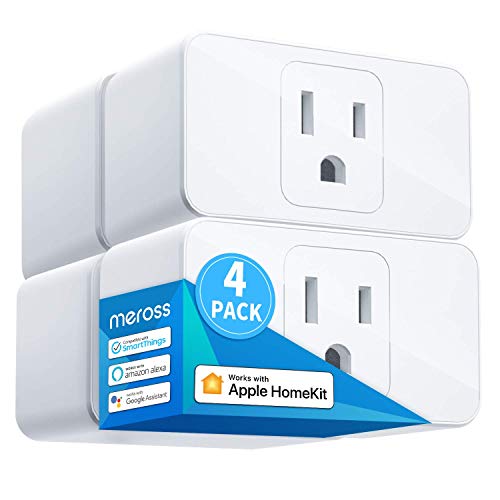
Meross 15A Wi-Fi Smart Plug 4-Pack
Best for: Multi-room Apple HomeKit outlet automation
- Smart Home Compatibility
- Apple HomeKit (what this guide is about)
- Connectivity
- 2.4GHz Wi-Fi
- Maximum Load
- 15A
- Dimensions
- 2.7 × 1.5 × 2.3 inches
- Weight
- 9.7 ounces
This four-pack of Meross 15A smart plugs adds Apple HomeKit control across multiple rooms. Each plug handles up to a 15A load and connects directly to standard 2.4GHz Wi-Fi networks. Measuring 1.5 inches wide and 2.3 inches high, two units stack inside a standard vertical duplex wall outlet. You will find this set practical if you want hands-free voice automation through Siri without needing a dedicated proprietary hardware bridge.
Pros
- Supports electrical appliances up to a 15A maximum load
- Compact 1.5-inch width allows two units to stack in one outlet
- Works with Apple HomeKit, Siri, Amazon Alexa, and Google Assistant
- Certified by ETL and FCC with flame-retardant PC housing
Cons
- Requires an Apple home hub device for out-of-home remote access
- Operates strictly on 2.4GHz Wi-Fi networks without 5GHz support
Good fit if
- You need to automate multiple appliances up to 15A across several rooms.
- You plan to stack two smart plugs into a single duplex outlet.
- You already have a HomePod, Apple TV, or iPad set up as a home bridge.
Skip if
- You only have a 5GHz Wi-Fi network in your home.
- You want remote control away from home without an existing Apple hub device.
Verdict: Meross 15A Smart Plug 4-Pack provides multi-room 15A appliance control in a compact, stackable footprint for Apple HomeKit homes. It delivers direct 2.4GHz Wi-Fi scheduling and Siri voice integration without requiring a proprietary brand hub.

Kasa Smart Single-Pole Dimmer Switch
Best for: single-pole HomeKit circuits with neutral wiring
- Smart Home Compatibility
- Apple HomeKit (what this guide is about)
- Connectivity
- 2.4 GHz Wi-Fi
- Wiring Requirement
- Neutral Required
- Circuit Type
- Single Pole
- Switch Function
- Dimmer
- Dimensions
- 5.06 × 3.33 × 1.77 inches
The Kasa Single-Pole Smart Dimmer Switch gives you direct in-wall lighting control with native Apple HomeKit integration. Designed specifically for single-pole setups, this dimmer requires a neutral wire and operates over a 2.4 GHz Wi-Fi connection without a separate bridge. You can adjust brightness levels, configure fade-on and fade-off lighting transitions, and set automated schedules. It suits you if you need dimmable HomeKit control for a single standalone switch.
Pros
- Native Apple HomeKit, Alexa, and Google Assistant support over 2.4 GHz Wi-Fi
- Dimming controls feature customizable fade-on and fade-off transitions
- Supports automated scheduling, timers, and an Away Mode
- Fits standard wall plate sizes
Cons
- Not compatible with 3-way or multi-location switch configurations
- Requires a neutral wire in the switch box
- Requires an Apple TV or HomePod on the network for out-of-home HomeKit control
Good fit if
- You have a single-pole switch box equipped with a neutral wire.
- You want brightness adjustments and fade transitions through Apple HomeKit.
- You prefer connecting directly via 2.4 GHz Wi-Fi without a proprietary bridge.
Skip if
- You need a switch for a 3-way or multi-location circuit.
- You lack a neutral wire in your wall electrical box.
Verdict: Kasa Single-Pole Smart Dimmer Switch provides reliable Apple HomeKit dimming and automated scheduling for single-switch boxes with neutral wiring. It adds convenient fade transitions and timer controls without requiring a proprietary hub.

Meross 15A Wi-Fi Smart Plug 2-Pack
Best for: dual-outlet placement in Apple HomeKit homes
- Smart Home Compatibility
- Apple HomeKit (what this guide is about)
- Connectivity
- 2.4GHz Wi-Fi
- Maximum Load
- 15A
- Dimensions
- 3.86 × 2.72 × 1.54 inches
The Meross 15A Wi-Fi Smart Plug 2-Pack adds voice and app control to standard wall outlets without an external hub. Each plug handles up to a 15A load and operates on 2.4GHz Wi-Fi networks. Its compact profile lets you stack two units in a single dual-socket outlet. You get direct Apple HomeKit integration alongside Alexa and SmartThings support. It suits anyone looking to automate everyday home appliances using Siri or the Apple Home app.
Pros
- Supports standard appliances up to 15A
- Compact design allows stacking two plugs in one standard outlet
- Direct 2.4GHz Wi-Fi connection requires no separate hub
- Works with Apple HomeKit, Siri, Alexa, and SmartThings
Cons
- Does not support 5GHz Wi-Fi networks
- Requires an Apple home hub device like Apple TV for out-of-home remote control
Good fit if
- You want to plug two smart switches into the same dual outlet.
- You need 15A switching capacity for standard home appliances.
- You control devices via Apple HomeKit, Siri, or the Apple Home app.
Skip if
- You only have a 5GHz Wi-Fi network without 2.4GHz support.
- You need remote control away from home without an Apple TV or HomeKit bridge.
Verdict: Meross 15A Wi-Fi Smart Plug 2-Pack delivers straightforward HomeKit automation in a space-saving form factor that fits two units per outlet. It offers reliable 15A switching over 2.4GHz Wi-Fi without needing a proprietary hub.
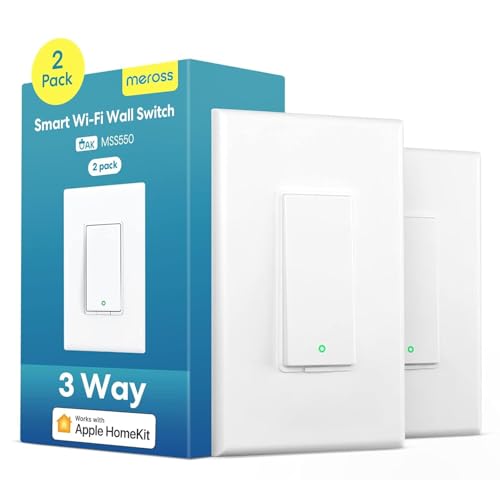
Meross 3-Way Smart Light Switch 2-Pack
Best for: Apple HomeKit 3-way lighting circuits
- Smart Home Compatibility
- Alexa, Apple HomeKit, SmartThings (what this guide is about)
- Hub Requirement
- No Hub Required
- Connectivity
- 2.4 GHz Wi-Fi
- Wiring Requirement
- Neutral Required
- Circuit Type
- 3-Way
- Dimensions
- 4.7 × 2.8 × 1.5 inches
This Meross light switch gives you Apple HomeKit integration for multi-switch lighting setups without requiring a dedicated bridge. It operates across 2.4 GHz Wi-Fi networks and replaces a single switch in an existing three-way circuit. You will need a neutral wire inside your electrical wall box for installation. It suits you if you want native Siri and Apple Home control over stairway or hallway lighting while keeping standard Decora-style wall plates.
Pros
- Works with Apple HomeKit without a dedicated smart hub
- Controls 3-way circuits by replacing only one traditional switch
- Fits standard 1, 2, 3, or 4-gang Decora and GFCI wall plates
- Built-in scheduling includes sunrise and sunset automations
Cons
- Requires a neutral wire in the junction box
- Does not support light dimming
- Incompatible with 5 GHz Wi-Fi networks
Good fit if
- You have a neutral wire available in your electrical switch box.
- You want to control a 3-way lighting circuit using Apple HomeKit or Siri.
- You prefer a Wi-Fi connection that functions without an added hardware hub.
Skip if
- You need dimming capability for your lighting fixtures.
- You do not have a neutral wire inside your existing wall box.
- You operate an exclusively 5 GHz wireless home network.
Verdict: Meross 3-Way Smart Light Switch provides hub-free Apple HomeKit operation for multi-switch lighting runs where neutral wiring is present. It gives you direct Siri voice and app control while keeping your existing companion 3-way switch in place.

Meross Mini Wi-Fi Smart Plug
Best for: stacking two smart plugs in one outlet
- Smart Home Compatibility
- Alexa, Apple HomeKit, SmartThings (what this guide is about)
- Hub Requirement
- No Hub Needed
- Connectivity
- 2.4GHz Wi-Fi
- Maximum Load
- 15A
- Dimensions
- 2.68 × 1.5 × 2.28 inches
This compact Wi-Fi switch lets you automate standard wall outlets without adding a separate equipment bridge. It supports electrical loads up to 15A and connects directly to your 2.4GHz network. The compact casing occupies a single socket, allowing you to fit two units into one standard duplex receptacle. This model suits you if you want native Apple HomeKit integration alongside voice commands through Siri, Alexa, or Google Assistant.
Pros
- Occupies a single socket so two units can stack in one duplex outlet
- Supports appliances and lighting loads up to 15A
- Connects directly over 2.4GHz Wi-Fi without a proprietary hub
- Allows automated scheduling tied to sunrise and sunset times
Cons
- Requires an Apple home hub like a HomePod or Apple TV for remote access
- Operates strictly on 2.4GHz Wi-Fi networks without 5GHz support
Good fit if
- You need a compact plug that leaves adjacent wall outlets accessible.
- You control 15A appliances using Apple HomeKit, Alexa, or Google Assistant.
- You want automated on and off schedules based on local sunrise and sunset.
Skip if
- You run a 5GHz-only wireless home network.
- You lack a HomePod, Apple TV, or iPad for out-of-home HomeKit control.
Verdict: Meross 15A Mini Wi-Fi Smart Plug delivers straightforward HomeKit appliance control with a compact form factor that fits two units per outlet. It provides direct 2.4GHz Wi-Fi pairing and scheduling without demanding a proprietary manufacturer hub.

TALTBREX Matter 16A Mini Relay Switch Module
Best for: concealed in-wall Apple Home automation
- Smart Home Compatibility
- Alexa, Google Home, Apple HomeKit, SmartThings (what this guide is about)
- Connectivity
- 2.4GHz Wi-Fi
- Wiring Requirement
- Neutral wire required
- Maximum Load
- 16A/100-240V
- Dimensions
- 1.54 × 1.54 × 0.7 inches
View on Amazon: TALTBREX Matter 16A Mini Relay Switch Module
This TALTBREX module is an in-wall relay switch designed to add smart controls behind your existing wall switches. It supports Matter over 2.4GHz Wi-Fi, allowing you to connect directly to Apple Home, Alexa, Google Home, or SmartThings. Rated for loads up to 16A at 100 to 240V, it handles standard lighting and appliances. You need an existing neutral wire inside your electrical box. It suits you if you want hidden Apple HomeKit control.
Pros
- Works with Apple Home, Alexa, Google Home, and SmartThings via Matter
- Supports high-load devices up to 16A at 100-240V
- Compact 1.54 by 1.54 by 0.7-inch size fits behind existing wall switches
- Enables local LAN communication between Matter devices without cloud dependence
Cons
- Requires a neutral wire in the switch box
- Operates only on 2.4GHz Wi-Fi networks
- Requires physical electrical wiring during setup
Good fit if
- You have neutral wiring available inside your switch box.
- You want to keep your existing switch plates while adding smart controls.
- You need a high load capacity of up to 16A.
Skip if
- You do not have a neutral wire in your wall box.
- You want a plug-in switch that requires no electrical installation.
- You run a 5GHz-only Wi-Fi setup without 2.4GHz support.
Verdict: TALTBREX Matter 16A Mini Relay Switch provides high-capacity, hidden Apple HomeKit control behind your existing wall switches using Matter over Wi-Fi. It is a solid choice if your electrical boxes contain neutral wiring.

RODOT Matter 16A Mini Switch Module 2-Pack
Best for: retrofitting traditional wall switches via Matter
- Smart Home Compatibility
- Alexa, Google Home, Apple HomeKit (what this guide is about)
- Connectivity
- WiFi
- Maximum Load
- 16A
This two-pack includes mini Wi-Fi relay modules designed to fit inside standard junction boxes behind your existing wall switches. Each module supports up to a 16A load and integrates directly with Apple Home via Matter, eliminating the need for a third-party app account. Matter Multi-Admin support allows simultaneous control through other ecosystems. It suits you if you want to keep your existing switches while adding timer schedules and native Apple HomeKit automation.
Pros
- Direct Matter setup without third-party app account binding
- 16A maximum load capacity
- Matter Multi-Admin allows simultaneous multi-ecosystem control
- Compact form factor fits behind switches in junction boxes
Cons
- Requires manual electrical wiring inside a junction box
- Operates over Wi-Fi without Thread support
- Lacks energy tracking and power consumption monitoring
Good fit if
- You want to convert traditional wall switches into smart switches without changing wall plates
- You require a high 16A rating for retrofitted switches or appliances
- You want Apple HomeKit compatibility without registering for separate vendor accounts
Skip if
- You prefer a plug-and-play smart outlet that requires no in-wall wiring
- You need detailed real-time energy monitoring metrics
Verdict: RODOT 16A Matter Mini Relay Module 2-Pack provides a concealed in-wall option to automate existing switches directly through Apple Home via Matter. Its 16A load limit and account-free setup offer a practical retrofit without replacing switch hardware.

Eve Energy Strip and Light Switch Bundle
Best for: combined outlet and light switch HomeKit setups
- Smart Home Compatibility
- Apple HomeKit (what this guide is about)
- Circuit Type
- Single-Pole, 3-Way
This bundle pairs a triple-outlet power strip with an in-wall smart light switch, both designed for Apple HomeKit. You get independent control over three strip outlets with power consumption tracking, plus single-pole or 3-way wall switch operation. Both devices support autonomous on-device schedules that run without an active phone connection. It suits you if you manage your home via iOS or iPadOS and need switch and outlet automation together.
Pros
- Supports both single-pole and 3-way switch setups
- Three independently controlled outlets with onboard physical buttons
- Stores schedules directly on device hardware
- Tracks total power consumption on the strip
Cons
- Requires an iPhone or iPad with the latest iOS or iPadOS
- No listed compatibility for non-Apple smart home platforms
Good fit if
- You run your smart home strictly through Apple HomeKit.
- You need both a 3-way capable light switch and a multi-outlet strip.
- You want schedules that run locally without an active network connection.
Skip if
- You do not use an iPhone or iPad.
- You only require a single smart switch rather than an outlet bundle.
Verdict: Eve Energy Strip and Light Switch Bundle provides coordinated Apple HomeKit control across three smart plug outlets and a single-pole or 3-way wall switch. Its standalone on-device scheduling makes it a capable dual-purpose addition to an iOS-centered smart home.
Specifications side by side
| Spec | Kasa Smart Plug Mini with Energy Monitoring | Kasa Outdoor 2-Socket Smart Plug | Meross Outdoor Dual Outlet Smart Plug | Lutron Claro Smart Accessory Switch | Meross 15A Wi-Fi Smart Plug 4-Pack | Kasa Smart Single-Pole Dimmer Switch | Meross 15A Wi-Fi Smart Plug 2-Pack | Meross 3-Way Smart Light Switch 2-Pack | Meross Mini Wi-Fi Smart Plug | TALTBREX Matter 16A Mini Relay Switch Module | RODOT Matter 16A Mini Switch Module 2-Pack | Eve Energy Strip and Light Switch Bundle |
|---|---|---|---|---|---|---|---|---|---|---|---|---|
| Smart Home Compatibility | Apple HomeKit, Alexa, Google Assistant | Apple HomeKit, Siri, Alexa, Google | HomeKit, Alexa, Google, SmartThings | Alexa, Apple HomeKit, Google Home | Apple HomeKit, Amazon Alexa, Google | Apple HomeKit, Alexa, Google Assistant | Apple HomeKit, Alexa, SmartThings | Apple HomeKit, Alexa, Google Assistant | Apple HomeKit, Alexa, Google Assistant | Matter, Apple Home, Alexa, Google Home | Matter, Apple Home, Alexa, Google Home | Apple HomeKit |
| Hub Requirement | not specified | No Hub Required | not specified | Hub Required | not specified | not specified | not specified | No Hub Required | No Hub Needed | not specified | not specified | not specified |
| Connectivity | not specified | 2.4GHz Wi-Fi | not specified | not specified | 2.4GHz Wi-Fi | 2.4 GHz Wi-Fi | 2.4GHz Wi-Fi | 2.4 GHz Wi-Fi | 2.4GHz Wi-Fi | 2.4GHz Wi-Fi | WiFi | not specified |
| Wiring Requirement | not specified | not specified | not specified | No Neutral Required | not specified | Neutral Required | not specified | Neutral Required | not specified | Neutral wire required | not specified | not specified |
| Circuit Type | not specified | not specified | not specified | 3-Way, Multi-Location | not specified | Single Pole | not specified | 3-Way | not specified | not specified | not specified | Single-Pole, 3-Way |
| Switch Function | not specified | not specified | not specified | Accessory Switch | not specified | Dimmer | not specified | not specified | not specified | not specified | not specified | not specified |
| Maximum Load | 15A, 1800W | 15A/1875W Max | not specified | not specified | 15A | not specified | 15A | not specified | 15A | 16A/100-240V | 16A | not specified |
| Application | not specified | not specified | not specified | Lights | not specified | not specified | not specified | not specified | not specified | not specified | not specified | not specified |
| Operating Environment | not specified | Outdoor | Outdoor | not specified | not specified | not specified | not specified | not specified | not specified | not specified | not specified | not specified |
| Dimensions | 2.62 × 1.57 × 1.5 inches | 1.52 × 3.11 × 4.33 inches | 3 × 3.1 × 1.6 inches | 1.44 × 2.94 × 4.69 inches | 2.7 × 1.5 × 2.3 inches | 5.06 × 3.33 × 1.77 inches | 3.86 × 2.72 × 1.54 inches | 4.7 × 2.8 × 1.5 inches | 2.68 × 1.5 × 2.28 inches | 1.54 × 1.54 × 0.7 inches | not specified | not specified |
| Weight | not specified | not specified | 3.2 ounces | not specified | 9.7 ounces | not specified | not specified | 6.35 ounces | not specified | not specified | not specified | not specified |
| Size | 4-Pack | not specified | HomeKit 2 Outlet | Pack of 1 | Standard Size | 1-pack | not specified | 3 Way Smart Switch 2 Pack | 1 Pack | 2 Pack | not specified | not specified |
| Color | White | Black | Black | Black | White | White, Dimmer Switch | White | White | white | Yellow | White | White |
| Model | EP25P4 | EP40A | MSS620 | DVRF-AS-BL | MSS110HK | KS220 | MSS110 | MSS550 | MSS110 | V-MTS01 | not specified | not specified |
If you also need networking hardware, see our list of best smart managed network switches ranked by specs.
How to Choose Apple HomeKit Switches
-
Select the Installation Form Factor
Choose a form factor that fits your installation comfort level. Plug-in models insert directly into standard wall receptacles without tools or electrical work. Concealed modules, like the TALTBREX Matter 16A Mini Relay Switch Module, measure just 0.7 inches thick and install behind your existing switches inside standard junction boxes. This approach preserves your original decorative faceplates while adding smart automation. If you prefer not to touch household wiring, choose plug-in adapters. If you want hidden smart functionality behind existing hardware, measure box depth to verify in-wall module clearance.
-
Match Your Circuit Layout
Match the switch architecture to your circuit layout before purchasing in-wall units. Single-pole circuits control fixtures from one wall location. If you control a room light from only one wall box, choose a dedicated single-pole model such as the Kasa Smart Single-Pole Dimmer Switch. Installing a single-pole device into a multi-switch circuit causes electrical faults and disables multi-location control. Check your wall box count before choosing hardware. Single-pole switches handle standard one-location setups, while staircases and hallways with multiple switches controlling the same light need dedicated multi-way hardware instead.
-
Check Environmental Operating Ratings
Inspect the environmental rating to ensure the switch can safely withstand moisture and temperature swings. Standard indoor plugs lack protection against rain, dampness, and condensation. For patios, gardens, and landscape lighting, select hardware explicitly rated for outdoor operating environments. The Meross Outdoor Dual Outlet Smart Plug specifies certified IP44 weather resistance to prevent water intrusion. Indoor-only hardware installed outdoors risks short circuits, equipment failure, and electrical shock. Always confirm an outdoor rating on the spec sheet before using smart switches on open decks, covered porches, or exterior outlets.
-
Verify Maximum Amperage Capacity
Evaluate the amperage limit against the electrical draw of the equipment you plan to connect. Standard lighting and small appliances draw minimal current, but heavy loads like space heaters, power tools, and air conditioners require higher capacity. Devices like the RODOT Matter 16A Mini Switch Module 2-Pack provide a 16A load rating, accommodating higher sustained draws than standard 10A or 15A switches. Exceeding a switch's rated amperage triggers internal safety trips or damages internal relay contacts. Calculate total connected wattage to ensure your intended devices operate safely within the published amperage rating.
-
Compare Connectivity and Matter Support
Review the connectivity protocol based on the other smart home systems in your household. If your home relies exclusively on Apple devices, native HomeKit Wi-Fi switches, such as the Meross 15A Wi-Fi Smart Plug 2-Pack, offer fast pairing directly within Apple Home. However, if your household shares controls across Android, Alexa, or Google Home alongside Apple devices, choose switches with Matter connectivity. Matter bridges devices across different ecosystems natively without locking you to iOS hardware. Check the connectivity specifications to confirm whether the device supports cross-platform Matter or standard HomeKit Wi-Fi.
-
Measure Physical Receptacle Clearance
Examine device dimensions to avoid blocking adjacent receptacles on standard duplex wall outlets. Bulky smart plugs can obstruct the upper or lower socket, effectively turning a two-outlet plate into a single usable port. Compact models like the Meross Mini Wi-Fi Smart Plug measure 1.5 inches wide by 2.28 inches high, leaving sufficient clearance to stack two smart plugs on one outlet. Before buying, measure the clearance around your target receptacle. If you need both outlets active for other appliances, select slim, horizontal, or miniature plug housings that respect standard socket spacing.
Frequently asked questions
Do outdoor Apple HomeKit switches require a dedicated smart home hub?
No, outdoor smart switches do not always require a separate hub. The Kasa Outdoor 2-Socket Smart Plug (EP40A) connects directly over standard 2.4GHz Wi-Fi networks without requiring an external hub. Similarly, the Meross Outdoor Dual Outlet Smart Plug (MSS620) supports Apple HomeKit, Alexa, and SmartThings right out of the box while providing certified IP44 weather resistance for exterior devices.
What is the difference between single-pole and 3-way Apple HomeKit switches?
Single-pole switches manage a fixture from one wall location, whereas 3-way switches control lights from two different points. The Kasa Smart Single-Pole Dimmer Switch (KS220) is built specifically for single-switch boxes and offers automated fade transitions. For multi-switch runs, models like the Meross MSS550 accommodate 3-way circuits while keeping your existing companion wall switch in place.
Can you control non-Apple devices with Matter-compatible HomeKit switches?
Yes, Matter-enabled switches work across multiple smart ecosystems alongside Apple HomeKit. Devices such as the TALTBREX Matter 16A Mini Relay Switch Module (model V-MTS01) and RODOT 16A Mini Switch Module integrate with Google Home, Alexa, and SmartThings simultaneously. Matter connectivity enables direct platform interoperability so you are not restricted solely to Apple devices or manufacturer-specific mobile applications.
How much electrical load can compact in-wall relay switches handle?
Compact in-wall relay modules can handle electrical loads up to 16A. Both the TALTBREX Matter Mini Relay Switch Module and the RODOT Matter Mini Switch Module feature a 16A maximum load capacity. These concealed modules install directly inside your existing electrical boxes behind traditional switch hardware, allowing you to automate standard lighting or heavier appliance circuits without swapping faceplates.
What network band do Wi-Fi Apple HomeKit switches require?
Most Wi-Fi Apple HomeKit switches connect over a standard 2.4GHz network band. Models such as the Kasa Outdoor 2-Socket Smart Plug and Meross 15A Wi-Fi Smart Plugs require 2.4GHz Wi-Fi to establish direct app and Siri voice control. If your home router uses combined dual-band Wi-Fi, ensure the 2.4GHz frequency is accessible during device pairing.
Can you install two smart plugs into a single duplex wall outlet?
Yes, compact smart plugs are sized to leave adjacent receptacles open or stack two units per outlet. The Meross Mini Wi-Fi Smart Plug (MSS110) measures 1.5 inches wide by 2.28 inches high, allowing two plugs to occupy one wall outlet. Similarly, the Kasa Smart Plug Mini EP25P4 measures 1.5 inches tall, preventing obstruction of secondary wall sockets.
How do accessory switches differ from primary smart switches in multi-location lighting?
Accessory switches provide wired secondary control rather than operating as independent smart switches. The Lutron Claro Smart Accessory Switch (DVRF-AS-BL) works across Diva and Claro multi-location circuits without requiring a neutral wire. Unlike standalone smart switches that connect directly to Wi-Fi, this accessory switch relies on a separate Lutron smart hub to enable Apple HomeKit support and automation features.