AEOTEC Z-Stick 7 Plus Z-Wave or AEOTEC SmartThings Zigbee Motion Sensor? Which AEOTEC Model to Buy
As an Amazon Associate we earn from qualifying purchases. Links on this page are affiliate links.
The aeotec smartthings motion sensor vs z stick 7 plus comparison highlights two very different devices from the same brand. Both are Aeotec products designed to enhance home automation, but they serve distinct roles. One is a Zigbee motion sensor for monitoring movement. The other is a Z-Wave USB adapter that acts as a hub controller. Understanding these functional differences helps you decide which component fits your specific smart home setup.
Key differences
| Aspect | Aeotec SmartThings Zigbee Motion Sensor | Aeotec Z-Stick 7 Plus Z-Wave USB Adapter |
|---|---|---|
| Connectivity | Zigbee | Z-Wave, Z-Wave Plus |
| Smart Home Compatibility | SmartThings | Home Assistant, Indigo 7 |
| Device Function | Motion Sensor | Hub Controller |
| Network Interface | not listed | USB |
Which one should you choose?
Choose Aeotec SmartThings Zigbee Motion Sensor if
- You need to detect movement in a specific room
- Your primary hub is SmartThings or compatible
- You want to automate lights based on occupancy
Choose Aeotec Z-Stick 7 Plus Z-Wave USB Adapter if
- You need to create a Z-Wave network hub
- You use Home Assistant or Indigo 7 software
- You want to connect Z-Wave devices to a computer
Verdict: Choose the motion sensor if you need to track activity and automate lighting. Choose the Z-Stick if you need to build a Z-Wave network controller. They are not interchangeable because one detects motion and the other manages network connectivity.
Zigbee Sensor vs Z-Wave Hub
Primary Function
The Aeotec SmartThings Zigbee Motion Sensor is a detection device. It monitors movement within a 120-degree view range up to 15 feet. You use it to trigger automation, such as turning lights on or off when you enter a room. It provides 24/7 monitoring alerts. In contrast, the Aeotec Z-Stick 7 Plus is a gateway controller. It is a USB adapter that creates a Z-Wave hub. It does not detect motion. Instead, it allows your computer or Raspberry Pi to control other Z-Wave devices. One is a sensor, the other is a network bridge.
Connectivity Protocol
These products use different wireless standards. The SmartThings Motion Sensor connects via Zigbee. This protocol is common for low-power sensors like motion detectors. The Z-Stick 7 Plus uses Z-Wave and Z-Wave Plus. It leverages the 700 Series technology for better range and speed. The data states it transmits up to 250% further in open space with an 18% faster CPU. You must choose the protocol that matches the rest of your smart home devices. You cannot mix these protocols directly without a bridge.
Smart Home Compatibility
Compatibility depends on your chosen hub. The SmartThings Motion Sensor works with the SmartThings App, the Aeotec SmartThings Hub, Samsung SmartThings Hub Gen 3, and other compatible Zigbee hubs. It is tightly integrated with the SmartThings ecosystem. The Z-Stick 7 Plus is designed for broader software flexibility. It works with Home Assistant and Indigo 7. It also supports Raspberry Pi, Windows, Mac, and Linux. If you use Home Assistant, the Z-Stick is the better choice. If you use SmartThings, the sensor fits that workflow.
Installation Type
Installation methods differ significantly. The Motion Sensor features a quick tilt magnetic ball mount. You can easily attach it to surfaces for monitoring. It is a standalone device that requires a hub to function. The Z-Stick 7 Plus is a USB adapter. You plug it into a computer, Raspberry Pi, or compatible hub. It acts as the controller for the network. It does not have its own power source or mounting bracket. It relies on the host device for power and processing. One is a peripheral, the other is a central component.
Security Features
The Z-Stick 7 Plus includes specific security protocols. It uses Aeotec exclusive Gen7 and 700 series technologies. It offers Z-Wave SmartStart and S2 security for device pairing and communication. This ensures encrypted and secure connections for your Z-Wave network. The product data for the SmartThings Motion Sensor does not list specific security protocols. It mentions monitoring and automation but omits security details. You should assume the Z-Stick provides more documented security features for network protection.
Choose Your Aeotec Device Today
You want to automate lighting based on presence
This Zigbee motion sensor detects movement up to 15 feet within a 120-degree view. You can set it to automatically turn devices on or off as people enter a room. It helps minimize energy usage by ensuring lights only run when needed. It requires a compatible Zigbee hub to function properly.
You need to build a Z-Wave home network
This USB adapter uses Z-Wave Plus technology to create a hub for your home. It works with Raspberry Pi, Windows, Mac, and Linux systems. The 700 Series chip offers faster transmission and greater range than older models. It supports SmartStart and S2 security for reliable control of other Z-Wave devices.
You use Home Assistant or Indigo 7
This Z-Wave USB stick is compatible with Home Assistant and Indigo 7 software. It allows you to control Z-Wave and Z-Wave Plus devices through your preferred platform. The device features an 18% faster CPU for quicker response times. It is designed to integrate seamlessly into existing home automation ecosystems.
The products compared
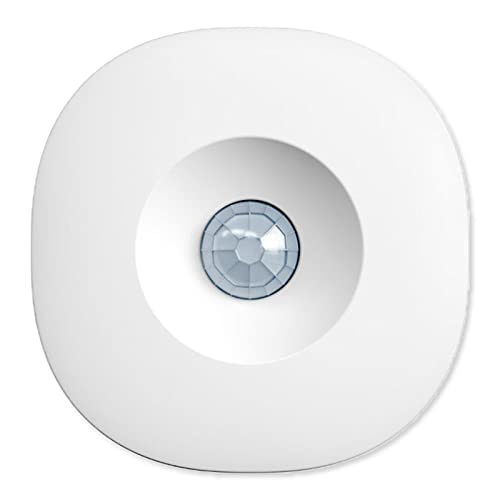
Aeotec SmartThings Zigbee Motion Sensor
Best for: SmartThings users needing Zigbee motion detection
- Connectivity
- Zigbee
- Smart Home Compatibility
- SmartThings
View on Amazon: Aeotec SmartThings Zigbee Motion Sensor Affiliate link
This Aeotec SmartThings Motion Sensor uses Zigbee connectivity to detect movement within a 120-degree view range up to 15 feet. It features a magnetic ball mount for quick tilt adjustment. You need a compatible Zigbee hub, such as the SmartThings Hub Gen 3, to operate it. The device is white and designed to trigger home automation routines when it senses unexpected motion.
Pros
- Zigbee connectivity for smart home integration
- 120-degree detection view range
- Motion detection up to 15 feet
- Magnetic ball mount for quick tilt adjustment
Cons
- Requires a separate Zigbee hub to function
- Limited to 15-foot detection distance
- No battery capacity or type listed
Good fit if
- You use a SmartThings Hub Gen 3
- You need a Zigbee motion sensor
- You want a magnetic mounting option
Skip if
- You do not have a Zigbee hub
- You need a Z-Wave device
- You require a standalone sensor without a hub
Verdict: Aeotec SmartThings Zigbee Motion Sensor fits users who already own a Zigbee hub and need reliable motion detection for automation. It is not suitable for Z-Wave networks or hub-less setups.
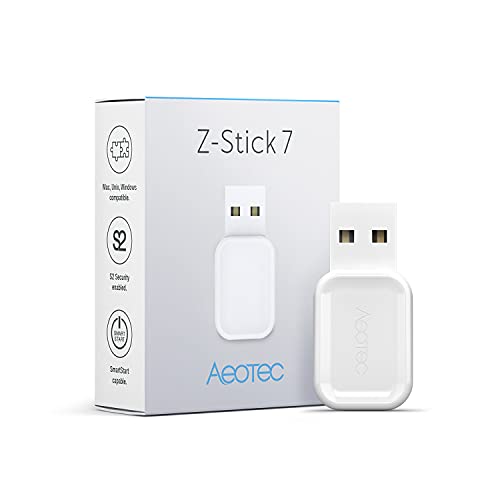
Aeotec Z-Stick 7 Plus Z-Wave USB Adapter
Best for: Building a Z-Wave hub on a computer
- Connectivity
- Z-Wave, Z-Wave Plus
- Smart Home Compatibility
- Home Assistant, Indigo 7
- Network Interface
- USB
View on Amazon: Aeotec Z-Stick 7 Plus Z-Wave USB Adapter Affiliate link
The Aeotec Z-Stick 7 Plus is a USB Z-Wave controller for building a hub on Raspberry Pi, Windows, Mac, or Linux. It uses the 700 Series with Z-Wave Plus, SmartStart, and S2 security. The device transmits 250% further in open space and has an 18% faster CPU. It works with Home Assistant and Indigo 7. You need this if you want a reliable Z-Wave network foundation.
Pros
- 700 Series Z-Wave Plus chipset
- 250% further transmission range
- S2 security support
- SmartStart pairing
- Compatible with Home Assistant
Cons
- Requires separate software installation
- USB interface only
- No built-in display
Good fit if
- You are building a Z-Wave hub on a PC or Raspberry Pi
- You want extended range for your smart home devices
- You need S2 security for your network
Skip if
- You want a standalone hub with a screen
- You need Wi-Fi connectivity
- You are looking for a Zigbee sensor
Verdict: Aeotec Z-Stick 7 Plus USB Controller is the right tool for users who need a powerful Z-Wave stick for their computer. It fits those who value range and security over a standalone device.
Specifications side by side
| Spec | Aeotec SmartThings Zigbee Motion Sensor | Aeotec Z-Stick 7 Plus Z-Wave USB Adapter |
|---|---|---|
| Connectivity | Zigbee | Z-Wave, Z-Wave Plus |
| Smart Home Compatibility | SmartThings | Home Assistant, Indigo 7 |
| Network Interface | not stated | USB |
| Color | White | white |
| Model | GP-AEOMSSUS | ZWA010 |
Frequently asked questions
Can I use the Aeotec SmartThings motion sensor with a Z-Wave hub?
No. This device uses Zigbee connectivity. It is designed specifically for SmartThings ecosystems. It will not work with Z-Wave networks or hubs that do not support Zigbee. You need a hub that supports both protocols or a dedicated Zigbee hub to use this sensor.
Does the Z-Stick 7 Plus include a motion sensor?
No. The Z-Stick 7 Plus is a USB adapter. It acts as a controller for Z-Wave devices. It does not have built-in motion detection capabilities. You must connect separate Z-Wave sensors to it to detect movement in your home.
Is the SmartThings motion sensor compatible with Home Assistant?
The product data lists SmartThings as its primary compatibility. It uses Zigbee for connectivity. While Home Assistant can support Zigbee, this specific sensor is marketed for SmartThings users. You should verify your hub supports the specific Zigbee model GP-AEOMSSUS before purchasing.
Can I plug the Z-Stick 7 Plus into a wall outlet?
No. This is a USB adapter. You must connect it to a computer or hub via USB. It is not a standalone plug-in device. It serves as a bridge to add Z-Wave capabilities to your existing computer-based smart home system.
What is the main difference between these two Aeotec products?
They serve completely different functions. One is a motion sensor. The other is a network controller. The SmartThings model detects movement. The Z-Stick model connects Z-Wave devices to your hub. You cannot substitute one for the other in your setup.
Do I need both devices for a complete smart home?
It depends on your goals. You need the Z-Stick to control Z-Wave devices. You need the motion sensor to detect presence. If you already have a Z-Wave hub, you only need the sensor. If you lack a hub, you need the stick first.
Is the Z-Stick 7 Plus a battery-powered device?
No. It connects via USB power. It draws energy directly from your computer or hub. It does not use batteries. This ensures it remains always active to manage your Z-Wave network without needing maintenance for power replacement.
Can the SmartThings motion sensor work without the SmartThings hub?
No. It requires a Zigbee hub to function. The data indicates it is for SmartThings users. It cannot connect directly to Wi-Fi or Bluetooth. You must have a compatible hub to pair this sensor and receive its motion detection alerts.