AEOTEC or THIRDREALITY? Smart Home Controllers Compared in 2026
As an Amazon Associate we earn from qualifying purchases. Links on this page are affiliate links.
This AEOTEC vs THIRDREALITY smart home controller comparison highlights two very different devices. The Aeotec hub acts as a central gateway for your entire network, supporting multiple protocols like Z-Wave and Zigbee. In contrast, the ThirdReality device is a single-purpose Zigbee button. Both integrate with SmartThings, but one manages your system while the other triggers specific scenes. You need to decide if you require a full hub or a simple remote.
Key differences
| Aspect | Aeotec Smart Home Hub with Zigbee and Matter | THIRDREALITY Zigbee Smart Button |
|---|---|---|
| Device Type | Smart Home Hub | Zigbee Smart Button |
| Connectivity Protocols | Matter, Z-Wave Plus, Zigbee, Wi-Fi | Zigbee 3.0 |
| Network Interface | Ethernet, Wi-Fi | not listed |
| Power Source | not listed | 2 AAA Batteries |
| Smart Home Compatibility | SmartThings, Amazon Alexa, Google Home | Home Assistant, HomeKit, SmartThings |
Which one should you choose?
Choose Aeotec Smart Home Hub with Zigbee and Matter if
- You need a central hub to connect Z-Wave, Zigbee, and Matter devices.
- You want to use voice assistants like Alexa or Google Home directly.
- You prefer a wired Ethernet connection for stable network performance.
Choose THIRDREALITY Zigbee Smart Button if
- You only need a wireless remote to trigger scenes or control lights.
- You want a battery-powered device that lasts up to three years.
- You already have a hub and just need additional Zigbee controllers.
Verdict: Choose the Aeotec hub if you are building a new smart home or need to connect diverse devices across multiple protocols. Select the ThirdReality button if you already have a compatible hub and simply want a convenient, low-power remote for daily tasks.
Aeotec Hub vs ThirdReality Button
System role
The Aeotec Smart Home Hub functions as a central gateway for your entire network. It connects thousands of compatible devices and supports multiple protocols, including Z-Wave Plus, Zigbee, and Matter. You use it to manage lighting, comfort, and energy use across your home. In contrast, the ThirdReality device is a single-purpose Zigbee button. It requires a separate hub to function and does not act as a controller itself. It is a remote input device, not a system core. This makes the Aeotec unit the true hub for a connected home, while the ThirdReality item is just a peripheral component.
Connectivity protocols
The Aeotec hub supports a wide range of connectivity standards. You get Matter, Z-Wave Plus (on the V3 model), Zigbee, and Wi-Fi. It also connects via Ethernet for wired stability. The ThirdReality button uses only Zigbee 3.0. It cannot connect directly to your Wi-Fi network or use Z-Wave. You must have a compatible hub to use this button. The Aeotec hub offers far more flexibility because it bridges multiple different smart home ecosystems and radio frequencies. The ThirdReality button is limited to one specific wireless standard, restricting the types of devices it can directly interact with without additional hardware.
Smart home compatibility
The Aeotec hub works with SmartThings, Amazon Alexa, and Google Home. You can set up and manage devices using the SmartThings app on Android, iOS, or iPadOS. It is designed for broad ecosystem integration. The ThirdReality button is compatible with SmartThings, Home Assistant, and Apple HomeKit (via a separate Smart Bridge MZ1). It also works with Aeotec and Hubitat hubs. While the button supports HomeKit, it requires extra hardware. The Aeotec hub provides direct app control and voice assistant integration out of the box. This makes the Aeotec unit more versatile for users who want a single point of control for various platforms.
Power source
The Aeotec hub plugs into a wall outlet or connects via Ethernet. It does not run on batteries, ensuring it stays online continuously. The ThirdReality button is powered by two AAA batteries. The manufacturer states it can last for three years with normal use. This low power consumption is a key feature for a portable remote. However, you must periodically replace the batteries. For a central hub, constant power is necessary for reliability. For a remote button, battery operation allows for flexible placement anywhere in your home, such as on a fridge or wall, without needing nearby outlets.
Physical form factor
The Aeotec hub is a stationary device measuring 5 inches by 5 inches by 1 inch. It weighs 1.1 pounds. It is designed to sit on a shelf or desk. The ThirdReality button is compact and portable, measuring 3.52 inches by 1.01 inches by 0.52 inches. It weighs only 1.44 ounces. You can stick it to a wall with double-sided tape or attach it to metal surfaces using magnetic strips. Both accessories are included. The Aeotec unit is a fixed infrastructure component. The ThirdReality button is a mobile control tool that you can move or place wherever you need quick access.
Which smart home controller fits you
Users needing a multi-protocol hub
The Aeotec hub supports Matter, Z-Wave Plus, and Zigbee. It connects via Ethernet or Wi-Fi. You can automate thousands of devices using the SmartThings app. Local automations improve speed. This central gateway manages lighting, sensors, and switches for a complete smart home setup.
Users wanting a scene controller
The ThirdReality button uses Zigbee 3.0 for stability. It offers three control settings: press, double press, and hold. You can assign scenes like movie mode or sleep mode. It runs on two AAA batteries for three years. Mount it with tape or magnets.
Users integrating with Apple HomeKit
This button works with HomeKit through the Smart Bridge MZ1. You get OTA updates for software improvements. It is compact and low power. You can control devices remotely with one action. It requires a separate Zigbee hub to function within your network.
The products compared
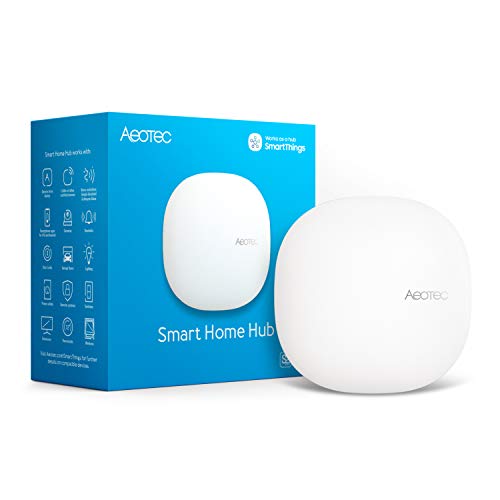
Aeotec Smart Home Hub with Zigbee and Matter
Best for: users needing Z-Wave Plus and Matter support
- Connectivity
- Matter, Z-Wave Plus, Zigbee, Wi-Fi
- Smart Home Compatibility
- SmartThings, Amazon Alexa, Google Home
- Network Interface
- Ethernet, Wi-Fi
- Dimensions
- 5 × 5 × 1 inches
- Weight
- 1.1 pounds
View on Amazon: Aeotec Smart Home Hub with Zigbee and Matter Affiliate link
The Aeotec Smart Home Hub acts as a central controller for your connected devices. It supports Matter, Z-Wave Plus, and Zigbee protocols. You can manage automations via the SmartThings app on iOS or Android. The unit connects via Wi-Fi or Ethernet. It works with Alexa and Google Home. This hub suits users who want local automation and broad protocol support in a compact white design.
Pros
- Supports Matter, Z-Wave Plus, and Zigbee
- Runs many automations locally for speed
- Connects via Wi-Fi or Ethernet
- Compatible with Alexa and Google Home
Cons
- Requires the SmartThings app for setup
- Z-Wave Plus support limited to V3 model
- Designed for North America use only
Good fit if
- You need a hub supporting Z-Wave Plus and Matter
- You prefer local automation for reliability
- You use the SmartThings app for control
Skip if
- You want a device with a built-in display
- You require Z-Wave support on the newer V4 model
- You need compatibility outside North America
Verdict: AEOTEC SmartThings Hub Z-Wave Plus is a solid choice for users who need broad protocol support including Matter and Z-Wave Plus. It fits those who value local automation and wired or wireless connectivity options.

THIRDREALITY Zigbee Smart Button
Best for: dedicated scene control via physical remote
- Connectivity
- Zigbee 3.0
- Smart Home Compatibility
- Home Assistant, HomeKit, SmartThings
- Power Source
- 2 AAA Batteries
- Circuit Type
- 3-Way
- Dimensions
- 1.01 × 0.52 × 3.52 inches
- Weight
- 1.44 ounces
View on Amazon: THIRDREALITY Zigbee Smart Button Affiliate link
This compact remote control uses Zigbee 3.0 connectivity to pair with hubs like Aeotec or SmartThings. It offers three distinct input modes: single press, double press, and long hold. You can assign specific scenes or device groups to each action. The unit runs on two AAA batteries, which the manufacturer states last up to three years. It mounts via included magnetic strips or double-sided tape. Apple HomeKit support requires a separate Smart Bridge MZ1.
Pros
- Zigbee 3.0 standard for stable low-power operation
- Three control settings: press, double press, and hold
- Includes magnetic strips and double-sided tape for mounting
- Compatible with SmartThings, Home Assistant, and HomeKit via bridge
Cons
- Requires a separate Zigbee hub to function
- Apple HomeKit integration needs an additional Smart Bridge MZ1
- Battery-powered; requires periodic replacement of AAA cells
Good fit if
- You want a simple physical remote for specific scenes
- You already use a Zigbee hub like Aeotec
- You prefer mounting options over wall-switch wiring
Skip if
- You need direct Wi-Fi or Bluetooth connectivity
- You want to control devices without a central hub
- You require native Apple HomeKit support without extra hardware
Verdict: THIRDREALITY Zigbee Smart Button is a versatile, battery-operated remote for users who already have a Zigbee hub. It fits best if you need dedicated physical controls for lighting or scenes without wiring.
Specifications side by side
| Spec | Aeotec Smart Home Hub with Zigbee and Matter | THIRDREALITY Zigbee Smart Button |
|---|---|---|
| Connectivity | Matter, Z-Wave Plus, Zigbee, Wi-Fi | Zigbee 3.0 |
| Smart Home Compatibility | SmartThings, Amazon Alexa, Google Home | Home Assistant, HomeKit, SmartThings |
| Network Interface | Ethernet, Wi-Fi | not stated |
| Power Source | not stated | 2 AAA Batteries |
| Circuit Type | not stated | 3-Way |
| Dimensions | 5 × 5 × 1 inches | 1.01 × 0.52 × 3.52 inches |
| Weight | 1.1 pounds | 1.44 ounces |
| Color | White | White |
| Model | GP-AEOHUBV3US | 850001595575 |
| Size | not stated | 1x3.54x0.59 |
Frequently asked questions
Can the Aeotec hub control devices from multiple brands?
Yes, it supports broad protocol compatibility. The device connects with Alexa and SmartThings ecosystems. It also handles Zigbee connections. This allows you to mix and match products from different manufacturers within a single interface without needing separate apps for each brand.
Does the ThirdReality button work with Home Assistant?
Yes, it is compatible with Home Assistant. The button uses the Zigbee connectivity standard. It also works with SmartThings. You can use it as a dedicated physical remote for scenes or lighting control without requiring complex wiring or additional hubs beyond your existing setup.
What is the size difference between the hub and the button?
The Aeotec hub is significantly larger. It measures five inches in width and length, with a one-inch height. The ThirdReality button is much smaller. It measures approximately one inch by three and a half inches. The button is lightweight, weighing just over one ounce.
Which device is better for local automation?
The Aeotec hub is designed for local automation. It supports Matter and Z-Wave Plus protocols. This allows for faster response times and reliability even without internet access. The ThirdReality button is a peripheral device that relies on a hub for processing, so it does not handle automation logic itself.
How do you connect the Aeotec hub to your network?
The hub offers wired and wireless options. It supports Zigbee connectivity for devices. It also integrates with Alexa and SmartThings platforms. You can connect it via Ethernet or Wi-Fi to ensure stable communication with your smart home devices and remote control applications.
Is the ThirdReality button battery operated?
Yes, the device is battery-operated. It is designed as a versatile remote for users who already have a Zigbee hub. You can place it anywhere without needing power outlets. It is ideal for dedicated scene control or lighting adjustments without the need for permanent wiring.
Can the Aeotec hub support Matter devices?
Yes, the Aeotec Smart Home Hub supports Matter. It also includes Z-Wave Plus and Zigbee capabilities. This multi-protocol support allows you to integrate newer Matter-certified devices alongside older Z-Wave and Zigbee products. You can manage all these devices through the SmartThings app or Alexa.
What is the primary function of the ThirdReality button?
It serves as a dedicated scene control remote. The button uses Zigbee connectivity to send commands to your hub. It is best for users who want physical controls for lighting or specific scenes. You can trigger complex automations with a single press, simplifying daily interactions with your smart home.