6 Best Alternatives to the Tapo P125 Apple HomeKit Mini (2026)
As an Amazon Associate we earn from qualifying purchases. Links on this page are affiliate links.
The Tapo P125 Apple HomeKit Mini Plug is a compact option for users who want to integrate outlets into their Apple ecosystem. If you are searching for tapo p125 apple homekit alternatives, you might need different form factors or connectivity types. This plug supports Wi-Fi and Bluetooth, allowing for easy setup and control via Siri or the Tapo App. Its small size, measuring 1.5 by 1.3 inches, helps prevent blocking adjacent outlets.
However, you may prefer a dedicated switch, a remote button, or a hub-based device. Some users need neutral wires for lighting control, while others want physical buttons for quick scene access. The alternatives listed here were chosen because their specs overlap with the original product’s core function: smart home control within Apple HomeKit. Whether you need a Zigbee switch, a Thread button, or a Matter-certified remote, these options provide reliable integration. Each product offers distinct connectivity and physical attributes that may better suit your specific home layout or control preferences.
Our top pick: Tapo P125 Apple HomeKit Mini Plug 2-Pack.
Comparing Alternatives to Tapo P125
Kasa Smart Single Pole Light Switch 3-Pack
The Kasa KS200P3 replaces wall outlets with wall switches. It controls lighting circuits directly rather than powering plugged-in devices. This switch requires neutral wires for installation, which the Tapo P125 does not. It offers a 3-pack configuration for whole-home lighting control. The physical dimensions are larger to fit standard electrical boxes. You lose the ability to plug in lamps or fans directly. However, you gain permanent control over hardwired lights. Choose this if you want to automate ceiling lights rather than portable appliances. It integrates with Apple HomeKit for voice commands and scheduling.
Aqara Zigbee Wireless Mini Switch
The Aqara WXKG11LM is a wireless button, not a power outlet. It connects via Zigbee, requiring a separate hub unlike the Tapo P125’s direct Wi-Fi connection. This button provides a physical trigger for HomeKit scenes or automations. It is much smaller and lighter than the plug. You cannot use it to power devices on or off directly. Instead, it sends signals to other smart devices. This option suits users who want quick manual triggers for lights or sensors. It works with multiple ecosystems including Alexa and Google Home. Pick this if you need remote controls for your Apple Home setup.
Airversa 3-Button Thread Remote
The Airversa AC1 uses Thread connectivity instead of Wi-Fi. This protocol offers lower latency and better reliability within the Apple Home ecosystem. It is a dedicated physical button for controlling devices. The device is compact and rechargeable. You cannot plug appliances into it. It serves as a remote controller for your smart home. This option is ideal for users who prefer physical buttons over app controls. Thread support ensures quick response times without relying on Wi-Fi stability. Choose this if you want a dedicated, fast-responding controller for your Apple Home scenes. It integrates seamlessly with HomeKit and Thread border routers.
Onvis 5-Key Thread Smart Button
The Onvis HS2 is a five-key smart button using Thread connectivity. It provides multiple controls in one small device. Like the Airversa, it requires a Thread hub rather than direct Wi-Fi. It offers local control for enhanced privacy and speed. You cannot use it to power outlets directly. It acts as a remote for scenes or device groups. This option suits users who want multiple automation triggers from a single button. It is compatible with Apple HomeKit and other Thread-enabled platforms. Pick this if you need versatile physical control options for your smart home. It fits well for users prioritizing local processing and quick response times.
Arre Matter and Thread Smart Button
The Arre ASB3194 is a Matter-certified smart button using Thread. It supports both Apple Home and SmartThings ecosystems. This connectivity ensures broad compatibility and reliable performance. It is a compact physical controller for automations. You cannot plug devices into it. It sends commands to other smart devices in your network. This option is best for users who want cross-platform flexibility with Thread technology. It requires a Thread router for operation. Choose this if you need a Matter-compliant button for your Apple Home setup. It offers a balance of local control and multi-ecosystem support for your smart devices.
Aqara Wireless Mini Switch and Hub Kit
The Aqara M100 Hub Kit combines a wireless switch with a Zigbee hub. It provides both a physical controller and a bridge for other Zigbee devices. This setup requires more space than the Tapo P125. You get a Matter bridge for Apple Home integration alongside the switch. The switch allows for 3-way control configurations. You cannot power outlets directly with this unit. It is ideal for users building a Zigbee network. Choose this if you need a hub and controller in one package. It suits those who want to expand their smart home with Zigbee devices while maintaining Apple Home compatibility.
Quick picks
Our 7 picks

Tapo P125 Apple HomeKit Mini Plug 2-Pack
Best for: Apple HomeKit users needing compact outlets
- Connectivity
- 2.4GHz Wi-Fi, Bluetooth
- Smart Home Compatibility
- Apple HomeKit, Alexa, Google Assistant
- Network Interface
- 2.4GHz Wi-Fi
- Dimensions
- 2.36 × 1.5 × 1.3 inches
View on Amazon: Tapo P125 Apple HomeKit Mini Plug 2-Pack Affiliate link
The Tapo P125 is a compact smart plug designed for Apple HomeKit integration. It supports Wi-Fi and Bluetooth connectivity for easy setup and control via the Tapo app or Siri. The unit measures 1.5 by 1.3 by 2.36 inches, allowing it to fit into tight spaces without blocking adjacent outlets. It includes scheduling features and works with Alexa, Google Assistant, and SmartThings. This 2-pack offers a reliable way to automate standard home electronics.
Pros
- Apple HomeKit compatible for native Siri control
- Compact dimensions of 1.5 by 1.3 by 2.36 inches
- Supports Wi-Fi and Bluetooth for quick onboarding
- Compatible with Alexa, Google Assistant, and SmartThings
- Includes scheduling and timer functions
Cons
- Requires an Apple device like an iPad or HomePod for remote HomeKit access
- Only includes 2 plugs in the base package
- No mention of energy monitoring capabilities
Good fit if
- You want native Apple HomeKit integration
- You need compact plugs that do not block other outlets
- You use Siri or Apple Home for voice control
Skip if
- You require remote control without an Apple hub
- You need energy usage monitoring
- You prefer a single plug purchase
Verdict: Tapo P125 Apple HomeKit Smart Plug Mini is a solid choice for Apple users who need compact, reliable outlets. It fits best in homes where Siri and HomeKit are the primary control methods.

Kasa Smart Single Pole Light Switch 3-Pack
Best for: Apple HomeKit lighting control with neutral wires
- Connectivity
- 2.4GHz Wi-Fi
- Smart Home Compatibility
- Apple HomeKit, Alexa, Google Assistant
- Network Interface
- 2.4GHz Wi-Fi
- Power Source
- Neutral wire
- Wiring Requirement
- Neutral Wire Required
- Circuit Type
- Single Pole
View on Amazon: Kasa Smart Single Pole Light Switch 3-Pack Affiliate link
This 3-pack of Kasa smart light switches supports Apple HomeKit, Alexa, and Google Assistant. It connects via 2.4GHz Wi-Fi and requires a neutral wire for installation. The single-pole design fits standard wall plates. You can control lights via the Kasa app or voice commands. Advanced scheduling and away mode features add security and convenience for your home automation setup.
Pros
- Compatible with Apple HomeKit, Alexa, and Google Assistant
- Includes a 3-pack of single-pole switches
- Features advanced scheduling and away mode
- App-guided installation process
Cons
- Requires a neutral wire for installation
- Limited to 2.4GHz Wi-Fi connections
- No dedicated physical remote included
Good fit if
- You need Apple HomeKit integration for lighting
- You have neutral wires in your switch boxes
- You want to control lights via voice commands
Skip if
- You only have 5GHz Wi-Fi access
- Your switch boxes lack a neutral wire
- You prefer a wireless switch without wiring
Verdict: Kasa Smart KS200P3 Apple HomeKit Switch offers reliable Apple HomeKit control with a convenient 3-pack. It is best for homeowners with neutral wires who want voice-controlled lighting.

Aqara Zigbee Wireless Mini Switch
Best for: Hub users needing extra remote buttons
- Connectivity
- Zigbee
- Smart Home Compatibility
- HomeKit, Google Home, Alexa, IFTTT
- Power Source
- Battery
- Circuit Type
- 3-Way
- Dimensions
- 1.77 × 1.77 × 0.47 inches
- Weight
- 0.64 ounces
View on Amazon: Aqara Zigbee Wireless Mini Switch Affiliate link
This is a compact, battery-powered remote that connects via Zigbee. It works with Apple HomeKit, Google Home, and Alexa. You must use a compatible Aqara hub. The switch supports single, double, and long press actions. It fits well if you want a small controller for scenes or doorbell alerts. It is not a plug or switch itself.
Pros
- Zigbee connectivity for stable hub connection
- Compatible with Apple HomeKit, Google Home, and Alexa
- Supports single, double, and long press programming
- Functions as an emergency button or doorbell
Cons
- Requires a separate Aqara hub to function
- Limited to 400 inches range from the hub
- Battery powered with no rechargeable option listed
Good fit if
- You already own a compatible Aqara hub
- You need a small remote for scene control
- You want to use HomeKit with Zigbee devices
Skip if
- You do not have an Aqara hub
- You want a direct Wi-Fi connection
- You need a plug or light switch
Verdict: Aqara Zigbee Wireless Mini Switch is a small remote for hub users. It suits those who need extra buttons for HomeKit scenes or doorbell alerts.
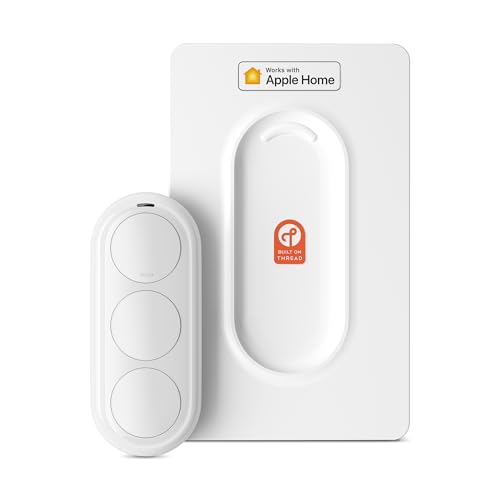
Airversa 3-Button Thread Remote
Best for: Apple Home users wanting a dedicated physical controller
- Connectivity
- Thread
- Smart Home Compatibility
- Apple Home
- Power Source
- Rechargeable battery
- Dimensions
- 2.99 × 1.26 × 0.57 inches
- Weight
- 1.76 ounces
View on Amazon: Airversa 3-Button Thread Remote Affiliate link
The Airversa QliQ AC1 is a three-button HomeKit controller that uses Thread for reliable, low-latency connectivity. It requires a Thread-enabled Apple Home hub within 30 feet to function. The device features a rechargeable battery that lasts up to two months on a single charge. You can map single, double, and long presses to nine different automations. Its compact, white design includes a built-in magnet and wall plate for flexible placement.
Pros
- Thread connectivity for instant responsiveness
- Rechargeable battery with up to 2 months life
- Three buttons support nine automations
- Vibration and audible feedback on press
- Includes magnet and wall plate for mounting
Cons
- Requires a Thread-enabled Apple Home hub
- Limited to 30-foot range from the hub
- No support for other smart home platforms
Good fit if
- You use Apple Home and need a physical controller
- You want to avoid replacing disposable batteries
- You need tactile feedback for your automations
Skip if
- You do not have a Thread-enabled Apple Home hub
- You need compatibility with Google Home or Alexa
- You want to control devices from far away
Verdict: Airversa QliQ AC1 HomeKit Thread Button is a practical choice for Apple Home users who want a dedicated, rechargeable physical controller with reliable Thread connectivity.

Onvis 5-Key Thread Smart Button
Best for: Apple HomeKit users with Thread hubs
- Connectivity
- Thread, Bluetooth
- Smart Home Compatibility
- Apple HomeKit
- Dimensions
- 2.17 × 0.79 × 2.17 inches
View on Amazon: Onvis 5-Key Thread Smart Button Affiliate link
The Onvis HS2 is a compact, white smart button with five keys. It uses Thread and Bluetooth to connect to Apple HomeKit. Each key supports single, double, and long press actions, allowing up to 15 scenes. Data stays on your iOS device with end-to-end encryption. You need a Thread-enabled Apple hub, like a HomePod Mini, to use it. It mounts with tape or magnets.
Pros
- Thread and Bluetooth connectivity
- Five keys with multiple press options
- Local data storage with no cloud
- Includes magnetic and adhesive mounts
Cons
- Requires a Thread-enabled Apple Home hub
- Limited to Apple HomeKit compatibility
- No physical display for status feedback
Good fit if
- You want a local, private smart button
- You already own a Thread-enabled Apple hub
- You need quick access to multiple scenes
Skip if
- You do not have an Apple HomeKit setup
- You need multi-platform support like Alexa
- You prefer a device with a screen
Verdict: Onvis 5-Key Smart Button is a secure, local control option for Apple HomeKit users who already have a Thread hub. It fits those who value privacy and quick scene access over multi-platform flexibility.

Arre Matter and Thread Smart Button
Best for: Apple Home and SmartThings users with Thread routers
- Connectivity
- Matter, Thread
- Smart Home Compatibility
- Matter, Apple Home, SmartThings
- Dimensions
- 1.57 × 1.57 × 0.43 inches
- Weight
- 4 ounces
View on Amazon: Arre Matter and Thread Smart Button Affiliate link
The Arre smart button supports Matter and Thread for low-latency control. It works with Apple Home and Samsung SmartThings. You get single, double, and long-press options. The unit measures 1.57 by 0.43 inches. It includes decorative stickers. You need a Thread border router to use it. This compact device fits well in homes using these ecosystems.
Pros
- Matter and Thread connectivity
- Works with Apple Home
- Works with Samsung SmartThings
- Three press modes
Cons
- Requires a Thread border router
- No mention of battery life
- No physical display
Good fit if
- You use Apple Home
- You use Samsung SmartThings
- You want Thread connectivity
Skip if
- You do not have a Thread border router
- You need a display
- You prefer Wi-Fi only
Verdict: Arre Matter Thread Smart Button offers reliable Thread connectivity for Apple Home and SmartThings users. It suits those who want a compact, Matter-certified button and already have the required router.

Aqara Wireless Mini Switch and Hub Kit
Best for: HomeKit users needing a Matter bridge
- Connectivity
- Zigbee, Thread, Matter
- Smart Home Compatibility
- Apple Home, Alexa, Home Assistant, IFTTT
- Circuit Type
- 3-Way
View on Amazon: Aqara Wireless Mini Switch and Hub Kit Affiliate link
This kit includes a Zigbee wireless button and the Aqara M100 hub. The button supports single, double, and long press inputs for versatile control. The hub acts as a Matter bridge, connecting Zigbee and Thread devices to Apple Home, Alexa, and Home Assistant. It supports up to 20 Zigbee and 20 Thread devices. You get emergency alert and doorbell features. This setup allows you to control multiple smart home accessories through one central controller.
Pros
- Supports single, double, and long press inputs
- M100 hub acts as a Matter bridge
- Compatible with Apple Home, Alexa, and Home Assistant
- Includes emergency alert and doorbell functions
Cons
- Requires a hub for operation, not standalone
- Only supports up to 20 Zigbee devices
- Does not list native Thread support on the button itself
Good fit if
- You want to use a physical button with HomeKit
- You need a Matter bridge for other devices
- You prefer Zigbee connectivity for sensors
Skip if
- You need a standalone switch without a hub
- You only use Wi-Fi devices
- You want direct Thread control on the button
Verdict: Aqara Wireless Mini Switch with M100 Hub is a practical solution for users who want a versatile physical controller and a Matter bridge for their Apple Home ecosystem. It suits those building a Zigbee-based smart home who need a central hub.
Specifications side by side
| Spec | Tapo P125 Apple HomeKit Mini Plug 2-Pack | Kasa Smart Single Pole Light Switch 3-Pack | Aqara Zigbee Wireless Mini Switch | Airversa 3-Button Thread Remote | Onvis 5-Key Thread Smart Button | Arre Matter and Thread Smart Button | Aqara Wireless Mini Switch and Hub Kit |
|---|---|---|---|---|---|---|---|
| Connectivity | 2.4GHz Wi-Fi, Bluetooth | 2.4GHz Wi-Fi | Zigbee | Thread | Thread, Bluetooth | Matter, Thread | Zigbee, Thread, Matter |
| Smart Home Compatibility | Apple HomeKit, Alexa, Google Assistant | Apple HomeKit, Alexa, Google Assistant | HomeKit, Google Home, Alexa, IFTTT | Apple Home | Apple HomeKit | Matter, Apple Home, SmartThings | Apple Home, Alexa, Home Assistant, IFTTT |
| Network Interface | 2.4GHz Wi-Fi | 2.4GHz Wi-Fi | not stated | not stated | not stated | not stated | not stated |
| Power Source | not stated | Neutral wire | Battery | Rechargeable battery | not stated | not stated | not stated |
| Wiring Requirement | not stated | Neutral Wire Required | not stated | not stated | not stated | not stated | not stated |
| Circuit Type | not stated | Single Pole | 3-Way | not stated | not stated | not stated | 3-Way |
| Hub Requirement | not stated | No Hub Required | not stated | not stated | not stated | not stated | not stated |
| Dimensions | 2.36 × 1.5 × 1.3 inches | 5.04 × 3.33 × 1.41 inches | 1.77 × 1.77 × 0.47 inches | 2.99 × 1.26 × 0.57 inches | 2.17 × 0.79 × 2.17 inches | 1.57 × 1.57 × 0.43 inches | not stated |
| Weight | not stated | not stated | 0.64 ounces | 1.76 ounces | not stated | 4 ounces | not stated |
| Size | 2-Pack | 3-pack | M Switch-01 | not stated | not stated | not stated | not stated |
| Color | white | White | White | White | white | not stated | not stated |
| Model | Tapo P125(2-Pack) | KS200P3 | WXKG11LM | AC1 | HS2 | ASB3194 | not stated |
Frequently asked questions
Can I use the Aqara Mini Switch without a hub?
No. The Aqara Zigbee Wireless Mini Switch requires a compatible hub to function. It uses Zigbee connectivity, which does not connect directly to your Wi-Fi router. You need a hub that supports Apple HomeKit and Zigbee devices to integrate this switch into your smart home setup.
Does the Kasa switch work without a neutral wire?
No. The Kasa Smart Single Pole Light Switch requires neutral wires for installation. It is designed for single-pole circuits and needs those wires to power the internal electronics. If your home lacks neutral wires in the switch box, this specific model will not work for your lighting control needs.
Is the Airversa remote rechargeable?
Yes. The Airversa 3-Button Thread Remote is a rechargeable device. It uses Thread connectivity for reliable communication with your Apple Home ecosystem. The compact design allows you to place it anywhere, and you can recharge it when the battery runs low, ensuring continuous operation for your scenes.
What connectivity does the Onvis smart button use?
It uses Thread. The Onvis 5-Key Thread Smart Button connects via the Thread network, which offers low power consumption and high reliability. This method requires a Thread border router in your home. It provides secure, local control for Apple HomeKit users who prioritize privacy and quick response times.
Can the Arre button work with SmartThings?
Yes. The Arre Matter and Thread Smart Button supports both Apple HomeKit and SmartThings. It uses Matter certification and Thread connectivity for cross-platform compatibility. This makes it a versatile choice if you use multiple smart home ecosystems, allowing you to control devices from either platform with a single physical button.
Does the Aqara kit include a hub?
Yes. The Aqara Wireless Mini Switch and Hub Kit includes the M100 Hub. This bundle provides a Matter bridge for your Apple Home ecosystem along with the wireless switch. It is ideal for users who need to expand their Zigbee network while adding a versatile physical controller for their smart home scenes.
How many buttons does the Airversa remote have?
It has three buttons. The Airversa QliQ AC1 HomeKit Thread Button features a 3-button layout. This allows you to assign different actions or scenes to each button. The physical design is compact, making it easy to mount or place near your main living areas for quick access to your Apple Home automations.