SONOFF Wireless 4-Button Zigbee Scene vs SONOFF TX Gen2 Touch Wall (2026): Key Differences
As an Amazon Associate we earn from qualifying purchases. Links on this page are affiliate links.
Comparing the sonoff fusion zigbee smart scene vs tx gen2 smart wall reveals two distinct control methods. Both devices manage smart home routines, but they serve different installation needs. The TX Gen2 replaces standard wall switches, while the Fusion button acts as a wireless remote. You must choose based on your wiring setup and preferred connectivity protocol for your specific automation goals.
Key differences
| Aspect | SONOFF TX Gen2 Touch Wall Switch | SONOFF Wireless 4-Button Zigbee Scene Switch |
|---|---|---|
| Connectivity | 2.4GHz Wi-Fi | Zigbee |
| Hub Requirement | No hub required | Hub required |
| Wiring Requirement | Neutral-wire power setup | No wiring required |
| Smart Home Compatibility | Matter, Apple Home, Google Home, Alexa | SmartThings, Home Assistant |
| Programmability | Independent relay mode | 16 scene triggers |
Which one should you choose?
Choose SONOFF TX Gen2 Touch Wall Switch if
- You want to replace existing wall switches without adding a hub.
- You need compatibility with Apple Home, Google Home, or Alexa.
- Your wall box supports neutral-wire power setups.
Choose SONOFF Wireless 4-Button Zigbee Scene Switch if
- You prefer local control via Home Assistant or Zigbee binding.
- You cannot run wires to the switch location.
- You want to trigger multiple routines with a single wireless button.
Verdict: Choose the TX Gen2 if you want a direct Wi-Fi replacement for wall switches with broad voice assistant support. Pick the Fusion button if you need a wireless, battery-powered remote for complex local automations or existing Zigbee networks.
SONOFF TX Gen2 vs Fusion Button
connectivity
The SONOFF TX Gen2 Touch Wall Switch uses 2.4GHz Wi-Fi to connect directly to your network. This allows remote control via the eWeLink app without needing a separate hub. You can sync it with Apple Home, Google Home, and Amazon Alexa. The SONOFF Wireless 4-Button Zigbee Scene Switch relies on Zigbee technology. It requires a compatible hub, such as the SONOFF ZBBridge or iHost, to function. It also supports SmartThings and Home Assistant. Wi-Fi offers direct internet access, while Zigbee provides a local mesh network. Your choice depends on whether you prefer hub-free simplicity or mesh reliability.
smart home compatibility
The TX Gen2 switch supports Matter, which helps break down ecosystem barriers. It integrates seamlessly with Apple Home, Google Home, and Amazon Alexa for cross-platform voice control. This ensures unified management of lights and appliances. The Fusion button focuses on Zigbee ecosystems. It works with SmartThings, Home Assistant (via ZHA and Z2M), and Zigbee2MQTT. It also offers dual modes for the SONOFF eWeLink ecosystem. If you use Apple or Google Home natively, the TX Gen2 is easier to set up. If you run Home Assistant, the Fusion button offers deeper local control.
wiring requirement
Installation methods differ significantly between these two devices. The TX Gen2 is a wall switch that fits standard 120-type panels in North American junction boxes. It supports neutral-wire power setups, requiring a permanent electrical connection. The Fusion button is completely wireless. It requires no wiring and can be placed on a desk, attached to metal surfaces with its magnetic base, or mounted with screws. You can also install it in a standard 86-type wall box. If you want a permanent fixture, choose the TX Gen2. For flexible placement without electrical work, the Fusion button is the better option.
programmability
The Fusion button offers extensive programmability with four buttons. Each button supports single, double, triple, and long-press actions, creating up to 16 customizable scene triggers. You can control lights, routines, and appliances with specific press patterns. It also supports TouchLink lighting control for direct dimming. The TX Gen2 focuses on relay control. It features an independent relay mode to prevent smart lights from going offline due to physical button presses. It supports scheduled timers and automated scenes via the app. The Fusion button provides more granular input options, while the TX Gen2 ensures stable relay states.
build
Physical dimensions and form factors vary. The TX Gen2 measures 2.91 inches in width and 4.72 inches in length, weighing 4.7 ounces. It is designed to replace standard wall plates. The Fusion button is compact, measuring 1.97 inches square and 0.88 inches thick, weighing 3.53 ounces. It is small enough to hold in one hand or mount discreetly. The TX Gen2 includes a dimmable LED button indicator for nighttime visibility. The Fusion button lacks a display but uses a magnetic base for versatile positioning. Choose the TX Gen2 for a permanent wall presence, or the Fusion button for a portable remote.
Which SONOFF device fits your home
Users with existing Wi-Fi and neutral wire
The TX Gen2 connects via 2.4GHz Wi-Fi, so you do not need a separate hub. It requires a neutral wire for power. The 120-type panel fits standard North American junction boxes. You can control it through the eWeLink app or voice assistants like Alexa and Google Home. The independent relay mode keeps lights online even if you press the physical button.
Renters or those avoiding electrical work
The Fusion button requires no wiring, making it ideal for rentals or difficult installations. It uses a magnetic base or adhesive for placement. You can also mount it in a standard 86-type wall box. This wireless design lets you place the controller anywhere without worrying about electrical boxes or neutral wires. It acts as a flexible remote for your smart devices.
Home Assistant users wanting local control
This device supports Zigbee Binding with Home Assistant via ZHA and Z2M. This allows direct control of devices without relying on hub processing. You get faster response times and greater reliability. It also supports TouchLink for instant dimming and on/off control. You can trigger 16 different scenes using single, double, triple, or long-press actions on the four buttons.
The products compared
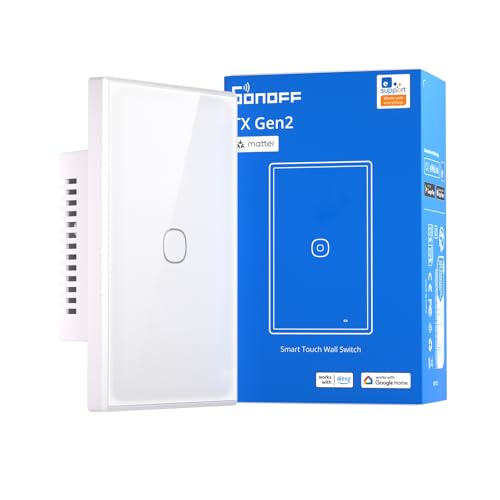
SONOFF TX Gen2 Touch Wall Switch
Best for: Matter users with neutral-wire junction boxes
- Smart Home Compatibility
- Matter, Apple Home, Google Home, Alexa
- Connectivity
- 2.4GHz Wi-Fi
- Wiring Requirement
- Supports neutral-wire power setups
- Dimensions
- 4.72 × 2.91 × 1.48 inches
- Weight
- 4.7 ounces
View on Amazon: SONOFF TX Gen2 Touch Wall Switch Affiliate link
This is a SONOFF TX Gen2 Smart Wall Touch Switch in a 1-channel configuration. It connects via 2.4GHz Wi-Fi and supports Matter, Apple Home, Google Home, and Alexa. The device features a 120-type panel design that fits standard North American junction boxes. It requires neutral-wire power setups. You can control lights remotely through the eWeLink app or voice commands. The switch includes a dimmable LED indicator for night visibility. Independent relay mode keeps lights online even if you press the physical button.
Pros
- Matter compatibility for seamless integration with major smart home platforms
- Independent relay mode prevents lights from going offline during manual use
- Dimmable LED button indicator for easy location in the dark
- Standard 120-type panel design fits most North American junction boxes
Cons
- Requires neutral-wire power setups, which may not suit all older homes
- Limited to 1-channel control in this specific model
- Relies on 2.4GHz Wi-Fi, lacking Bluetooth or Zigbee connectivity
Good fit if
- You need a Matter-compatible switch for cross-platform control
- You want to keep lights accessible via the physical button
- Your junction box supports neutral-wire wiring
Skip if
- You only have 120V power without a neutral wire
- You prefer a Zigbee or Bluetooth connection over Wi-Fi
- You need multi-channel control in a single unit
Verdict: SONOFF TX Gen2 Touch Switch 1C offers robust Matter support and independent relay control for users with neutral-wire setups. It is ideal for those who want reliable app and voice control without losing manual switch functionality.

SONOFF Wireless 4-Button Zigbee Scene Switch
Best for: Wire-free smart home scene triggering
- Smart Home Compatibility
- Home Assistant, SmartThings
- Hub Requirement
- Hub Required
- Connectivity
- Zigbee
- Wiring Requirement
- No wiring required
- Switch Function
- Scene Controller, Dimmer, On/Off
- Dimensions
- 1.97 × 1.97 × 0.88 inches
View on Amazon: SONOFF Wireless 4-Button Zigbee Scene Switch Affiliate link
This is a wireless four-button scene controller using Zigbee connectivity. It requires a compatible hub like the SONOFF ZBBridge or iHost to function. The device offers 16 programmable triggers via single, double, triple, and long-press actions. It supports local binding in Home Assistant for faster response times. You can use it as a handheld remote or mount it magnetically. It fits users wanting flexible, wire-free control for smart lighting and routines.
Pros
- Four buttons support 16 customizable scene triggers
- Local Zigbee binding for direct device control
- TouchLink dimming and on/off without cloud
- Magnetic base for flexible wireless installation
Cons
- Requires a separate Zigbee hub to operate
- Limited to scene triggering rather than direct switching
- No built-in display for status feedback
Good fit if
- You want wire-free placement for smart triggers
- You use Home Assistant or Zigbee2MQTT
- You need local automation without cloud latency
Skip if
- You prefer a single device for all controls
- You do not own a compatible Zigbee hub
- You need direct wall-switch replacement functionality
Verdict: SONOFF SNZB-01M Wireless Zigbee Scene Button is a compact wireless remote for users who already have a Zigbee hub. It suits those needing flexible placement for lighting and routine triggers. It is not a direct wall switch replacement.
Specifications side by side
| Spec | SONOFF TX Gen2 Touch Wall Switch | SONOFF Wireless 4-Button Zigbee Scene Switch |
|---|---|---|
| Smart Home Compatibility | Matter, Apple Home, Google Home, Alexa | Home Assistant, SmartThings |
| Hub Requirement | not stated | Hub Required |
| Connectivity | 2.4GHz Wi-Fi | Zigbee |
| Wiring Requirement | Supports neutral-wire power setups | No wiring required |
| Switch Function | not stated | Scene Controller, Dimmer, On/Off |
| Dimensions | 4.72 × 2.91 × 1.48 inches | 1.97 × 1.97 × 0.88 inches |
| Weight | 4.7 ounces | 3.88 ounces |
| Size | 1C | not stated |
| Color | White | White |
| Model | T6-1C-120M | SNZB-01M |
Frequently asked questions
Can the SONOFF TX Gen2 replace my existing light switch?
Yes, the SONOFF TX Gen2 Touch Wall Switch is designed to replace standard wall switches. It fits into standard North American junction boxes with a 2.91-inch width. You must have a neutral wire in your wall for it to function. It maintains manual control while adding smart features.
Does the SONOFF Fusion button require a hub to work?
Yes, the SONOFF Wireless 4-Button Zigbee Scene Switch requires a Zigbee hub. It connects via Zigbee protocol rather than Wi-Fi. You cannot connect it directly to your router. You need a compatible hub to trigger scenes and routines from this wireless remote.
Is the SONOFF TX Gen2 compatible with Matter?
Yes, the SONOFF TX Gen2 Touch Wall Switch supports Matter. This allows for broader compatibility with various smart home ecosystems. It works with Alexa and Google Home as well. This makes it suitable for users who want reliable app and voice control without losing manual functionality.
What is the main difference between these two SONOFF devices?
The TX Gen2 is a wired wall switch that replaces your existing hardware. The Fusion button is a wireless remote that sticks to any surface. The TX Gen2 controls lights directly through your wall box. The Fusion button triggers scenes and routines remotely without needing wiring.
Can I use the SONOFF Fusion button without batteries?
No, the SONOFF Wireless 4-Button Zigbee Scene Switch is battery-powered. It weighs 3.53 ounces and measures 1.97 inches square. Since it is wireless, you do not need to hardwire it. You must replace the batteries periodically to keep the device operational for scene triggering.
Does the SONOFF TX Gen2 need a neutral wire?
Yes, the SONOFF TX Gen2 Touch Wall Switch requires a neutral wire. It is best for users with neutral-wire junction boxes. Without this wire, the device cannot power its internal electronics. It is not suitable for older homes that only have hot and load wires in the switch box.