SENCKIT Smart Radiator Thermostat Valve Review: Who It Fits and Who Should Skip It
As an Amazon Associate we earn from qualifying purchases. Links on this page are affiliate links.
This senckit smart thermostat radiator valve review covers a Zigbee-enabled device designed for precise room heating control. It features an LCD digital display and supports weekly scheduling with multiple programming modes. The unit connects via the Tuya or Smart Life app, allowing remote adjustments from your phone. It also integrates with voice assistants like Alexa and Google Home for hands-free operation. Note that a separate Zigbee hub is required to enable these smart features. The valve operates within a wide temperature range, making it suitable for various home heating setups.
What stands out
- Zigbee connectivity requires a separate hub for smart automation.
- LCD digital display provides clear local temperature readings.
- Weekly programming supports 5+2, 6+1, and 7-day schedules.
- Compatible with Alexa, Google Home, and Tuya app.
Who it fits
Good fit for
This valve suits users with existing Zigbee hubs who want granular control over individual radiator temperatures. It is ideal for households that prefer scheduled heating cycles to match daily routines. The wide temperature range benefits those needing precise adjustments for specific rooms. Users who rely on voice commands for home automation will find the Alexa and Google integration convenient. It also works well for those who want to monitor battery levels and use window-open detection to save energy.
Who should skip it
Skip this option if you do not already own a compatible Zigbee hub, as one is sold separately. It is not suitable for users who prefer Wi-Fi-only devices without additional hardware. Those who want a simple, non-programmable thermostat may find the scheduling features unnecessary. If you need Bluetooth direct connection without a hub, this device will not work for you. Users who do not use the Tuya app or voice assistants may find the smart features redundant.
Verdict: The SENCKIT valve offers reliable Zigbee-based control for users with compatible hubs. It is a solid choice for those seeking programmable, voice-enabled radiator management.
Key Specs Explained
Connectivity: Zigbee
This device uses the Zigbee protocol rather than Wi-Fi. You must purchase a separate Zigbee hub to connect it to your smart home network. This approach often offers lower power consumption and a more stable mesh network compared to Wi-Fi devices. It requires you to invest in additional hardware, so check your existing hub compatibility before buying.
Display Type: LCD digital display
The unit features a built-in LCD screen that shows the current temperature and settings directly on the valve. You do not need to open an app on your phone to see the status or adjust basic settings. This physical feedback is useful for quick checks, especially if your network is down or you are troubleshooting the device manually.
Programmability: 5+2, 6+1, 7 days
You can set weekly schedules with flexibility. The 5+2 option allows five weekdays and two weekend days to share settings. The 6+1 and 7-day options let you customize every single day differently. This helps you save energy when you are away or asleep, and ensures comfort when you are home, adapting to your specific routine.
System Compatibility: Floor heating systems
The listing states this valve is mainly used for floor heating systems to control pipe opening and closing. You should verify if it fits your specific radiator type or underfloor heating setup. This specification suggests it is designed for hydronic heating loops rather than just standard wall radiators, so check your plumbing configuration to ensure proper integration.
Smart Home Compatibility: Alexa, Google Home
You can control the temperature using voice commands through Amazon Alexa or Google Assistant. This allows hands-free operation, such as setting the bedroom temperature by simply speaking. It integrates with your existing smart home ecosystem, making it easier to automate routines or adjust settings without reaching for your smartphone or the physical device.
Design and Build Quality
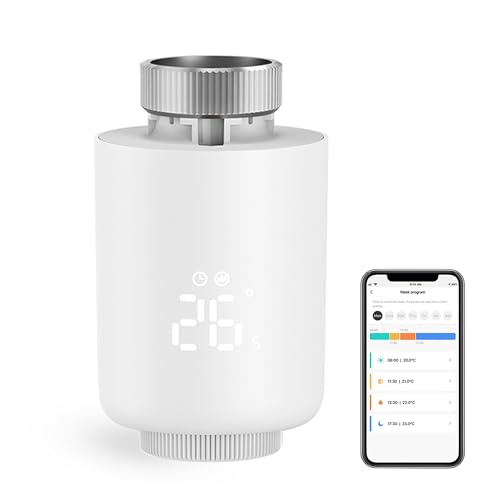
According to the listing, the SENCKIT Smart Radiator Thermostat Valve comes in a mini design with an LCD digital display. The unit measures 2.17 inches in width and length, with a height of 2.91 inches. These dimensions suggest a compact form factor that fits standard radiator setups without protruding excessively into the room. The listing notes a white color option, though black is also available. This finish choice allows you to match the valve to your existing radiator hardware or interior decor preferences.
The physical layout centers around the digital display, which provides visual feedback for temperature settings and modes. You do not need to rely solely on app notifications to see the current status. The device is designed specifically for radiator valve systems, as indicated by the system compatibility data. This means the mechanical interface is tailored to attach directly to thermostatic radiator valves rather than floor heating pipes, despite the title mentioning floor heating control. The compact size ensures it does not obstruct airflow or movement in the room.
Since the listing describes this as a "new mini design," the build prioritizes space efficiency. The LCD screen is integrated into the top or front face, keeping controls accessible. You will need to ensure your radiator valve type is compatible with this specific valve attachment. The white or black plastic casing appears functional rather than decorative, focusing on durability and ease of cleaning. This practical design supports daily adjustments without requiring complex installation tools.
Setup And Everyday Use Guide
Setting up this device requires a separate Zigbee hub, which you must purchase independently. The listing notes that the hub is not included. Once connected to your hub, you manage the valve through the Tuya or Smart Life app. You can also use voice commands via Alexa or Google Home to adjust temperatures remotely. This setup allows you to control the room temperature in real time without needing to physically touch the unit.
The valve supports a wide temperature range from 5°C to 45°C. You can set the desired heat level using the LCD digital display on the device or through the app. The unit offers multiple operating modes to suit different needs. These include vacation mode, comfort mode, automatic mode, manual mode, and energy saving mode. You can also activate the window opening function to detect drafts and lower heating, or use the anti-freezing feature to protect pipes in cold weather.
Scheduling is flexible. You can program weekly routines using 5+2, 6+1, or 7-day patterns. Each day allows up to six distinct time periods for temperature changes. This helps you customize heating based on your daily routine. The device is designed primarily for radiator valves in floor heating systems. It also includes a child lock function to prevent accidental changes and a low voltage warning to alert you when the battery needs replacement. These features ensure consistent control and energy efficiency for your home heating system.
Before You Buy SENCKIT Valve
Before purchasing the SENCKIT Smart Radiator Thermostat Valve, you must verify your heating infrastructure. The listing specifies compatibility with floor heating systems and radiator valves. Ensure your existing radiators accept this specific valve type. You also need a separate Zigbee hub, as it is not included. Without this hub, the device cannot connect to your smart home network. Check that your router supports Zigbee protocols. You will manage temperatures via the Tuya or Smart Life app. Voice control requires Alexa or Google Home integration. This device suits users with existing Zigbee ecosystems who want precise zone control. It does not replace whole-home thermostats. It adds smart functionality to individual radiators or floor loops. Consider if you need remote access or just local scheduling. The mini design fits most standard radiator setups. Verify your valve thread size before ordering. This product fits best in homes with zoned heating needs.
Check before you buy
- Confirm your radiators accept this valve type.
- Purchase a separate Zigbee hub for connectivity.
- Verify your floor heating system compatibility.
- Ensure your router supports Zigbee protocols.
The product at a glance
SENCKIT Smart Radiator Thermostat Valve
Best for: scheduled control with an existing Zigbee hub
- System Compatibility
- Floor heating systems
- Smart Home Compatibility
- Alexa, Google Home
- Programmability
- 5+2, 6+1, 7 days
- Connectivity
- Zigbee
- Display Type
- LCD digital display
- Hub Requirement
- Hub Required
View on Amazon: SENCKIT Smart Radiator Thermostat Valve Affiliate link
This SENCKIT radiator valve uses Zigbee connectivity to adjust room temperature between 5°C and 45°C. It features an LCD digital display and supports weekly programming with 5+2, 6+1, or 7-day schedules. You control it via the Tuya app or voice commands through Alexa and Google Home. Note that a separate Zigbee hub is required for operation. It suits users with floor heating systems or radiators needing precise, scheduled climate control.
Pros
- Zigbee connectivity for smart home integration
- LCD digital display for local status
- Weekly programmable schedules (5+2, 6+1, 7 days)
- Voice control via Alexa and Google Home
Cons
- Requires a separate Zigbee hub
- Limited to floor heating systems and radiator valves
- No Bluetooth or Wi-Fi direct connection
Good fit if
- You want scheduled temperature control for specific rooms
- You already have a Zigbee hub setup
- You prefer voice control via Alexa or Google
Skip if
- You do not have a Zigbee hub
- You need direct Wi-Fi or Bluetooth connection
- You want a unit with a built-in hub
Verdict: SENCKIT Zigbee Smart Radiator Thermostat Valve works well if you already have a Zigbee hub and want scheduled control for floor heating or radiators. It fits users who want voice commands but need to buy a hub separately.
Specifications side by side
| Spec | SENCKIT Smart Radiator Thermostat Valve |
|---|---|
| System Compatibility | Floor heating systems |
| Smart Home Compatibility | Alexa, Google Home |
| Programmability | 5+2, 6+1, 7 days |
| Connectivity | Zigbee |
| Display Type | LCD digital display |
| Hub Requirement | Hub Required |
| Dimensions | 2.17 × 2.17 × 2.91 inches |
| Color | White |
| Model | Zigbee-TRV |
Frequently asked questions
Does the SENCKIT Smart Radiator Thermostat Valve work without a hub?
No, this device requires a separate Zigbee hub to function. It does not connect directly to your Wi-Fi router. You must purchase the hub independently to enable smart home integration and remote control features for your heating system.
Can I control this radiator valve with voice commands?
Yes, you can use voice commands if you have a compatible hub. The device supports integration with Alexa and Google Home. This allows you to adjust temperatures or check status using your preferred voice assistant through the connected smart home ecosystem.
What type of heating systems is this valve compatible with?
The listing specifies compatibility with radiator valves and floor heating systems. You must verify that your existing radiators accept this specific valve type before installation. It is designed as a replacement for standard radiator thermostatic heads.
Is the SENCKIT valve programmable for weekly schedules?
Yes, the unit is programmable. You can set weekly schedules using the Tuya or Smart Life app. This feature allows you to customize heating times for different days, helping you maintain comfort while optimizing energy usage based on your routine.
What are the physical dimensions of the SENCKIT valve?
The device measures 2.17 inches in width and length, with a height of 2.91 inches. It comes in a white finish. These compact dimensions suggest it fits standard radiator setups without taking up excessive space on the wall or pipe.
Which apps can I use to manage this smart thermostat?
You can manage the valve through the Tuya or Smart Life app. These apps allow you to configure settings, view temperature data, and adjust schedules remotely. The app interface serves as the primary control method once the device is paired with your hub.