SENCKIT Bluetooth Fingerbot Button Pusher Review (2026): A Spec-Based Look
As an Amazon Associate we earn from qualifying purchases. Links on this page are affiliate links.
This senckit smart switch button pusher review covers a device that lets you automate physical buttons without rewiring. The SENCKIT Bluetooth Fingerbot Button Pusher connects via Bluetooth to the Smart Life or Tuya app. It attaches directly to existing switches using a 3M sticker. The unit measures 1.3 inches on each side and weighs 1.1 ounces. It runs on a replaceable battery that lasts over a year. You can adjust the press amplitude and direction. This compact tool retrofits old appliances into your smart home setup.
What stands out
- No wiring required; uses a 3M sticker for installation
- Bluetooth connectivity for direct app control via Smart Life or Tuya
- Adjustable amplitude and forward/reverse operation modes
- Low battery alarm notification through the app
- Compatible with Alexa and Google Home when paired with a separate gateway
Who it fits
Good fit for
You should buy this if you have non-smart devices with physical rocker switches or buttons. It suits renters who cannot modify wiring. You can use it for garage doors, fans, or coffee makers. The Bluetooth link works well if you are near the device. If you want voice control, you can add a Bluetooth gateway. This setup is ideal for retrofitting legacy appliances without replacing them.
Who should skip it
Skip this if you need direct Wi-Fi connectivity. This device relies on Bluetooth, so it requires your phone to be nearby for basic control. You must buy a separate Bluetooth gateway to use voice assistants like Alexa or Google Home. If you want a built-in display or remote, this unit does not have one. It only presses buttons; it does not replace the switch itself. You need an existing physical button to attach it to.
Verdict: The SENCKIT Fingerbot is a practical way to add smart control to legacy switches without wiring. It works best for users comfortable with Bluetooth and optional gateways for voice commands.
Key specs explained for SENCKIT
Connectivity: Bluetooth
This device uses Bluetooth to communicate with your phone. You control it directly via the Smart Life or Tuya app without needing Wi-Fi. This makes setup simple and reduces network congestion. It is ideal for renters who cannot install complex hubs. Compare this to Wi-Fi devices that require a home router connection for every single command.
Wiring Requirement: No Wiring
The unit requires no electrical wiring or professional installation. It sticks directly to existing switches using a 3M adhesive. This allows you to retrofit old appliances instantly. It is perfect for users who want smart features without drilling holes or calling an electrician. Most smart switches require wiring changes, but this stays non-invasive.
Smart Home Compatibility: Alexa, Google Home
The product works with major voice assistants when paired with a Bluetooth gateway. You can use voice commands to trigger the button press. This adds hands-free convenience to your routine. Note that the gateway is not included in the box. Other devices may include the hub, so check the package contents carefully before buying.
Weight: 1.1 ounces
The device is very lightweight at just 1.1 ounces. This ensures the adhesive holds securely without pulling off the switch plate. It is small enough to fit on tight spaces around buttons. Heavier motors might strain the sticker over time. This light design helps maintain a clean look on your existing hardware.
Design and build details
According to the listing, the SENCKIT Bluetooth Fingerbot Button Pusher measures 1.3 inches on each side. It is a compact cube that fits into tight spaces next to existing switches. The device weighs 1.1 ounces. This light weight means it does not strain the adhesive or the switch it is attached to. You can place it on small buttons or large rocker switches without worry.
The unit is black and uses a simple geometric shape. There are no external buttons or dials on the device itself. All control happens through the Smart Life or Tuya app on your phone. This clean exterior avoids accidental presses and keeps the look minimal. The 3M sticker allows you to mount it directly beside a physical button. You do not need tools or wiring to install it.
The design supports both forward and reverse operation. The amplitude is adjustable, which helps when dealing with different switch types. You can set it to click or press, and choose rising or falling motion modes. This flexibility means it works with old garage door remotes, coffee makers, or standard wall lamps. The compact size and wireless nature make it suitable for renters or anyone who cannot modify their home wiring. It sits quietly next to the device it controls.
Setup and everyday use guide
You install the SENCKIT Bluetooth Fingerbot Button Pusher without tools or wiring. The listing states it uses a 3M sticker to attach directly next to any rocker switch or button. You can retrofit old devices in seconds. The device supports both click and press modes. It also offers forward and reverse operation. You can adjust the amplitude for rising or falling movement. This flexibility allows it to control various appliances like lamps, fans, or coffee makers.
For daily control, you use the Smart Life or Tuya app via Bluetooth. You do not need Wi-Fi for basic operation. You can set schedules to turn functions on or off automatically. This works even when you are away from home. The device includes a replaceable battery. The listing claims working time lasts more than one year without replacement. An automatic low battery alarm sends a message through the app when power is running low.
To expand your setup, you can use a Bluetooth gateway. This accessory is not included. With the gateway, you can control the fingerbot using voice assistants like Alexa or Google Home. You can also create home automation routines. The smart home system can trigger the fingerbot based on other events. This adds convenience for managing physical switches through your existing smart ecosystem.
Before you buy this fingerbot
Before you buy, consider how this device fits into your existing setup. The SENCKIT Bluetooth Fingerbot Button Pusher connects directly to your phone via Bluetooth. You control it using the Smart Life or Tuya app. This direct connection simplifies setup but limits remote access. To control the device from outside your home or use voice commands with Alexa and Google Home, you must purchase a separate Bluetooth gateway. The listing notes that this hub is not included. You should check if your current smart home ecosystem supports this add-on. The unit runs on a replaceable battery that lasts over a year. You will need to monitor battery levels through the app and replace cells when the low-battery alarm triggers. This device works well for retrofitting older switches without wiring. It suits renters or those avoiding electrical work. Compare it with other options in Smart Thermostats & Smart Home Controls to see if a built-in hub is necessary for your needs.
Check before you buy
- Confirm you have a Bluetooth gateway for remote and voice control.
- Check if your phone supports the Smart Life or Tuya app.
- Verify the target switch is a rocker or button type.
- Plan for annual battery replacement when the app alerts you.
The product at a glance
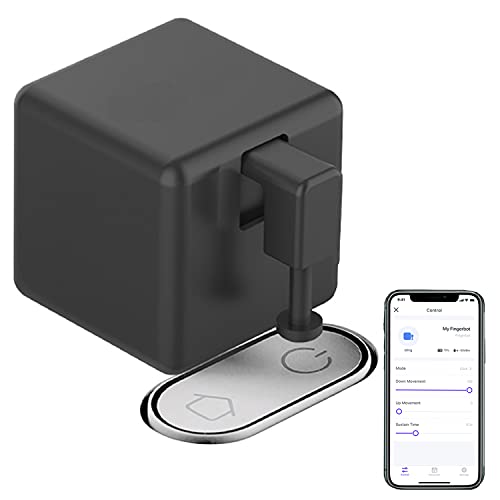
SENCKIT Bluetooth Fingerbot Button Pusher
Best for: Automating existing mechanical switches
- Smart Home Compatibility
- Alexa, Google Home
- Connectivity
- Bluetooth
- Wiring Requirement
- No Wiring
- Dimensions
- 1.3 × 1.3 × 1.3 inches
- Weight
- 1.1 ounces
View on Amazon: SENCKIT Bluetooth Fingerbot Button Pusher Affiliate link
The SENCKIT Fingerbot is a wireless app-controlled device that physically presses existing switches. It connects via Bluetooth and fits standard rocker switches or buttons. The unit measures 1.3 inches on each side and weighs 1.1 ounces. It uses a replaceable battery that lasts over a year. You can control it through the Smart Life app or set schedules. It requires a separate gateway for voice assistant compatibility.
Pros
- No wiring required for installation
- Adjustable click and press modes
- Low battery alarm via app
- Works with Smart Life app
Cons
- Requires separate gateway for voice control
- Limited to Bluetooth direct connection
- Does not replace existing switches
Good fit if
- You want to automate old mechanical switches
- You prefer no-wiring retrofit solutions
- You need adjustable pressing amplitude
Skip if
- You need built-in voice assistant support
- You want to replace existing wall switches
- You require Wi-Fi connectivity
Verdict: SENCKIT Bluetooth Fingerbot Button Pusher suits users who want to automate physical switches without wiring. It works well for simple tap-based controls but needs an extra gateway for voice commands.
Specifications side by side
| Spec | SENCKIT Bluetooth Fingerbot Button Pusher |
|---|---|
| Smart Home Compatibility | Alexa, Google Home |
| Connectivity | Bluetooth |
| Wiring Requirement | No Wiring |
| Dimensions | 1.3 × 1.3 × 1.3 inches |
| Weight | 1.1 ounces |
| Color | Black |
| Model | ADFB0302 |
Frequently asked questions
Does the SENCKIT Bluetooth Fingerbot need a hub for voice control?
Yes, you need an extra gateway to use voice commands. The device connects via Bluetooth directly to your phone. It does not have built-in Wi-Fi. Without a separate hub, you cannot use Alexa or Google Home directly. You must add a compatible Bluetooth gateway to bridge the connection for voice assistants.
What is the size of the SENCKIT button pusher?
The unit measures 1.3 inches in width, height, and length. It is a compact cube designed to fit into tight spaces. The small footprint allows it to sit next to existing switches without blocking adjacent outlets or controls. This dimension ensures it remains unobtrusive on most wall plates.
Can I control the fingerbot remotely without being at home?
No, remote control is not possible with the standard Bluetooth connection. The device relies on a direct link to your smartphone. If you move out of Bluetooth range, you lose access. You must purchase a separate gateway to enable remote access from anywhere.
How does the SENCKIT attach to existing switches?
It uses a 3M adhesive sticker for installation. You do not need tools or wiring to set it up. The device sticks directly next to or over your existing mechanical rocker or button. This method allows for quick retrofitting without damaging the wall or modifying the switch mechanism.
Which apps work with this smart button pusher?
The device works with the Smart Life and Tuya apps. You use these applications to control the physical button taps. These apps provide the interface for scheduling and manual operation. No other third-party apps are listed in the specifications, so you must use one of these two platforms.
Is the SENCKIT Fingerbot compatible with Alexa and Google Home?
Yes, it is compatible with both Alexa and Google Home. However, this compatibility requires an additional Bluetooth gateway. The device itself only connects via Bluetooth. You must configure the gateway to bridge the signal to these voice assistants for hands-free control.
What is the weight of the SENCKIT fingerbot?
The unit weighs 1.1 ounces. This light weight ensures it does not strain the adhesive or the switch it is attached to. The low mass makes it easy to handle during installation. It remains securely in place without adding significant bulk to your existing switch setup.