MoesGo WiFi RF433 Smart Touch vs MoesGo WiFi Dimmer Switch RF433: Spec Comparison
As an Amazon Associate we earn from qualifying purchases. Links on this page are affiliate links.
The moesgo wifi rf433 smart touch vs wifi dimmer switch rf433 comparison highlights two distinct smart switches. Both use 2.4GHz Wi-Fi and support Alexa and Google Home. They also allow scheduling and remote control via the Smart Life app. The main difference lies in wiring and function. One switch requires no neutral wire and offers touch control. The other requires a neutral wire and provides dimming capabilities with an RF433 remote.
Key differences
| Aspect | MoesGo WiFi RF433 Touch Switch, 3 Gang, Black | MoesGo WiFi Dimmer Switch with RF433 Remote |
|---|---|---|
| Wiring Requirement | No Neutral Required | Neutral wire required |
| Switch Function | Touch Switch | Dimmer |
| Connectivity | Wi-Fi | 2.4GHz WiFi, RF433 |
| Panel Material | Fire-retardant material | Glass panel |
| Color Options | Black, White | White |
| Dimensions | 2.9 x 1.5 x 4.7 inches | 3.58 x 2.09 x 5.59 inches |
Which one should you choose?
Choose MoesGo WiFi RF433 Touch Switch, 3 Gang, Black if
- You need a switch that works without a neutral wire.
- You prefer a touch interface with a black or white option.
- You want a smaller unit that fits standard 3-gang spaces.
Choose MoesGo WiFi Dimmer Switch with RF433 Remote if
- You require dimming functionality for your lights.
- You have a neutral wire available in your wall box.
- You want the ability to control lights with an RF433 remote.
Verdict: Choose the touch switch if your installation lacks a neutral wire or you prefer simple on/off control. Select the dimmer switch if you need adjustable lighting levels and have the necessary wiring. Both options offer reliable smart home integration through Wi-Fi.
Touch Switch vs Dimmer Specs
Wiring requirement
The MoesGo WiFi RF433 Smart Touch Light Switch works without a neutral wire. It uses a single live wire design, which simplifies installation in older homes that lack neutral lines. The MoesGo Smart Dimmer Switch requires a neutral wire for power. This means you may need to check your wall box wiring before installing the dimmer. If your home does not have a neutral wire at the switch location, the touch switch is the only viable option. The dimmer cannot function without that ground connection for its internal electronics.
Dimming capability
The MoesGo Smart Dimmer Switch offers true dimming functionality. You can adjust the brightness of your lights gradually, rather than just turning them on or off. The MoesGo WiFi RF433 Smart Touch Light Switch is a standard on/off switch. It does not support dimming. If you want to control the intensity of your lighting for ambiance or energy saving, the dimmer switch is the necessary choice. The touch switch only provides binary control, meaning lights are either fully on or fully off with no middle ground for brightness adjustment.
Remote control
The MoesGo Smart Dimmer Switch includes RF433 remote control support. This allows you to operate the switch from a distance using a dedicated remote, which is useful for hard-to-reach switches. The MoesGo WiFi RF433 Smart Touch Light Switch does not list remote control support in its specifications. It relies on the Smart Life app, voice commands, and direct touch input. If you prefer controlling lights from across the room or without using your phone, the dimmer switch provides that extra layer of convenience through its included remote hardware.
Build material
The MoesGo Smart Dimmer Switch features a glass panel. Glass is generally more durable, resistant to scratches, and less prone to moisture damage than plastic. It also offers a more premium aesthetic. The MoesGo WiFi RF433 Smart Touch Light Switch uses fire-retardant material, which is likely plastic given the description. While durable and safe, it may not look as sleek or feel as high-end as the glass panel on the dimmer. If you prioritize a modern, scratch-resistant finish that blends well with contemporary wall designs, the glass panel on the dimmer is the superior build choice.
Size and fit
The MoesGo WiFi RF433 Smart Touch Light Switch is a 3-gang unit with specific dimensions of 2.9 inches in width and 4.7 inches in length. The MoesGo Smart Dimmer Switch is a single gang unit with a width of 3.58 inches and a length of 5.59 inches. The touch switch is narrower but shorter, while the dimmer is wider and longer. You must measure your wall box and surrounding space to ensure the correct fit. The 3-gang touch switch covers more wall area but controls three separate circuits, whereas the dimmer controls one circuit in a larger footprint.
Backlight control
The MoesGo Smart Dimmer Switch allows you to turn the backlight on or off. This feature is helpful for bedrooms or dark rooms where a glowing indicator light might disturb sleep. The MoesGo WiFi RF433 Smart Touch Light Switch does not mention backlight control in its specifications. It likely has a standard indicator or none at all, but you cannot toggle it via the app or switch. If you want to customize the visibility of the switch indicator in low-light conditions, the dimmer switch gives you that specific control option.
Which smart switch fits your wiring
Older home without neutral wire
This switch works without a neutral wire. You can install it using just a single live wire. This design simplifies the process in older homes. The device uses fire-retardant material and avoids electric arcs. It requires no hub and supports only 2.4GHz networks. This makes it a practical choice for standard wall boxes lacking neutral lines.
User wanting light dimming control
You need a dimmer switch to adjust light brightness. This model provides that functionality unlike the touch switch. It requires a neutral wire for installation. The glass panel offers scratch and moisture resistance. You can also toggle the backlight on or off. This feature helps improve sleep quality by eliminating indicator lights in the dark.
Remote control via RF433 remote
This switch includes RF433 remote support for multi-control. You can use a physical remote alongside the Smart Life app. The device remembers its last relay status when powered off. You can also set the relay status option upon restart. This adds convenience for controlling lights from multiple locations without relying solely on voice or phone commands.
The products compared
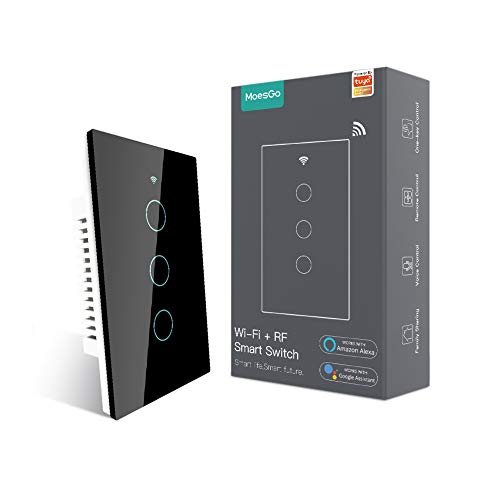
MoesGo WiFi RF433 Touch Switch, 3 Gang, Black
Best for: 3-gang no-neutral 2.4GHz Wi-Fi setups
- Smart Home Compatibility
- Alexa, Google Home
- Hub Requirement
- No Hub Required
- Connectivity
- 2.4GHz Wi-Fi, RF433
- Wiring Requirement
- No Neutral Required
- Circuit Type
- Single Pole
- Dimensions
- 4.7 × 2.9 × 1.5 inches
View on Amazon: MoesGo WiFi RF433 Touch Switch, 3 Gang, Black Affiliate link
This MoesGo smart switch offers touch control for three circuits without needing a neutral wire. It connects via 2.4 GHz Wi-Fi and works with Alexa and Google Home. You can schedule operations or control it remotely using the Smart Life app. The black unit measures 4.7 by 2.9 inches. It requires a minimum 5-watt load to function properly.
Pros
- No neutral wire required for installation
- Compatible with Alexa and Google Home
- Supports scheduling and countdown timers
- Control via Smart Life app or touch
Cons
- Only supports 2.4 GHz Wi-Fi networks
- Requires a minimum 5-watt load
- No hub required but limited to single pole
Good fit if
- You need a 3-gang switch without neutral wiring
- You use 2.4 GHz Wi-Fi for smart devices
- You want voice control via Alexa or Google
Skip if
- You only have 5 GHz Wi-Fi available
- You have low-wattage LED bulbs under 5 watts
- You need a hub-based system
Verdict: MoesGo WiFi RF433 Touch Switch 3 Gang Black fits homes with 2.4 GHz Wi-Fi and no neutral wires. It suits users who need voice control for three circuits.

MoesGo WiFi Dimmer Switch with RF433 Remote
Best for: dimming lights with voice control and RF remotes
- Smart Home Compatibility
- Alexa, Google Home
- Connectivity
- 2.4GHz Wi-Fi, RF433
- Wiring Requirement
- Neutral wire required
- Circuit Type
- 2-way, 3-way
- Switch Function
- Dimmer
- Dimensions
- 5.59 × 3.58 × 2.09 inches
View on Amazon: MoesGo WiFi Dimmer Switch with RF433 Remote Affiliate link
This MoesGo dimmer switch adds smooth light control to your home automation. It connects via 2.4GHz WiFi and RF433 remotes for flexible management. The glass panel offers a scratch-resistant finish, and you can toggle the backlight for better sleep. It works with Alexa and Google Home. Note that this model requires a neutral wire for installation, which differs from some other options in this guide.
Pros
- Glass panel resists scratches and moisture
- Compatible with Alexa and Google Home
- Supports RF433 remote control
- Optional backlight switch for night use
Cons
- Requires a neutral wire for installation
- Only supports 2.4GHz WiFi networks
- No mention of a neutral wire bypass option
Good fit if
- You have a neutral wire available in your switch box
- You want to control light brightness via voice commands
- You prefer a glass panel finish over plastic
Skip if
- Your switch box lacks a neutral wire
- You only have 5GHz WiFi access points
- You need a switch for a ceiling fan
Verdict: MoesGo WiFi RF433 White Dimmer Switch fits users with neutral wires who want dimming and voice control. It is not suitable for setups without a neutral wire.
Specifications side by side
| Spec | MoesGo WiFi RF433 Touch Switch, 3 Gang, Black | MoesGo WiFi Dimmer Switch with RF433 Remote |
|---|---|---|
| Smart Home Compatibility | Alexa, Google Home | Alexa, Google Home |
| Hub Requirement | No Hub Required | not stated |
| Connectivity | 2.4GHz Wi-Fi, RF433 | 2.4GHz Wi-Fi, RF433 |
| Wiring Requirement | No Neutral Required | Neutral wire required |
| Circuit Type | Single Pole | 2-way, 3-way |
| Switch Function | not stated | Dimmer |
| Dimensions | 4.7 × 2.9 × 1.5 inches | 5.59 × 3.58 × 2.09 inches |
| Weight | 4.8 ounces | not stated |
| Size | 3 Gang(No neutral required) | White Dimmer Switch |
| Color | Black | White |
| Model | not stated | WS-USD-RFW |
Frequently asked questions
Does the MoesGo smart touch switch work without a neutral wire?
Yes, the MoesGo WiFi RF433 Touch Switch in black supports no-neutral wiring. It uses a single live wire design for easier installation. This feature makes it suitable for older homes that lack neutral lines in the switch box. You do not need to run additional wires for this model.
What is the difference between the touch switch and the dimmer switch?
The primary difference is the wiring requirement and function. The touch switch works without a neutral wire and offers on/off control. The dimmer switch requires a neutral wire and provides adjustable light brightness. Both use Wi-Fi connectivity and support voice commands through smart home assistants.
Can I control these switches with my voice?
Yes, both devices support voice control via Alexa and Google Home. You can use voice commands to turn lights on or off. The dimmer switch also allows voice control for adjusting brightness levels. This integration works seamlessly with the Smart Life app for remote management.
What are the dimensions of the MoesGo touch switch?
The MoesGo WiFi RF433 Touch Switch measures 2.9 inches in width, 1.5 inches in height, and 4.7 inches in length. It weighs 4.8 ounces. The black finish fits standard wall plates. These dimensions ensure it fits most common switch boxes in residential settings.
Does the dimmer switch include a remote control?
Yes, the MoesGo WiFi Dimmer Switch comes with an RF433 remote. This remote allows you to control lights without using the wall switch or app. The device itself connects via Wi-Fi to your home network. It provides an alternative way to manage your lighting setup conveniently.
Is the dimmer switch compatible with no-neutral wiring setups?
No, the MoesGo WiFi Dimmer Switch requires a neutral wire for operation. It is not suitable for homes without neutral lines in the switch box. You must have a neutral wire available during installation. If your home lacks this, consider the touch switch model instead.
What color options are available for these switches?
The touch switch is available in black. The dimmer switch is available in white. These colors allow you to match your existing wall decor. The touch switch features a sleek black finish, while the dimmer offers a clean white appearance. Both are designed to blend into standard interiors.