MOES Wi-Fi Smart Curtain Switch vs MOES 4-Gang Wireless Zigbee Scene: Spec Comparison
As an Amazon Associate we earn from qualifying purchases. Links on this page are affiliate links.
This comparison covers the moes wi fi smart curtain switch vs 4 gang wireless zigbee scene. Both devices let you automate home functions via the MOES or Smart Life apps. The main difference lies in their core purpose and connection method. One unit operates a motorized curtain directly using Wi-Fi. The other acts as a wireless remote trigger for other devices using Zigbee. You need to decide if you want direct motor control or a multi-purpose scene button.
Key differences
| Aspect | MOES Wi-Fi Smart Curtain Switch | MOES 4-Gang Wireless Zigbee Scene Switch |
|---|---|---|
| Connectivity | Wi-Fi | Zigbee |
| Hub Requirement | No Hub Required | Hub Required |
| Wiring Requirement | Wired (replaces traditional switch) | No Wiring Required |
| Smart Home Compatibility | Alexa, Google Home, Tuya | Home Assistant, Zigbee2MQTT |
| Switch Function | Curtain Switch | Scene Switch |
Which one should you choose?
Choose MOES Wi-Fi Smart Curtain Switch if
- You want to control motorized blinds or curtains directly without extra hardware.
- You prefer a simple Wi-Fi setup that connects straight to your router.
- You need compatibility with Amazon Alexa or Google Assistant for voice commands.
Choose MOES 4-Gang Wireless Zigbee Scene Switch if
- You want a battery-powered remote that requires no electrical wiring.
- You already have a Zigbee hub and want to trigger multiple devices with one tap.
- You use Home Assistant or Zigbee2MQTT for your smart home automation.
Verdict: Choose the Wi-Fi Curtain Switch if you need to automate window coverings directly with minimal setup. Pick the Wireless Zigbee Scene Switch if you prefer a flexible, battery-powered remote to trigger various smart home scenes. Your choice depends on whether you need direct motor control or a versatile automation trigger.
Curtain Switch vs Zigbee Scene Specs
Connectivity
The MOES Wi-Fi Smart Curtain Switch connects directly to your home Wi-Fi network. You do not need an external hub for this device. It communicates straight with your router. The MOES 4-Gang Wireless Zigbee Scene Switch uses the Zigbee protocol instead. This method requires a separate Zigbee hub to function. You must purchase and pair a compatible MOES hub separately. The hub acts as the bridge between the switch and your smart home system. This adds a layer of complexity but can reduce Wi-Fi congestion.
Smart Home Compatibility
Voice control options differ significantly between the two products. The Wi-Fi Curtain Switch works with Amazon Alexa and Google Assistant. You can open or close your curtains using voice commands without extra setup. The Zigbee Scene Switch does not support Alexa, Google Home, or Siri directly. It is compatible with Home Assistant and Zigbee2MQTT platforms. This makes the Curtain Switch better for standard voice users. The Scene Switch suits advanced users who prefer local control via Home Assistant.
Wiring Requirement
Installation requirements vary based on the device type. The Wi-Fi Curtain Switch is a wall-mounted unit that replaces existing switches. It likely requires neutral wire connections for stable operation, as indicated by other MOES switch variations. The 4-Gang Zigbee Scene Switch is fully wireless. It requires no wiring and runs on a single CR2430 battery. You can mount it with double-sided tape anywhere in your home. This makes the Zigbee switch ideal for rentals or retrofitting without electrical work.
Control Functionality
Each device serves a different primary purpose. The Curtain Switch is dedicated to operating motorized blinds and shutters. It supports timing, countdowns, and group controls for multiple curtains. The Zigbee Scene Switch is a multi-purpose remote. It has four buttons that can trigger up to twelve different scenes. You can automate various devices like lights or fans with one touch. The Curtain Switch offers specific motor control. The Scene Switch offers broader automation flexibility for different device types.
Physical Design
The physical dimensions and interface styles are distinct. The Curtain Switch features a glass panel touch screen. It measures approximately 4.72 inches in length and 2.91 inches in width. The design is sleek and modern for wall mounting. The Zigbee Scene Switch is a compact, rectangular button panel. It is 3.94 inches wide and only 0.79 inches thick. The low profile allows for discreet placement. The Curtain Switch offers tactile touch feedback. The Scene Switch relies on simple button presses.
Which switch fits your setup best
Users with no hub or wiring access
This Wi-Fi curtain switch requires no hub. It connects directly to your router. It also needs no wiring changes if you replace an existing switch. You get direct app control and voice commands via Alexa or Google Assistant. This makes it ideal for renters or those avoiding complex installations.
Users wanting wireless scene control
This device is a wireless scene switch. It needs a Zigbee hub and does not support Alexa or Google Home. It offers twelve scenes across four buttons. You can place it anywhere without wiring. It works best with Home Assistant or Zigbee2MQTT for users who want flexible, button-based automation.
Users automating curtains directly
This unit is designed specifically for curtain motors. It supports timing and countdown features. You can group multiple switches in the app. It provides direct remote control via Wi-Fi. This makes it the practical choice for automating blinds, shutters, or awnings without needing separate scene triggers.
The products compared
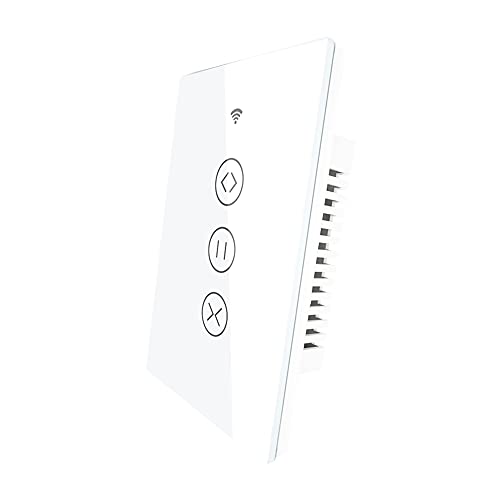
MOES Wi-Fi Smart Curtain Switch
Best for: hub-free motorized curtain and blind automation
- Smart Home Compatibility
- Amazon Alexa, Google Assistant
- Hub Requirement
- No Hub Required
- Switch Function
- Curtain Switch
- Connectivity
- Wi-Fi
- Dimensions
- 4.72 × 2.91 × 1.5 inches
View on Amazon: MOES Wi-Fi Smart Curtain Switch Affiliate link
The MOES Wi-Fi Smart Curtain Switch replaces standard wall controls to operate motorized roller blinds, shutters, and awnings. It connects directly over Wi-Fi without requiring a separate hub. You can manage opening schedules, set countdowns, and trigger movement using the glass touch panel, Smart Life app, Alexa, or Google Assistant. It suits setups focused on automating dedicated window coverings.
Pros
- Works directly over Wi-Fi with no hub required
- Integrates with Amazon Alexa, Google Assistant, and Smart Life
- Glass touch panel includes countdown and schedule functions
- Operates roller blinds, venetian blinds, shutters, and awnings
Cons
- Dedicated to curtain motor control rather than multi-device scene switching
- Lacks Zigbee mesh protocol support
Good fit if
- You need direct wall control for motorized shades without buying a separate hub.
- You use Alexa or Google Assistant for automated window covering routines.
Skip if
- You want a multi-button wireless switch to activate broad room scenes.
- You manage your smart home devices primarily through a Zigbee network.
Verdict: MOES Wi-Fi Smart Curtain Switch delivers direct motorized blind and shutter automation for users who want hub-free Wi-Fi control and voice integration.

MOES 4-Gang Wireless Zigbee Scene Switch
Best for: existing Zigbee hub owners wanting tactile control
- Smart Home Compatibility
- Home Assistant, Zigbee2MQTT
- Hub Requirement
- Hub Required
- Connectivity
- Zigbee
- Wiring Requirement
- No Wiring Required
- Switch Function
- Scene Controller
- Dimensions
- 3.94 × 3.94 × 0.79 inches
View on Amazon: MOES 4-Gang Wireless Zigbee Scene Switch Affiliate link
This wireless scene switch uses Zigbee connectivity and requires a separate MOES Zigbee Hub. It features four buttons for controlling smart devices via the MOES or Smart Life apps. The device runs on a CR2430 battery and needs no wiring, allowing flexible placement with double-sided tape. It supports Home Assistant and Zigbee2MQTT but does not support Alexa, Google Home, or Siri. It is ideal for users who want tactile scene control without complex installation.
Pros
- Wireless design requires no wiring or electrical work
- Four buttons allow for multiple scene automations
- Compatible with Home Assistant and Zigbee2MQTT platforms
- Runs on a single included CR2430 battery
Cons
- Requires a separate Zigbee Hub to function
- Does not support Alexa, Google Home, or Siri
- Limited to controlling MOES smart devices only
Good fit if
- You already own a MOES Zigbee Hub
- You prefer physical buttons over voice commands
- You use Home Assistant or Zigbee2MQTT
Skip if
- You want direct compatibility with Alexa or Google Home
- You do not have a Zigbee Hub available
- You need a wired switch installation
Verdict: MOES 4-Gang Wireless Zigbee Scene Switch suits users who already have a Zigbee Hub and want tactile control over their smart home without wiring. It is best for those who prioritize app-based automation and physical buttons over voice assistant integration.
Specifications side by side
| Spec | MOES Wi-Fi Smart Curtain Switch | MOES 4-Gang Wireless Zigbee Scene Switch |
|---|---|---|
| Smart Home Compatibility | Amazon Alexa, Google Assistant | Home Assistant, Zigbee2MQTT |
| Hub Requirement | No Hub Required | Hub Required |
| Connectivity | not stated | Zigbee |
| Wiring Requirement | not stated | No Wiring Required |
| Switch Function | Curtain Switch | Scene Controller |
| Dimensions | 4.72 × 2.91 × 1.5 inches | 3.94 × 3.94 × 0.79 inches |
| Color | Onecolor | 4 Gang Black |
| Size | not stated | Medium |
| Model | not stated | ZT-SY-EU4S-BK-C-MS |
Frequently asked questions
Can I control the MOES Wi-Fi Smart Curtain Switch with voice assistants?
Yes, you can use voice commands to operate this device. It is compatible with Alexa, Google Home, and the Tuya smart home ecosystem. You can trigger curtain movements or schedules using your voice without needing to open an app on your phone.
Does the 4-Gang Zigbee Switch require a separate hub to function?
Yes, this switch relies on the Zigbee protocol for connectivity. It does not connect directly to your Wi-Fi router. You must have an existing Zigbee hub in your smart home setup to pair this device and enable its wireless scene control features.
What are the physical dimensions of the MOES Wi-Fi Curtain Switch?
The unit measures 2.91 inches in width, 1.5 inches in height, and 4.72 inches in length. It is designed to fit standard electrical boxes. The compact form factor allows it to replace traditional wall switches without requiring significant space or complex installation modifications.
Is the Zigbee scene switch available in different colors?
The specific model listed comes in a 4 Gang Black finish. It is categorized as a medium size device. The physical dimensions are 3.94 inches in width and length, with a height of 0.79 inches. This slim profile allows for easy mounting on walls.
Which device is better for automating motorized window blinds?
The MOES Wi-Fi Smart Curtain Switch is the dedicated choice for this task. It is specifically designed to automate motorized window blinds. The other device is a scene switch intended for controlling lighting or other zones, making it unsuitable for direct curtain motor integration.
Can I use the Zigbee switch without a smartphone app?
You can use the physical buttons for immediate control, but full setup requires the app. The device supports tactile control over your smart home. However, configuring scenes and linking it to your hub typically involves using the MOES or Smart Life application on your phone.
Does either device work with the Tuya smart home platform?
The MOES Wi-Fi Smart Curtain Switch explicitly lists Tuya compatibility. This allows you to integrate it into broader Tuya-based automations. The data for the 4-Gang Zigbee Switch does not specify Tuya support, so you should verify hub compatibility before purchasing if you use that ecosystem.
What is the main difference in connectivity between these two MOES products?
The primary difference is the network protocol used. The curtain switch connects via Wi-Fi, allowing direct router communication. The scene switch uses Zigbee, which requires a hub. This affects how you install them and what additional hardware you need for your smart home network.