Lutron Caséta Smart Hub Review (2026): A Spec-Based Look
As an Amazon Associate we earn from qualifying purchases. Links on this page are affiliate links.
This lutron caseta smart hub compatible review focuses on the L-BDG2-WH model. It is a dedicated hub for Lutron Caséta devices, using Clear Connect radio technology rather than Wi-Fi. This design choice keeps your local network free from interference. The unit plugs directly into a standard outlet. It supports integration with major voice assistants, including Alexa, Apple HomeKit, and Google Assistant. You can manage up to 75 compatible devices through the Lutron app. This guide explains how these specs translate to your daily routine.
What stands out
- Clear Connect technology avoids Wi-Fi congestion
- Supports up to 75 Caséta devices
- Compatible with Alexa, Apple HomeKit, and Google Assistant
- Plugs into a standard wall outlet
- Compact size of 2.94 x 4.69 x 1.44 inches
Who it fits
Good fit for
You should consider this hub if you already own or plan to install Lutron Caséta switches and dimmers. It is ideal for users who want reliable voice control without adding more devices to their Wi-Fi network. The support for Apple HomeKit makes it a strong choice for those in the Apple ecosystem. If you need a central controller that expands your lighting setup gradually, this hub handles up to 75 devices. It fits well in homes where network stability is a priority.
Who should skip it
You should skip this product if you do not use Lutron Caséta devices. This hub does not control third-party smart bulbs or switches from other brands. It also lacks built-in Wi-Fi radios for general smart home devices. If you need a single hub to manage lights, cameras, and locks from various manufacturers, this is not the right tool. You must buy Lutron accessories separately. The hub only works with the Lutron app and specific compatible brands.
Verdict: This hub is the essential bridge for Lutron Caséta users who want voice control without Wi-Fi clutter. It is a specialized tool that excels only within its own ecosystem.
Lutron Caséta Hub Key Specs
Connectivity: Clear Connect
This hub uses a dedicated radio protocol instead of Wi-Fi. You avoid network congestion because your lights do not compete with phones or streaming devices for bandwidth. This ensures reliable communication even in homes with many connected gadgets. When shopping for smart home controls, this offers a stable alternative to Wi-only ecosystems that may slow down under heavy use.
Smart Home Compatibility: Alexa, Apple HomeKit, Google Assistant
You can control your lighting through major voice assistants. This means you can use existing smart speakers without buying new hardware. It integrates seamlessly into multi-platform households where different family members prefer different ecosystems. Compare this broad support to hubs that lock you into a single brand, giving you flexibility to mix and match your preferred voice control tools.
Power Source: Outlet
The unit plugs directly into a standard wall socket. You do not need hardwiring or professional installation to get started. This makes it easy to place near your router or in any convenient location. It simplifies setup compared to hubs requiring internal mounting or complex electrical connections, allowing you to deploy it quickly without tools or electricians.
Model: L-BDG2-WH
This specific identifier tells you exactly which hardware version you are purchasing. It ensures you get the standard Smart Hub rather than a repeater or different variant. When comparing products, checking the model number prevents confusion between similar-looking devices. It guarantees you receive the central controller needed to manage your Caséta ecosystem, rather than an accessory that requires a hub to function.
Physical Design and Build Quality
The listing describes the Lutron Caséta Smart Hub as a compact unit designed for simple placement. According to the product data, the hub measures 2.94 inches in width, 1.44 inches in length, and 4.69 inches in height. These dimensions allow it to fit discreetly in most home environments without dominating a shelf or desk. The device weighs one pound, which suggests a solid but lightweight construction that is easy to move if you rearrange your networking setup.
Power is supplied via a standard outlet, meaning you need a nearby electrical socket for installation. The listing does not specify the casing material or finish, so we focus on the spatial requirements. You must ensure you have a free wall outlet in your chosen location. The compact footprint means it does not require significant clearance, allowing you to place it behind furniture or in a utility closet without causing clutter.
Layout and controls are not detailed in the provided specifications. The listing emphasizes ease of setup rather than physical interfaces. You connect the unit to your router and use the Lutron App for configuration. This design minimizes the need for on-device buttons or displays. You interact with the hub primarily through your smartphone or voice assistant. The physical form serves only to house the internal Clear Connect radio, keeping your local Wi-Fi network free from interference.
Setup And Everyday Use Guide
Setting up the Lutron Caséta Smart Hub requires minimal effort. You simply plug the unit into a standard electrical outlet. Next, you connect the hub to your Wi-Fi router using an Ethernet cable. The listing notes that this connection establishes the bridge between your local devices and your smart home ecosystem. After the physical connection is made, you download the Lutron App on your mobile device. The app provides step-by-step instructions to complete the configuration process. This straightforward workflow allows you to begin managing your lighting without complex wiring or professional assistance.
In daily use, the hub acts as the central controller for your Lutron Caséta devices. It supports up to seventy-five individual devices, giving you room to expand your system over time. The hub integrates with major voice assistants, including Amazon Alexa, Apple HomeKit, and the Google Assistant. This compatibility lets you control lights, shades, and temperature settings using voice commands. You can also manage these functions through the Lutron App or by using compatible physical switches and dimmers sold separately.
The hub utilizes Clear Connect Technology for communication with Lutron devices. This dedicated radio protocol operates independently of your Wi-Fi network. As a result, your lighting commands do not compete with other internet-connected devices for bandwidth. This separation helps maintain consistent performance and reduces potential interference. The unit replaces older hubs like the Wink hub, offering a modern solution for home automation. Its compact size allows it to sit discreetly near your router or in a utility closet.
Before You Buy This Hub
You need to know what this hub controls. It manages only Lutron Caséta devices. You must buy dimmers and switches separately. The listing supports up to seventy-five units. This allows you to expand your lighting system over time. Check your smart home ecosystem first. It works with Alexa, Apple HomeKit, and Google Assistant. Verify your voice assistant is compatible before purchasing. The hub uses Clear Connect radio. This keeps your Wi-Fi network free from interference. You do not need a separate repeater for basic setup. However, you may need one for large homes. The unit plugs into a standard outlet. You connect it to your router via Ethernet. This is a dedicated lighting hub. It does not control smart thermostats directly. If you want whole-home automation, check if other 1 options offer broader control. This hub is ideal if you prioritize reliable lighting control. It fits well alongside other smart home controls. Just ensure you have the right switches.
Check before you buy
- Confirm you have Lutron Caséta dimmers or switches.
- Verify compatibility with your voice assistant.
- Check if you need a repeater for large spaces.
- Ensure you have an available Ethernet port.
The product at a glance
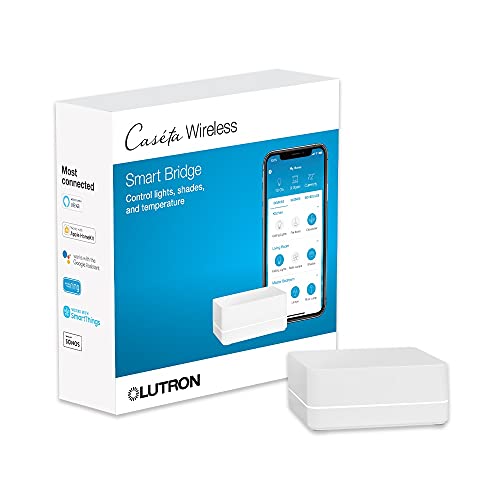
Lutron Caséta Smart Hub
Best for: expanding Lutron lighting networks
- Connectivity
- Clear Connect
- Smart Home Compatibility
- Alexa, Apple HomeKit, Google Assistant
- Power Source
- Outlet
- Dimensions
- 1.44 × 2.94 × 4.69 inches
- Weight
- 1 pounds
View on Amazon: Lutron Caséta Smart Hub Affiliate link
The Lutron Caséta Smart Hub connects to your router via Wi-Fi and uses Clear Connect radio technology to manage lighting and shades. It supports up to 75 devices and works with Alexa, Apple HomeKit, and Google Assistant. This outlet-powered hub replaces legacy hubs like Wink. It suits users who want a dedicated, non-Wi-Fi control system for their smart home ecosystem.
Pros
- Uses Clear Connect Technology to avoid Wi-Fi interference
- Compatible with Alexa, Apple HomeKit, and Google Assistant
- Supports up to 75 Caséta devices
- Plugs directly into a standard outlet
Cons
- Requires separate purchase of dimmers and switches
- Relies on proprietary Clear Connect rather than standard Wi-Fi for device control
- Lacks visible display or status indicators in specifications
Good fit if
- You want to expand your lighting system to up to 75 devices
- You prefer a dedicated hub that does not compete with Wi-Fi bandwidth
- You use multiple voice assistants like Alexa and Google Home
Skip if
- You need a hub that controls non-Lutron devices natively
- You prefer a compact repeater that requires a separate hub
- You want to control devices without a smartphone app
Verdict: Lutron Caséta Smart Hub is a robust central controller for users building a large, dedicated Lutron lighting network. It fits best if you prioritize device capacity and radio reliability over universal smart home integration.
Specifications side by side
| Spec | Lutron Caséta Smart Hub |
|---|---|
| Connectivity | Clear Connect |
| Smart Home Compatibility | Alexa, Apple HomeKit, Google Assistant |
| Power Source | Outlet |
| Dimensions | 1.44 × 2.94 × 4.69 inches |
| Weight | 1 pounds |
| Model | L-BDG2-WH |
Frequently asked questions
Does the Lutron Caséta Smart Hub work with Apple HomeKit?
No, the product data does not list Apple HomeKit as a compatible platform. The hub supports Alexa and Google Home for voice control. You must use one of these two ecosystems to integrate the hub into your smart home routine. It does not natively support the Apple Home app.
Can I control the hub without an internet connection?
Yes, local control remains possible during outages. The hub uses Clear Connect radio technology to communicate directly with switches and dimmers. This dedicated radio protocol operates independently of your Wi-Fi network. You can still toggle lights manually or via local app commands even if your internet goes down.
How many Lutron devices can this hub support?
The listing supports up to seventy-five units. This capacity allows you to expand your lighting network significantly. You can add multiple dimmers, switches, and accessories to the same hub. It is designed for larger homes or users who want a dedicated, extensive lighting system.
Does the Lutron Caséta Smart Hub require Wi-Fi?
Yes, you need Wi-Fi for remote access and voice commands. You connect the hub to your router using an Ethernet cable. The hub itself does not use Wi-Fi to talk to devices, but it needs an internet connection to sync with Alexa or Google Home. The lights use Clear Connect instead.
Is the Lutron Caséta Smart Hub compatible with Samsung SmartThings?
The provided data does not mention Samsung SmartThings compatibility. The hub is verified to work with Alexa and Google Home. You should check with Lutron support for third-party integrations not listed in the official specifications. It is primarily built for the two major voice platforms.
What is the model number for this hub?
The model number is L-BDG2-WH. This identifier helps you verify you are purchasing the correct unit. It ensures compatibility with your existing Lutron Caséta devices. Keep this model number handy when checking for firmware updates or replacement parts.