Insteon i3 Keypad 4-Button Smart Review: Specs, Pros and Cons
As an Amazon Associate we earn from qualifying purchases. Links on this page are affiliate links.
This insteon i3 keypad 4 button smart review covers the Insteon i3 4-Button Smart Keypad (KP014). It is a wall-mounted control panel with four configurable buttons. You can assign each button to a preset or control other Insteon products. The device functions as a dimmer or on/off switch. It supports up to 400W incandescent loads or 150W LED. It also handles switching up to 9A. This unit replaces standard wall switches. It requires a neutral wire for installation. The design is simple and white. It offers local control from a single location.
What stands out
- Four configurable buttons for total room control
- Supports dimming up to 400W incandescent or 150W LED
- Switches up to 9A for on/off loads like ceiling fans
- Replaces standard wall switches with built-in dimmer or on/off function
- Compatible with Amazon Alexa and Google Home via Insteon Hub 2
Who it fits
Good fit for
This keypad suits users who already have an Insteon ecosystem and need local control for multiple fixtures. It is ideal for rooms with several lights or fans. You can assign each button to different devices. The unit works well if you have a neutral wire available. It fits standard wall boxes. You will need the Insteon Hub 2 for voice control and smartphone access. If you want to manage up to four devices from one spot, this model delivers clear, physical control.
Who should skip it
You should look elsewhere if your home lacks a neutral wire. This device requires one for proper installation. It is not suitable for basic on/off only setups without dimming needs, as it offers more features than necessary. You must purchase the Insteon Hub 2 separately for smart features like voice control. If you do not plan to use the hub, you lose smartphone and voice assistant compatibility. The unit is also limited to the Insteon ecosystem, so it will not work with other smart home brands without a hub.
Verdict: The Insteon i3 4-Button Smart Keypad offers robust local control for multi-switch circuits. It is a solid choice for existing Insteon users who need flexible button mapping.
Key specs explained for you
Maximum Load: 150W LED, 400W Incandescent, 9A, 1/3 HP
This rating tells you the maximum power this switch can safely handle. You can connect up to 400 watts of incandescent bulbs or 150 watts of LED lights. The 9-amp and 1/3 HP ratings allow you to control ceiling fans or other motors. Check your existing fixture’s wattage before buying. This ensures the device will not overheat or fail when you turn on multiple lights or a fan in the same room.
Hub Requirement: Requires Insteon Hub 2
You cannot use this keypad alone for smart features. You must purchase the Insteon Hub 2 separately to enable remote control and voice commands. Without the hub, the device works as a standard local switch. This adds to your total system cost. Compare this to other smart switches that connect directly to Wi-Fi. You need this extra hardware to unlock the full smart home functionality described in the listing.
Wiring Requirement: Neutral Wire Required
Your wall box must contain a neutral wire for this device to function. Many older homes lack this wire, which can make installation difficult or impossible. You will likely need an electrician to install it if your wiring is outdated. Check your existing switch box before purchasing. This requirement is common in modern smart controls but differs from older models that work without a neutral connection.
Switch Function: Dimmer, On/Off Switch
The first button acts as a default dimmer or on/off switch for a connected load. You can reassign this function to any of the four buttons using software. This gives you flexibility in how you control your lights. You can dim a chandelier or simply toggle a light on and off. This dual capability makes it useful for various lighting scenarios in your home without needing separate switches.
Smart Home Compatibility: Amazon Alexa, Google Home
You can control this keypad using voice commands through Alexa or Google Home. This requires the Insteon Hub 2 and the Connected Home Access subscription. You can add voice control to your routine for hands-free operation. This integrates the keypad into your broader smart home ecosystem. Compare this to devices with native voice support. Here, compatibility depends on the separate hub and subscription service.
Design and Build Overview
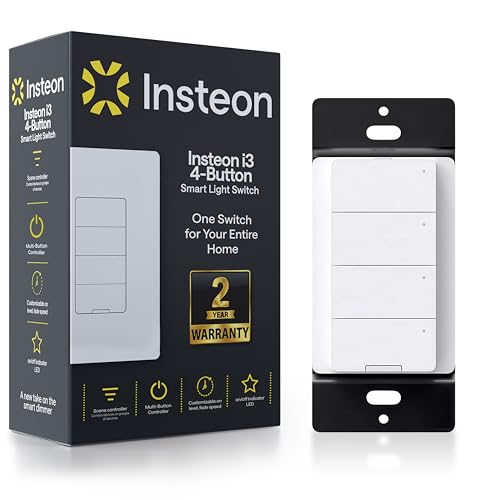
The Insteon i3 4-Button Smart Keypad (KP014) presents a clean, rectangular form factor. According to the listing, the device is available in a standard white finish. This color choice allows the unit to blend seamlessly into most residential wall plates and decor schemes. It is designed to replace a standard wall switch directly, maintaining the familiar footprint you expect from traditional lighting controls. This compatibility simplifies installation for homeowners who want to upgrade their smart home infrastructure without altering their existing electrical boxes.
The layout centers around four distinct, configurable buttons. You can assign each button to control a specific fixture or manage other Insteon products throughout your home. This arrangement provides direct physical access to your smart devices right from the wall. The unit includes a built-in on/off switch or dimmer function, which is assigned to the first button by default. You can reassign this primary function to any of the four buttons using compatible software, offering flexibility in how you interact with the device daily.
While the listing does not specify exact dimensions or weight, the design prioritizes a low-profile installation. It requires a neutral wire to be present in your wall box for proper operation. The white finish and standard switch size ensure it does not protrude excessively from the wall. This subtle design keeps the focus on functionality rather than aesthetics, making it a practical choice for users who value unobtrusive smart home integration in their living spaces.
Setup and Everyday Use Guide
You replace a standard wall switch with this unit. The listing requires a neutral wire for installation. You must have this wire present in your electrical box. The device comes with a built-in switch or dimmer on button one by default. You can reassign this function to any of the four buttons using compatible software. This allows you to tailor the panel to your specific room layout.
You control up to four devices at once. You can pair the keypad with other Insteon products. This works for multi-switch circuits. You can operate these circuits with or without a Hub. However, smartphone control and voice assistant compatibility require the Insteon Hub 2. You also need Connected Home Access. Both the Hub and the access service are sold separately. You do not get these features out of the box.
Daily use involves pressing one of the four configurable buttons. You assign each button to a preset for one fixture or to control other Insteon products. You manage all of this from a single wall location. The unit handles dimming and on/off loads. You can use it for ceiling fans or lights. The maximum load is 9 amps. You can dim up to 400 watts of incandescent bulbs or 150 watts of LEDs. You interact with the panel physically. You use voice control only if you have added the required Hub.
Before You Buy This Keypad
You need the Insteon Hub 2 to unlock smartphone control and voice assistant compatibility. Without this hub, you lose remote access and integration with Amazon Alexa or Google Home. You must also verify that your electrical box contains a neutral wire, as the listing requires it for proper installation. This device replaces a standard wall switch, so ensure your existing wiring supports this configuration. You can assign each button to control up to four different devices, making it useful for multi-switch circuits. Keep in mind that this keypad is part of the broader Smart Thermostats & Smart Home Controls ecosystem. It works well alongside other Insteon products but does not operate as a standalone smart controller. Check your current hub setup before purchasing. If you already use an Insteon Hub 2, this keypad integrates easily. If not, factor in the additional hub requirement. The unit handles dimming and on/off loads efficiently, supporting up to 150W LED or 400W incandescent bulbs. Regular maintenance is minimal, but ensure your firmware stays updated through the hub software.
Check before you buy
- Confirm you own an Insteon Hub 2 for full smart features
- Verify your electrical box has a neutral wire present
- Check if you need Alexa or Google Home voice control
- Ensure your lights match the 150W LED or 400W incandescent limits
The product at a glance
Insteon i3 4-Button Smart Keypad
Best for: local scene control with existing Insteon hubs
- Smart Home Compatibility
- Amazon Alexa, Google Home
- Hub Requirement
- Hub Required
- Connectivity
- Dual-Band Mesh
- Wiring Requirement
- Neutral Required
- Switch Function
- Dimmer, On/Off Switch
- Maximum Load
- 400W Incand, 150W LED, 9A
View on Amazon: Insteon i3 4-Button Smart Keypad Affiliate link
The Insteon i3 keypad replaces standard wall switches with four configurable buttons. It functions as a dimmer for up to 150W LED or 400W incandescent loads, and handles up to 9A for on/off devices like fans. You need a neutral wire for installation. Voice control via Alexa and Google Home requires the separate Insteon Hub 2. This unit suits users wanting local scene control with smart integration.
Pros
- Four configurable buttons for room control
- Supports 150W LED dimming
- Handles 9A on/off loads
- Compatible with Alexa and Google Home
Cons
- Requires Insteon Hub 2 for smart features
- Needs a neutral wire for installation
- Hub and access sold separately
Good fit if
- You need local control for multiple fixtures
- You already use Insteon products
- You have a neutral wire available
Skip if
- You lack a neutral wire
- You want standalone smart control without a hub
- You prefer a dial interface
Verdict: Insteon i3 4-Button Smart Keypad fits users who want precise local scene control and already own the Insteon Hub 2 for voice integration.
Specifications side by side
| Spec | Insteon i3 4-Button Smart Keypad |
|---|---|
| Smart Home Compatibility | Amazon Alexa, Google Home |
| Hub Requirement | Hub Required |
| Connectivity | Dual-Band Mesh |
| Wiring Requirement | Neutral Required |
| Switch Function | Dimmer, On/Off Switch |
| Maximum Load | 400W Incand, 150W LED, 9A |
| Color | White |
| Model | KP014 |
Frequently asked questions
Does the Insteon i3 keypad work without a hub?
No. You need the Insteon Hub 2 for smartphone control and voice assistant compatibility. Without this hub, you lose remote access and integration with Amazon Alexa or Google Home. The device functions locally for scene control, but cloud features require the hub.
What is the maximum load for this keypad?
The maximum load is 150W for LED, 400W for incandescent, 9A, or 1/3 HP. This rating tells you the maximum power this switch can safely handle. You can connect up to 400 watts of incandescent bulbs or 150 watts of LED lights.
What color options are available for the Insteon i3?
The Insteon i3 4-Button Smart Keypad is available in white. This color choice allows the unit to blend seamlessly into most residential wall plates. The listing does not mention other color finishes for this specific model.
Does this keypad require a neutral wire?
Yes. The listing requires a neutral wire for installation. You must have this wire present in your electrical box before replacing your standard wall switch. This is a critical requirement for the device to function correctly.
How many buttons does the Insteon i3 have?
The Insteon i3 4-Button Smart Keypad has four configurable buttons. You can assign each button to a preset or control other Insteon products. Button one comes with a built-in switch or dimmer function for direct control.
What is the model number for this keypad?
The model number is KP014. This identifier helps you find the correct replacement parts or verify compatibility with your existing Insteon ecosystem. It distinguishes this 4-button version from other keypad models in the Insteon lineup.