Google Nest Smart Wi-Fi Thermostat Review (2026): A Spec-Based Look
As an Amazon Associate we earn from qualifying purchases. Links on this page are affiliate links.
This google nest smart wi fi thermostat review covers the Google Nest Smart Wi-Fi Thermostat, a programmable device designed for home comfort and efficiency. It connects via 2.4 GHz and 5 GHz Wi-Fi and uses Bluetooth Low Energy for local setup. The unit measures 3.31 inches in diameter and 1.07 inches thick. It is ENERGY STAR certified and works without a C wire in most homes. You control it through the Google Home app or compatible voice assistants. This spec-based look explains who this thermostat suits based on its technical features.
What stands out
- ENERGY STAR certified for energy efficiency
- Works without a C wire in most homes
- HVAC monitoring sends alerts for system issues
- Compatible with Google Assistant and Matter-certified assistants
Who it fits
Good fit for
You should choose this thermostat if you want a simple, programmable device that integrates with Google Home or Matter ecosystems. It suits homeowners who prefer app-based scheduling and remote control from phones or tablets. The lack of a C wire requirement in most setups makes it ideal for standard residential HVAC systems. If you value HVAC monitoring alerts and automatic temperature adjustments when you leave home, this model aligns with your needs.
Who should skip it
Skip this model if you need a physical lock feature, as the data confirms the lock feature is not included. It may not suit systems that are heating only, cooling only, zone controlled, or heat pump systems, which typically require a C wire. If you rely on non-Matter, non-Google voice assistants without a compatible smart device, voice control will not work. Users wanting a larger display or manual dial adjustments should look elsewhere.
Verdict: This thermostat offers solid smart features and easy installation for most homes. It is a practical choice for Google and Matter users seeking basic automation.
Key specs explained for you
Connectivity: Wi-Fi, Bluetooth Low Energy
This thermostat connects to your home network using standard Wi-Fi for remote access and Bluetooth Low Energy for initial setup. You can control the temperature from anywhere using a phone or tablet. The Bluetooth feature simplifies the installation process by allowing your mobile device to communicate directly with the unit. This combination ensures reliable connectivity for both local configuration and long-distance management of your home climate.
Programmability: Programmable
You can create a custom energy-efficient schedule directly through the Google Home app on your Android or iPhone. This allows you to set specific temperatures for different times of the day. It is ideal for households with consistent routines, as it automates comfort levels without manual adjustments. You can adjust these settings remotely, ensuring your home is warm or cool exactly when you need it, which helps optimize energy usage based on your daily habits.
Wiring Requirement: Works without C wire in most homes
This device is designed to operate without a common C wire in the majority of residential systems. This simplifies installation for many users who do not want to run new electrical lines. However, certain systems like heating only, cooling only, zone controlled, or heat pump setups may still require a C wire or a compatible power accessory. You should verify your specific system compatibility before purchase to ensure smooth operation and consistent power supply.
Smart Home Compatibility: Google Assistant, Matter
The thermostat integrates with Google Assistant and all Matter-certified voice assistants for voice control. You need a compatible smart device to use these features. This broad compatibility allows you to control your thermostat using various smart home ecosystems. It supports voice commands for adjusting temperature or checking status. This flexibility ensures you can manage your home environment using the voice assistant you already prefer, enhancing convenience and accessibility for your daily routine.
Design and build specs
According to the listing, the Google Nest Smart Wi-Fi Thermostat has a compact, circular form factor. The unit measures 3.31 inches in width and length, with a slim profile of 1.07 inches in height. This low depth allows it to sit flush against your wall without protruding significantly. The device weighs 4.96 ounces, making it lightweight and easy to handle during installation or removal. You can choose from four finish options: Sand, Charcoal, Snow, or Fog. These color choices let you match the thermostat to your existing wall decor or trim style.
The layout is minimal, featuring a single main dial for manual adjustments. There are no physical buttons or complex control panels on the face of the device. This design reduces the number of potential failure points and keeps the interface intuitive. You primarily interact with the thermostat through the Google Home app on your phone, tablet, or laptop. The app handles all scheduling, temperature changes, and system monitoring. This reliance on software controls means you need a stable internet connection for full functionality.
The build quality focuses on simplicity and durability. The materials are chosen to withstand daily use in various home environments. The circular shape ensures that the dial can be turned in any direction for easy access. This ergonomic design helps you adjust settings quickly without looking closely at the display. The slim profile also means it will not interfere with light switches or outlets nearby. You get a clean, modern look that blends into most interiors.
Setup and everyday use guide
Setting up this thermostat begins with checking your home’s wiring. The listing states it works without a C wire in most homes. Systems that are heating only, cooling only, zone controlled, or heat pump systems may require a C wire or a compatible power accessory. You can verify compatibility using the online Nest Compatibility Checker before purchase. Initial setup uses Bluetooth Low Energy for local connection. Once configured, the device connects to your home network via 2.4 GHz and 5 GHz Wi-Fi.
Daily use relies on the Google Home app for control. You can program energy-efficient schedules directly through the app on Android or iPhone. The thermostat adjusts temperature when you leave, reducing energy use in an empty home. Family members can also change settings remotely from phones, laptops, or tablets. The Savings Finder feature suggests schedule tweaks to help you save more. You should check with your energy provider for potential rebates.
HVAC monitoring checks your heating and cooling systems for issues. It sends alerts if something seems wrong and provides maintenance reminders. For voice control, the device supports Google Assistant and all Matter-certified voice assistants. Voice commands require a compatible smart device. There is no lock feature included. You control the unit primarily through the app and voice commands, with no physical remote provided.
Check compatibility and wiring first
Before you install the Google Nest Smart Wi-Fi Thermostat, verify your HVAC system’s compatibility. The listing notes it works without a C wire in most homes, but heating-only, cooling-only, zone-controlled, or heat pump systems often require one. You must also ensure your Wi-Fi network supports 2.4 GHz and 5 GHz bands for reliable connectivity. Check if your existing smart home ecosystem includes Google Assistant or a Matter-certified voice assistant, as these enable voice control. The device integrates with the Google Home app for scheduling and Savings Finder features. You will need an Android or iPhone to access remote control and maintenance alerts. This model sits among 1 options in our guide. It suits users who prioritize energy efficiency and app-based scheduling over complex manual programming. Ensure your home’s wiring matches these requirements to avoid installation delays. The compact design fits standard wall plates, but confirm physical dimensions match your space. Regular maintenance reminders help keep your HVAC system running smoothly without extra effort.
Check before you buy
- Verify HVAC system supports C wire or alternative power
- Confirm Wi-Fi network has 2.4 GHz and 5 GHz bands
- Check Google Home app availability on your mobile device
- Ensure smart home ecosystem includes Google Assistant or Matter
The product at a glance
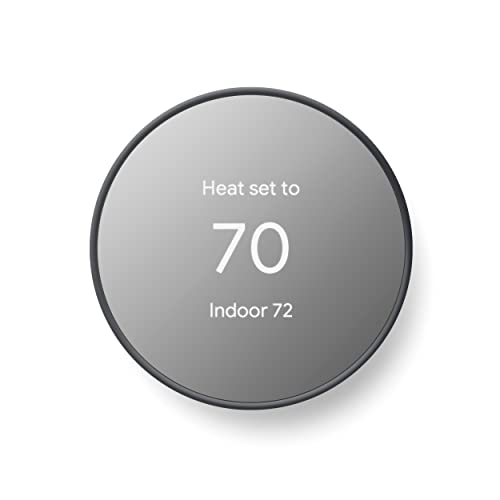
Google Nest Smart Wi-Fi Thermostat
Best for: Remote scheduling and HVAC monitoring
- Wiring Requirement
- Works without C wire in most homes
- Smart Home Compatibility
- Google Assistant, Matter
- Programmability
- Programmable
- Connectivity
- Wi-Fi, Bluetooth Low Energy
- Dimensions
- 3.31 × 3.31 × 1.07 inches
- Weight
- 4.96 ounces
View on Amazon: Google Nest Smart Wi-Fi Thermostat Affiliate link
This Google Nest thermostat is a programmable smart device designed to manage home heating and cooling. It connects via Wi-Fi and Bluetooth Low Energy. The unit works without a C wire in most homes, simplifying installation. You can control it remotely using the Google Home app on Android or iPhone. It also features HVAC monitoring to alert you to system issues. The compact charcoal design fits standard wall spaces.
Pros
- Works without a C wire in most homes
- Remote control via Google Home app
- HVAC monitoring sends maintenance alerts
- Compatible with Google Assistant and Matter
Cons
- No physical lock feature to prevent manual changes
- Requires Google Home app for scheduling
- Limited to 2.4 GHz and 5 GHz Wi-Fi bands
Good fit if
- You want to control temperature from anywhere
- Your home lacks a C wire
- You use Google Assistant or Matter devices
Skip if
- You need a physical lock on the device
- You prefer a thermostat with a built-in display screen
- You do not use the Google Home app
Verdict: Google Nest Smart Thermostat Charcoal is a solid choice for users who want remote scheduling and system monitoring. It suits those with compatible Wi-Fi networks and existing smart home ecosystems.
Specifications side by side
| Spec | Google Nest Smart Wi-Fi Thermostat |
|---|---|
| Wiring Requirement | Works without C wire in most homes |
| Smart Home Compatibility | Google Assistant, Matter |
| Programmability | Programmable |
| Connectivity | Wi-Fi, Bluetooth Low Energy |
| Dimensions | 3.31 × 3.31 × 1.07 inches |
| Weight | 4.96 ounces |
| Color | Charcoal |
| Model | GA02081-CA |
Frequently asked questions
Does the Google Nest Smart Wi-Fi Thermostat work without a C wire?
It works without a C wire in most homes. However, systems that are heating only, cooling only, zone controlled, or heat pump systems often require one. You should verify your specific HVAC setup before installation to ensure proper power delivery and functionality.
What Wi-Fi bands does this thermostat support?
It connects via 2.4 GHz and 5 GHz Wi-Fi. This dual-band support allows for flexible network integration in your home. You can control the temperature remotely using a phone or tablet once the device is linked to your internet connection.
Is the Google Nest thermostat compatible with existing smart home ecosystems?
Yes, it suits users with existing smart home ecosystems. The device integrates with your current setup to provide remote scheduling and system monitoring. This makes it a solid choice for those who already use connected home devices and want centralized control.
How small is the Google Nest Smart Wi-Fi Thermostat?
The unit measures 3.31 inches in width and length. It has a slim profile of 1.07 inches in height. This compact, circular form factor allows it to sit flush against most walls without taking up significant visual space or requiring large mounting holes.
Can I control this thermostat remotely?
Yes, you can control it from anywhere using a phone or tablet. The Wi-Fi connectivity enables remote access to your home’s climate settings. You can adjust temperatures and schedule routines without needing to be physically present at the thermostat itself.
What is the model number for the charcoal version?
The model number for the charcoal version is GA02081-CA. This identifier helps you confirm you are purchasing the correct color and specification variant. It ensures compatibility with your specific installation needs and aesthetic preferences for your home’s interior design.