Ezlo EzloPlus Smart Home Hub Review: Who It Fits and Who Should Skip It
As an Amazon Associate we earn from qualifying purchases. Links on this page are affiliate links.
This ezlo ezloplus smart home hub review covers a central controller designed to unify disparate smart home protocols. The device runs on MiOS by Ezlo, an operating system built for property management. It supports Zigbee, Z-Wave, and RF devices, allowing you to mix brands. It also connects to Wi-Fi devices through Amazon Alexa or Google Assistant. The hub features a black enclosure measuring 4.13 by 4.13 by 1.37 inches. It requires an Ethernet connection to your router for setup. This guide explains how these specs work in your home.
What stands out
- Supports Zigbee, Z-Wave, and RF devices for broad compatibility
- Integrates with Amazon Alexa and Google Assistant for voice control
- Runs on MiOS by Ezlo for centralized web and mobile management
- Connects via Ethernet to your home router for stable networking
Who it fits
Good fit for
This hub suits users with mixed ecosystems who want a single point of control. If you use Z-Wave sensors, Zigbee lights, and Wi-Fi cameras, this device bridges them. It is ideal for renters or homeowners who prefer managing everything from a mobile app or web interface. The inclusion of Alexa and Google support helps those who already use voice assistants for daily tasks. You will appreciate the ability to coordinate locks, sensors, and lights from one place.
Who should skip it
Skip this option if you need local-only automation without internet dependency. The hub requires an active Wi-Fi router and Ethernet connection to function. It does not list native support for Apple HomeKit or Matter protocols. If you prefer a dedicated physical remote or standalone display over app management, this may not fit your workflow. Users seeking a device that operates entirely offline without cloud integration should look elsewhere.
Verdict: The EzloPlus is a practical choice for users with mixed Zigbee, Z-Wave, and Wi-Fi devices who want unified app control. It works best for those comfortable with Ethernet setup and voice assistant integration.
Key specs explained for EzloPlus
Connectivity: Zigbee, Z-Wave, RF, Wi-Fi, Ethernet
This hub supports multiple wireless protocols, allowing you to connect devices that do not use standard Wi-Fi. Zigbee and Z-Wave are common in sensors and lights, while RF covers older remotes. Ethernet provides a stable wired link to your router. You benefit from broader compatibility than hubs using only one protocol. Compare this to hubs that lack Z-Wave or Ethernet support when choosing a central controller.
Smart Home Compatibility: Amazon Alexa, Google Assistant
You can control the hub and its connected devices using voice commands through Amazon Alexa or Google Assistant. This means you do not need to open the Ezlo app for every action. You can ask your assistant to turn on lights or check locks. This integration is standard for modern smart home hubs. Ensure your existing voice ecosystem matches these options for seamless control.
Operating System: MiOS by Ezlo
The hub runs on MiOS, an operating system designed for property management and smart home automation. This software allows you to mix and match devices from different brands in one interface. You gain centralized control over video doorbells, sensors, and lights. This differs from proprietary apps that lock you into a single brand. Check if the software interface meets your preference for unified management.
Dimensions: 4.13 x 4.13 x 1.37 inches
The device measures 4.13 inches in width and length, with a height of 1.37 inches. This compact, square footprint allows you to place it on shelves or in cabinets without taking up much space. The black enclosure blends into most home decor. Compare these dimensions to larger hubs that require more shelf room or specific mounting locations for your setup.
Design and Build Quality
According to the listing, the EzloPlus features a black enclosure that blends functionality with a clean aesthetic. The unit measures 4.13 inches in width and length, with a height of 1.37 inches. This compact, square footprint allows you to place it discreetly on a shelf or mount it in a utility closet without dominating your space. The low profile ensures it fits behind furniture or in tight corners where larger hubs might not.
The listing does not mention the weight, but the dimensions suggest a lightweight chassis suitable for easy placement. You connect the hub to your router using the included Ethernet cable, which requires a router with an available port. This wired connection prioritizes stability over wireless flexibility, meaning you should position the hub near your network equipment. The design supports both iOS and Android devices for setup, ensuring you can manage the system from most modern smartphones.
The black finish is described as a blend of style and function, helping it match common home electronics. Since the hub runs on MiOS by Ezlo, the physical design supports its role as a central controller for property management. You can mix and match devices from various brands, and the hub coordinates them through a single interface. The layout is simple, focusing on connectivity rather than complex physical controls, which aligns with its app-based management system.
Setup and everyday use
You begin setup by connecting the hub to your router. The listing specifies using the included Ethernet cable for this link. You need an internet-connected Wi-Fi router with an available port. The device requires a stable network connection to function. You then use the in-app guide to complete the installation. Your smartphone or tablet must run iOS 9.0 or later, or Android 8.1 or later. Once connected, the hub runs on MiOS by Ezlo. This operating system allows you to mix and match devices from different brands. You can control Zigbee, Z-Wave, and RF devices directly. You can also manage thousands of Wi-Fi devices through Amazon Alexa or Google Assistant. Daily use involves coordinating these varied smart devices. You can control video doorbells, sensors, lights, cameras, and door locks from a single interface. The web or mobile app provides this control from anywhere. Voice commands via Alexa or Google Assistant offer another layer of convenience. You can use your voice to manage bulbs, motion sensors, and locks. If a device does not work initially, the listing notes that Ezlo will integrate it for you. This support feature aims to reduce friction during the expansion of your smart home ecosystem. The black enclosure sits quietly while managing these connections. You rely on the app for monitoring and automation adjustments. The system is designed to handle a wide array of manufacturers, simplifying your daily interactions with your home technology.
Before You Buy EzloPlus
You should verify that your existing smart devices support Zigbee, Z-Wave, or RF protocols before purchasing. The EzloPlus integrates with Amazon Alexa and Google Assistant, but you must ensure your voice platform accounts are properly linked. Since it runs on MiOS, you may need to learn a new interface if you are used to other ecosystems. You will need an Ethernet cable and a Wi-Fi router with an available port for setup. iOS 9.0 or Android 8.1 devices are required for the mobile app. This hub fits best in homes with mixed-brand devices that do not share a single cloud. It sits alongside other smart home controls by acting as a central bridge rather than a standalone thermostat. You should check if your current smart lights, sensors, or locks are compatible with these specific wireless standards. If your devices rely solely on proprietary Wi-Fi without Alexa or Google integration, this hub may not help. Regular updates to the MiOS operating system will keep your automation running smoothly.
Check before you buy
- Check if your devices support Zigbee, Z-Wave, or RF.
- Confirm your router has an available Ethernet port.
- Verify your smartphone meets iOS 9.0 or Android 8.1.
- Ensure your voice assistant is linked to the hub.
- Review MiOS interface compatibility with your current setup.
The product at a glance
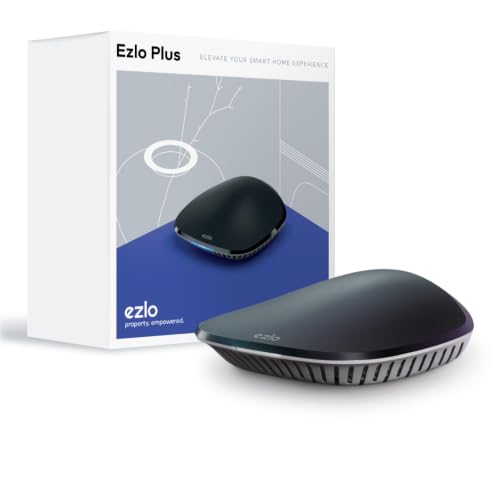
EzloPlus Smart Home Hub
Best for: Mixed Z-Wave and Zigbee device ecosystems
- Smart Home Compatibility
- Amazon Alexa, Google Assistant
- Connectivity
- Zigbee, Z-Wave, RF, Wi-Fi, Ethernet
- Application
- Lights
- Dimensions
- 4.13 × 4.13 × 1.37 inches
View on Amazon: EzloPlus Smart Home Hub Affiliate link
The EzloPlus hub runs MiOS to unify Z-Wave, Zigbee, and RF devices. It bridges these protocols to Amazon Alexa and Google Assistant for voice control. You connect it via Ethernet to your router. The black enclosure measures 4.13 by 1.37 inches. It supports iOS 9.0 and Android 8.1 for mobile management. This hub suits users who want to mix brands and automate lights or locks through a single interface.
Pros
- Supports Z-Wave, Zigbee, and RF protocols
- Integrates with Amazon Alexa and Google Assistant
- Runs on MiOS for mixed-brand automation
- Connects via Ethernet for stable network link
Cons
- Requires Ethernet connection to router
- No local display for manual status checks
- Limited to iOS 9.0 and Android 8.1 minimums
Good fit if
- You own a mix of Z-Wave and Zigbee devices
- You want to control devices via Alexa or Google
- You prefer a centralized hub over scattered apps
Skip if
- You need a hub with a built-in display
- You only use Wi-Fi devices without other protocols
- You require Bluetooth connectivity for direct control
Verdict: EzloPlus Smart Home Hub unifies Z-Wave and Zigbee devices under MiOS for Alexa and Google control. It fits users with mixed-protocol ecosystems who need Ethernet stability.
Specifications side by side
| Spec | EzloPlus Smart Home Hub |
|---|---|
| Smart Home Compatibility | Amazon Alexa, Google Assistant |
| Connectivity | Zigbee, Z-Wave, RF, Wi-Fi, Ethernet |
| Application | Lights |
| Dimensions | 4.13 × 4.13 × 1.37 inches |
| Color | Black |
| Model | EZLOPLUS-US-2022_V2 |
Frequently asked questions
Does the EzloPlus work with Google Home?
Yes, the hub supports Google Assistant integration. This allows you to control connected devices using voice commands through your Google account. The listing confirms compatibility with both Alexa and Google, enabling unified control across your smart home ecosystem.
What wireless protocols does this hub support?
The EzloPlus supports Zigbee, Z-Wave, and RF protocols. It also includes Wi-Fi and Ethernet connectivity for network stability. This mix lets you connect various sensors, lights, and older remote devices that do not use standard Wi-Fi.
Is an Ethernet connection required for setup?
The listing specifies using the included Ethernet cable to connect the hub to your router. You need an internet-connected Wi-Fi router with an available port. This wired link ensures a stable network connection for reliable device operation.
What operating system runs on the EzloPlus?
The device runs on MiOS by Ezlo. This operating system is built for property management and unifies disparate smart home protocols. It allows you to mix brands and control Zigbee, Z-Wave, and RF devices from a single interface.
What are the physical dimensions of the hub?
The EzloPlus measures 4.13 inches in width and length, with a height of 1.37 inches. The enclosure is black, providing a compact square footprint. This size allows you to place it discreetly on a shelf or desk.
Can I use this hub to control lights?
Yes, the application data lists lights as a primary use case. By supporting Zigbee and Z-Wave, the hub can connect to compatible smart bulbs and switches. You can then manage these lights through the MiOS interface or voice assistants.