Enbrighten In-Wall Motion Sensor Smart vs Enbrighten 700 Series Z-Wave In-Wall (2026): Key Differences
As an Amazon Associate we earn from qualifying purchases. Links on this page are affiliate links.
When comparing the enbrighten z wave smart motion sensor vs z wave light dimmer switch, you are looking at two distinct in-wall devices from Enbrighten. Both rely on a Z-Wave hub for operation and support Alexa integration. They also share the ability to extend your smart home network range. The main difference lies in their core function. One device detects motion to control lighting automatically, while the other allows you to adjust light brightness manually or via voice commands.
Key differences
| Aspect | Enbrighten In-Wall Motion Sensor Smart Switch | Enbrighten 700 Series Z-Wave In-Wall Dimmer |
|---|---|---|
| Connectivity | Z-Wave | Z-Wave Plus |
| Smart Home Compatibility | Alexa, SmartThings | Alexa, Google Assistant |
| Switch Function | Motion Sensor, On/Off | Dimmer |
| Circuit Type | Single Pole, Multi-Switch | Single Pole, 3-Way, Multi-Switch |
| Wiring Requirement | Neutral Required | not listed |
Which one should you choose?
Choose Enbrighten In-Wall Motion Sensor Smart Switch if
- You want lights to turn on automatically when you enter a room.
- You need a vacancy or occupancy sensor for a hallway or bathroom.
- Your existing switch box has a neutral wire available.
Choose Enbrighten 700 Series Z-Wave In-Wall Dimmer if
- You want to adjust the brightness of your lights gradually.
- You require Google Assistant compatibility alongside Alexa.
- You need a 3-way switching configuration for staircases or large rooms.
Verdict: Choose the motion sensor if you prioritize automatic lighting control and occupancy detection for convenience. Select the dimmer switch if you prefer manual brightness control and need support for Google Assistant or 3-way setups. Both devices effectively extend your Z-Wave network range.
Motion Sensor vs Dimmer Specs
Smart Home Compatibility
Product A supports Alexa and SmartThings. It also lists Wink compatibility in its key specifications. Product B supports Alexa and Google Assistant. This gives you a choice between SmartThings and Google Assistant depending on your existing ecosystem. Both require a Z-Wave hub. If you use Google Assistant, Product B is the better fit. If you prefer SmartThings or Wink, Product A offers those options. Neither lists support for other major platforms beyond these. Your choice depends on which assistant you use daily.
Core Function
Product A is a motion sensor with on/off switching. It detects occupancy or vacancy to control lights automatically. It also allows manual operation. Product B is a dimmer switch. It adjusts light brightness from 0 to 100 percent. It does not have motion detection capabilities. These are fundamentally different devices. You cannot replace one with the other. Product A is for automation based on presence. Product B is for manual brightness control. Choose based on whether you need sensing or dimming.
Wiring Requirements
Product A requires a neutral wire for installation. This is a common requirement for many smart switches. The data for Product B does not explicitly state the wiring requirements. However, it features SimpleWire technology with auto-detecting terminals. This suggests easier installation, but the neutral wire need is unclear from the provided data. You must check your wall box for a neutral wire before buying Product A. For Product B, consult the full manual to confirm if a neutral is needed. This uncertainty makes a clear edge difficult to assign without more data.
Z-Wave Certification
Product B is explicitly labeled as Z-Wave Plus. This indicates it meets the latest certification standards for Z-Wave devices. Product A is listed as Z-Wave compatible. The data does not specify if it is Z-Wave Plus or an older generation. Z-Wave Plus devices typically offer better range and reliability. Product B’s certification ensures it works with all previous Z-Wave generations. This makes it a more robust choice for network expansion. Product A’s exact certification level is less clear from the provided specifications.
Multi-Switch Config
Product A supports single-pole and multi-switch setups. You can connect up to four add-on switches to the same load. Product B also supports single-pole, 3-way, and multi-switch configurations. It works with up to four add-on switches for full dimming control. It also supports standard three-way switches for on/off control. Both offer extensive multi-location control. Product B adds 3-way readiness as a specific feature. This allows for traditional switch setups without add-on modules. Both are strong in this area, but Product B offers more versatility.
Which Enbrighten Z-Wave Device Fits You
You need automatic light control in a hallway
This motion sensor handles occupancy and vacancy modes automatically. You can set timeout durations from five seconds to thirty minutes. The light-sensing option ensures it only activates in low-light conditions. It is ideal for spaces where you want lights to turn on and off without manual input, such as bathrooms or hallways.
You want to dim lights with voice commands
This dimmer switch offers variable brightness control rather than simple on/off functionality. It works with Google Assistant and Alexa for voice dimming. The QuickFit design reduces housing depth by twenty percent, making installation easier in tight electrical boxes. You get full dimming features from multiple locations using compatible add-on switches.
You use SmartThings for home automation
Product A explicitly lists SmartThings compatibility in its specifications. This ensures seamless integration if you already use the SmartThings ecosystem for your other smart devices. The Z-Wave connectivity allows it to repeat your signal, extending range up to 150 feet. You gain reliable automation without needing additional bridges or complex setup steps.
You need flexible wiring options for new installs
The SimpleWire technology features auto-detecting line/load terminals to eliminate wiring guesswork. This is helpful if you are unsure about your existing wiring configuration. It supports 3-way setups and multi-switch configurations. You can maintain full dimming control from up to four locations, providing flexibility for staircases or large rooms with multiple entry points.
The products compared
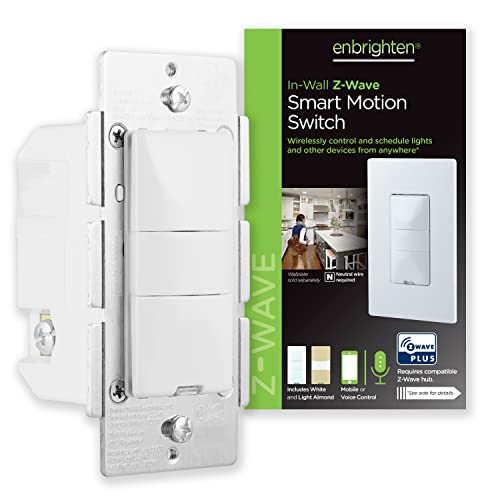
Enbrighten In-Wall Motion Sensor Smart Switch
Best for: Z-Wave range extension with motion sensing
- Smart Home Compatibility
- Alexa, SmartThings, Wink
- Hub Requirement
- Hub Required
- Connectivity
- Z-Wave
- Wiring Requirement
- Neutral Required
- Circuit Type
- Single Pole, Multi-Switch
- Switch Function
- Motion Sensor, On/Off Switch
View on Amazon: Enbrighten In-Wall Motion Sensor Smart Switch Affiliate link
This Enbrighten 26931 is a Z-Wave indoor motion sensor and on/off switch. It requires a neutral wire and a hub to connect to Alexa or SmartThings. You can choose between occupancy, vacancy, or manual modes. It offers five time-out durations and three sensitivity levels. The unit includes white and almond buttons to match your decor. It also acts as a range extender for your Z-Wave network.
Pros
- Supports occupancy, vacancy, and manual operation modes
- Includes white and light almond changeable buttons
- Functions as a Z-Wave range extender up to 150 feet
- Offers five time-out durations from 5 seconds to 30 minutes
Cons
- Requires a neutral wire for installation
- Requires a Z-Wave hub to function
- Limited to single-pole and multi-switch setups only
Good fit if
- You need a Z-Wave motion sensor that also extends your network range
- You want customizable motion detection modes like vacancy or occupancy
- You have a neutral wire available in your switch box
Skip if
- You do not have a Z-Wave hub for connectivity
- Your switch box lacks a neutral wire
- You need 3-way switching without add-on units
Verdict: Enbrighten Z-Wave Motion Sensor 26931 suits users who need a Z-Wave range extender with customizable motion detection modes. It fits homes with neutral wires and hubs. It does not suit users without hubs or neutral wires.

Enbrighten 700 Series Z-Wave In-Wall Dimmer
Best for: Z-Wave users needing shallow box installation
- Smart Home Compatibility
- Alexa, Google Assistant
- Hub Requirement
- Hub Required
- Connectivity
- Z-Wave Plus, Z-Wave
- Circuit Type
- Single Pole, 3-Way, Multi-Switch
- Switch Function
- Dimmer
- Dimensions
- 2.6 × 3.1 × 6.05 inches
View on Amazon: Enbrighten 700 Series Z-Wave In-Wall Dimmer Affiliate link
The Enbrighten 700 Series Z-Wave dimmer switch offers precise light control for your home automation setup. It features QuickFit design, which reduces housing depth by 20% for easier installation in standard electrical boxes. SimpleWire technology auto-detects line and load terminals to simplify wiring. This device supports single-pole, 3-way, and multi-switch configurations, allowing up to four add-on switches. It works with Alexa and Google Assistant when paired with a compatible Z-Wave hub.
Pros
- QuickFit design reduces housing depth by 20% for easier installation
- SimpleWire technology auto-detects line and load terminals to eliminate wiring guesswork
- Supports single-pole, 3-way, and multi-switch setups with up to four add-on switches
- Z-Wave Plus compatible with all previous Z-Wave generations for network expansion
Cons
- Requires a separate Z-Wave certified hub for smart home integration
- Limited to white and light almond paddle colors unless purchased separately
- No mention of local control or bypass mode for direct switching
Good fit if
- You need a dimmer that fits in shallow electrical boxes
- You want to control lights from multiple locations using add-on switches
- You already use a Z-Wave hub like SmartThings or Ring Alarm
Skip if
- You do not have a Z-Wave hub to connect the device
- You prefer a switch that works without any smart home hub
- You need a dimmer with more color options than white or light almond
Verdict: Enbrighten 700 Series Z-Wave Dimmer is a practical choice for users with shallow boxes who want flexible multi-switch control. It suits those already invested in the Z-Wave ecosystem who need reliable dimming without complex wiring.
Specifications side by side
| Spec | Enbrighten In-Wall Motion Sensor Smart Switch | Enbrighten 700 Series Z-Wave In-Wall Dimmer |
|---|---|---|
| Smart Home Compatibility | Alexa, SmartThings, Wink | Alexa, Google Assistant |
| Hub Requirement | Hub Required | Hub Required |
| Connectivity | Z-Wave | Z-Wave Plus, Z-Wave |
| Wiring Requirement | Neutral Required | not stated |
| Circuit Type | Single Pole, Multi-Switch | Single Pole, 3-Way, Multi-Switch |
| Switch Function | Motion Sensor, On/Off Switch | Dimmer |
| Operating Environment | Indoor | not stated |
| Dimensions | 1.5 × 1.5 × 3 inches | 2.6 × 3.1 × 6.05 inches |
| Weight | 6.4 ounces | not stated |
| Size | 1 Pack | 700 Series |
| Color | White & Light Almond | White & Light Almond |
| Model | 26931 | 58438 |
Frequently asked questions
Can I use the Enbrighten motion sensor without a hub?
No, this device requires a Z-Wave hub to function. It does not connect directly to your Wi-Fi or work with a phone alone. You must have a compatible hub like SmartThings or Alexa to control the motion detection features remotely or automate your lights.
Does the Enbrighten dimmer support Google Assistant?
Yes, the Enbrighten 700 Series Z-Wave Dimmer supports Google Assistant. While the motion sensor lists Alexa and SmartThings, this dimmer adds Google Assistant compatibility. This allows you to control your lighting through voice commands on Google Home devices or the Google Home app.
Is the motion sensor suitable for outdoor use?
No, the Enbrighten In-Wall Motion Sensor is designed for indoor environments only. It is not weatherproof or rated for exterior installation. You should install it inside hallways, bathrooms, or rooms where ambient light and occupancy need to be monitored within a protected space.
Can I install the dimmer in a shallow electrical box?
Yes, the Enbrighten 700 Series is noted for shallow box installation. Its compact dimensions allow it to fit into tighter spaces behind walls. This makes it a practical choice for older homes or tight junction boxes where standard-sized switches might not fit properly.
Does the motion sensor work with Wink?
Yes, the Enbrighten motion sensor lists Wink compatibility in its key specifications. This gives you flexibility if you use the Wink hub. You can integrate motion detection into your existing Wink ecosystem alongside other Z-Wave devices for automated lighting and security routines.
Is the dimmer a 3-way switch?
Yes, the Enbrighten 700 Series Z-Wave Dimmer supports 3-way circuit types. You can install it in multi-switch configurations where you control one light from multiple locations. This allows for flexible wiring setups in hallways or large rooms without needing additional smart hardware.
What colors are available for these Enbrighten devices?
Both devices are available in White and Light Almond finishes. This ensures you can match your existing wall plates and switch aesthetics. You can maintain a consistent look throughout your home when replacing standard switches with these smart Z-Wave alternatives.