Enbrighten In-Wall Motion Sensor Smart vs Enbrighten Z-Wave In-Wall Smart Rocker (2026): Key Differences
As an Amazon Associate we earn from qualifying purchases. Links on this page are affiliate links.
The enbrighten in wall motion sensor smart vs z wave in wall smart rocker comparison highlights two distinct Z-Wave devices. Both require a hub and a neutral wire for installation. They also extend your Z-Wave network range. The primary difference lies in their core function. One unit includes motion detection and light sensing for automated control. The other is a standard rocker switch focused on manual or scheduled operation with easier wiring features.
Key differences
| Aspect | Enbrighten In-Wall Motion Sensor Smart Switch | Enbrighten Z-Wave In-Wall Smart Rocker Switch |
|---|---|---|
| Switch Function | Motion Sensor, On/Off Switch | On/Off Switch |
| Circuit Type | Single Pole, Multi-Switch | 3-Way Ready |
| Smart Home Compatibility | Alexa, SmartThings, Wink | Amazon Alexa, Google Assistant |
| Wiring Requirement | Neutral Required | Neutral Required |
| Connectivity | Z-Wave | Z-Wave |
Which one should you choose?
Choose Enbrighten In-Wall Motion Sensor Smart Switch if
- You want lights to turn on automatically when you enter a room
- You need vacancy or occupancy sensing modes
- You use SmartThings or Wink as your hub
Choose Enbrighten Z-Wave In-Wall Smart Rocker Switch if
- You need a 3-way switching setup without an additional sensor
- You prefer voice control with Google Assistant
- You want simpler wiring with auto-detecting line and load terminals
Verdict: Choose the motion sensor if you need automated lighting control based on presence and light levels. Pick the rocker switch if you want a standard manual toggle with enhanced installation features and 3-way capability. Both devices integrate seamlessly into your Z-Wave ecosystem.
Motion Control vs Manual Switching
Core Functionality
The Enbrighten In-Wall Motion Sensor Smart Switch includes an integrated motion detector that automatically controls lighting based on presence. You can choose between occupancy mode for automatic on/off or vacancy mode for manual activation with automatic shutdown. The Enbrighten Z-Wave In-Wall Smart Rocker Switch lacks any motion sensing capabilities. It functions solely as a manual on/off switch. You must physically toggle the rocker to control lights. This makes the Motion Sensor model the clear choice for hands-free automation, while the Rocker switch requires deliberate user interaction for every lighting change.
Smart Home Compatibility
Both devices require a Z-Wave hub to operate and support Amazon Alexa. The Enbrighten Z-Wave In-Wall Smart Rocker Switch explicitly lists Google Assistant compatibility in its specifications, allowing voice control through that ecosystem. The Enbrighten In-Wall Motion Sensor Smart Switch lists SmartThings and Wink compatibility but does not mention Google Assistant in the provided data. If you rely heavily on Google Assistant, the Rocker switch offers broader voice control options out of the box. Otherwise, both support the same Z-Wave hub infrastructure.
Wiring Requirement
Installation for both devices shares a critical requirement: a neutral wire. The Enbrighten In-Wall Motion Sensor Smart Switch requires a neutral wire for operation. Similarly, the Enbrighten Z-Wave In-Wall Smart Rocker Switch also requires a neutral wire. Neither device supports no-neutral-wire installations. This means you must verify your switch box contains a neutral conductor before purchasing either option. If your home lacks neutral wires in the switch location, neither of these Enbrighten models will function correctly without additional wiring modifications.
Circuit Configuration
The Enbrighten Z-Wave In-Wall Smart Rocker Switch is 3-Way Ready, meaning it can be used in setups where multiple switches control the same light. The Enbrighten In-Wall Motion Sensor Smart Switch is listed as Single Pole and Multi-Switch compatible. It works with add-on switches but is not explicitly labeled as 3-Way Ready in the same manner. If you need to control a light from two different locations using standard 3-way wiring logic, the Rocker switch provides that native flexibility. The Motion Sensor is better suited for single-location automation with add-on repeaters.
Physical Design
The Enbrighten Z-Wave In-Wall Smart Rocker Switch features a rocker-style paddle available in white, light almond, black, brown, and ivory. The Enbrighten In-Wall Motion Sensor Smart Switch uses a traditional toggle button style, with included white and light almond options. The Rocker switch also utilizes QuickFit technology, reducing housing depth by up to 20% compared to previous models. This shallower depth aids installation in tight electrical boxes. The Motion Sensor switch has a standard depth. If you prefer a modern aesthetic or have deep boxes, the Rocker design offers more flexibility.
Which Enbrighten Z-Wave Switch Fits Your Home
You want automatic lighting without manual switches
This model features an integrated motion sensor with three detection modes. You can choose occupancy mode for fully automatic control or vacancy mode for manual activation with automatic shutdown. It also includes light-sensing options to activate only in low-light conditions. This makes it ideal for hallways or closets where hands-free operation is preferred over a standard rocker switch.
You need easy installation in tight spaces
The QuickFit design reduces housing depth by up to twenty percent compared to previous models. It eliminates heat tabs to fit better in older or crowded switch boxes. SimpleWire technology auto-detects line and load wires to speed up setup. These features make installation simpler and more reliable, especially if you are replacing existing switches in multi-gang configurations or limited space.
You want voice control with Google Assistant
This switch supports Google Assistant for voice control when connected through a compatible Z-Wave hub. The other model lists Alexa and SmartThings but does not mention Google Assistant. If you use Google Home or prefer voice commands for turning lights on and off, this device provides the necessary compatibility for seamless integration into your existing smart home ecosystem.
You prefer a traditional rocker style design
This device uses a classic rocker paddle style that replaces standard wall switches. It includes white and light almond paddles, with black, brown, and ivory options available. The other model uses a button interface with changeable caps. If you prefer the tactile feel and aesthetic of a rocker switch over a push-button interface, this choice matches standard home decor more closely.
The products compared
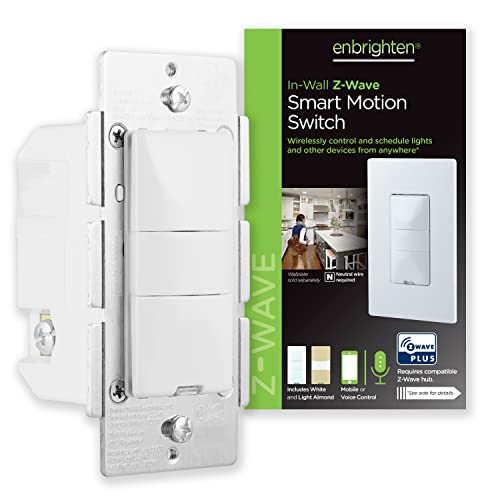
Enbrighten In-Wall Motion Sensor Smart Switch
Best for: Indoor rooms requiring hub-based motion automation
- Smart Home Compatibility
- Alexa, SmartThings, Wink
- Hub Requirement
- Hub Required
- Connectivity
- Z-Wave
- Wiring Requirement
- Neutral Required
- Circuit Type
- Single Pole, Multi-Switch
- Switch Function
- Motion Sensor, On/Off Switch
View on Amazon: Enbrighten In-Wall Motion Sensor Smart Switch Affiliate link
This Enbrighten switch combines motion sensing with Z-Wave connectivity. It requires a hub and a neutral wire for installation. You can choose occupancy, vacancy, or manual modes. The device includes white and light almond buttons to match your decor. It repeats Z-Wave signals to extend range. This unit suits users who want automatic lighting control in indoor spaces.
Pros
- Offers occupancy, vacancy, and manual operation modes
- Includes variable time-out settings from 5 seconds to 30 minutes
- Features adjustable motion sensitivity levels
- Acts as a Z-Wave range extender up to 150ft
- Supports multi-switch setups with add-on units
Cons
- Requires a separate Z-Wave hub for operation
- Needs a neutral wire for installation
- Limited to indoor use only
Good fit if
- You need automatic lighting control in high-traffic rooms
- You already have a Z-Wave hub and neutral wiring
- You want to extend your smart home signal range
Skip if
- You do not have a Z-Wave hub
- Your switch box lacks a neutral wire
- You need outdoor-rated equipment
Verdict: Enbrighten Z-Wave Motion Sensor Switch is a practical choice for homes with existing Z-Wave hubs and neutral wiring. It provides flexible motion detection modes and signal boosting for reliable indoor automation.

Enbrighten Z-Wave In-Wall Smart Rocker Switch
Best for: tight electrical boxes and Z-Wave range extension
- Smart Home Compatibility
- Amazon Alexa, Google Assistant
- Hub Requirement
- Hub Required
- Connectivity
- Z-Wave
- Wiring Requirement
- Neutral Required
- Circuit Type
- 3-Way Ready
- Switch Function
- On/Off Switch
View on Amazon: Enbrighten Z-Wave In-Wall Smart Rocker Switch Affiliate link
This Enbrighten Z-Wave rocker switch replaces standard in-wall switches with a neutral wire. It features QuickFit technology, which reduces housing depth by 20% for tighter electrical boxes. SimpleWire auto-detects line and load connections to speed up installation. You control it via a Z-Wave hub with Alexa or Google Assistant. It also acts as a range extender, boosting your smart home signal by up to 150 feet.
Pros
- QuickFit design reduces housing depth by 20% for limited space
- SimpleWire auto-detects line and load terminals for fast setup
- Extends Z-Wave wireless range by up to 150 feet
- Includes white and light almond changeable paddles
Cons
- Requires a separate Z-Wave hub for operation
- Lacks built-in motion sensing capabilities
- Does not support direct voice control without a hub
Good fit if
- You have tight electrical boxes needing reduced depth
- You want to extend your Z-Wave network range
- You prefer a rocker style over a toggle switch
Skip if
- You do not have a neutral wire in your wall
- You want to control lights without a smart hub
- You need automatic motion-activated lighting
Verdict: Enbrighten Z-Wave Smart Rocker Switch is a reliable on/off control for tight spaces that also strengthens your Z-Wave mesh network. It suits homeowners who prioritize easy installation and network reliability over standalone automation.
Specifications side by side
| Spec | Enbrighten In-Wall Motion Sensor Smart Switch | Enbrighten Z-Wave In-Wall Smart Rocker Switch |
|---|---|---|
| Smart Home Compatibility | Alexa, SmartThings, Wink | Amazon Alexa, Google Assistant |
| Hub Requirement | Hub Required | Hub Required |
| Connectivity | Z-Wave | Z-Wave |
| Wiring Requirement | Neutral Required | Neutral Required |
| Circuit Type | Single Pole, Multi-Switch | 3-Way Ready |
| Switch Function | Motion Sensor, On/Off Switch | On/Off Switch |
| Switch Style | not stated | Rocker |
| Operating Environment | Indoor | not stated |
| Dimensions | 1.5 × 1.5 × 3 inches | 1.78 × 2.36 × 4.13 inches |
| Weight | 6.4 ounces | not stated |
| Size | 1 Pack | 1 Pack |
| Color | White & Light Almond | White Rocker Switch |
| Model | 26931 | 46201 |
Frequently asked questions
Can these switches work without a smart home hub?
No, both the Enbrighten In-Wall Motion Sensor Smart Switch and the Z-Wave In-Wall Smart Rocker Switch require a compatible hub to function. They rely on Z-Wave connectivity, which necessitates a central controller to process commands and integrate with your smart home ecosystem. You cannot use them as standalone Wi-Fi or Bluetooth devices.
Do I need a neutral wire for installation?
Yes, both models require a neutral wire for proper installation. This is a standard requirement for most Z-Wave smart switches to ensure stable power and reliable communication with your hub. Verify your electrical box contains a neutral wire before purchasing either the motion sensor switch or the rocker switch.
Are these switches compatible with Alexa?
Yes, both devices support Alexa integration. The Enbrighten In-Wall Motion Sensor Smart Switch and the Z-Wave In-Wall Smart Rocker Switch can be controlled via voice commands through Alexa. You can use voice commands to turn lights on or off, or adjust settings if the device supports it.
Can I use the rocker switch in a 3-way setup?
Yes, the Enbrighten Z-Wave In-Wall Smart Rocker Switch supports 3-way circuit configurations. This allows you to install it alongside another switch to control the same light from multiple locations. The motion sensor switch does not list 3-way compatibility, so verify your wiring needs before choosing.
Which device is better for extending Z-Wave range?
Both devices act as signal repeaters to strengthen your Z-Wave mesh network. However, the Z-Wave In-Wall Smart Rocker Switch is specifically noted for range extension in tight spaces. The motion sensor switch also boosts signals but adds automated lighting features based on presence detection for indoor rooms.
What are the physical dimensions of these switches?
The motion sensor switch measures 1.5 inches in width and 3 inches in height. The rocker switch is larger, measuring 2.36 inches in width and 4.13 inches in height. Check your electrical box depth and size to ensure the rocker switch fits, as it is bulkier than the motion sensor model.
Is the motion sensor switch suitable for outdoor use?
No, the Enbrighten In-Wall Motion Sensor Smart Switch is designed for indoor environments only. It is not rated for outdoor weather conditions. If you need outdoor automation, you must look for a device specifically rated for exterior use, as this model is intended for interior rooms requiring hub-based motion automation.
Does the motion switch offer different detection modes?
Yes, the Enbrighten In-Wall Motion Sensor Smart Switch offers flexible motion detection modes. You can select occupancy mode for automatic on and off control or vacancy mode for manual activation with automatic shutdown. This allows you to customize how the switch responds to movement in your home.