Display Type in Smart Thermostats: What It Is and Is It Worth It?
As an Amazon Associate we earn from qualifying purchases. Links on this page are affiliate links.
Smart Thermostat Display Types Explained
The display type is the primary interface between you and your heating or cooling system. It determines how you adjust temperatures, change schedules, and view system status. In the current market, the touchscreen is the dominant standard for smart thermostats. This spec refers to a screen that responds directly to your touch, eliminating the need for physical buttons or dials.
When you see a touchscreen listed in the specifications, it means the device uses capacitive or resistive technology to register your finger’s presence. Capacitive screens are more common in modern devices because they offer a smoother, more responsive experience. They work by detecting the electrical properties of your skin. This allows for intuitive gestures, such as swiping to change modes or tapping to confirm settings.
How is this measured or labeled on product listings? You will typically see terms like "touchscreen," "capacitive display," or "LCD touchscreen." Sometimes, the resolution is also noted, such as 320x240 pixels. This number indicates the clarity of the icons and text. Higher resolution screens make it easier to read detailed information, like humidity levels or filter change reminders, especially from a distance.
Why does this matter to you? A touchscreen provides a cleaner aesthetic with fewer protruding parts. It reduces dust accumulation and simplifies cleaning. For many users, the visual feedback of a bright, clear screen is more satisfying than clicking a mechanical button. It also allows for more complex menus and graphical representations of your energy usage.
However, not all displays are created equal. Some budget models may use simpler resistive touchscreens that require more pressure. Others might lack a display entirely, relying solely on a mobile app. When evaluating options, consider whether you prefer direct physical interaction or if you are comfortable controlling your home comfort through a smartphone. The touchscreen remains the most versatile option for those who want immediate, local control without needing to unlock a phone. Understanding the display type explained in the specs helps you choose a device that fits your daily habits and visual preferences.
Touchscreen Display Options
Touchscreen
A touchscreen display lets you control your thermostat by tapping or swiping the screen. You adjust temperatures, view humidity levels, and change schedules without needing physical buttons. This interface offers a modern look and intuitive navigation. Some models, like the Honeywell Home X8S, feature larger screens for easier reading and video integration. Others, such as the Honeywell Home T6 Pro, provide reliable local control without Wi-Fi. Touchscreens often support customizable color interfaces, as seen in the Honeywell Home RTH9600WF, which shows weather data. However, they may require a C-wire for power. If you prefer direct, tactile interaction with your home’s climate settings, a touchscreen is a practical choice.
Non-Touchscreen
Non-touchscreen thermostats rely on physical buttons or dials for input. These devices often have simpler interfaces that require less maintenance over time. They are typically easier to clean since there are no screens to smudge. Some users prefer the tactile feedback of buttons for precise adjustments. This type of thermostat is often more durable in high-traffic areas. While they lack the visual flair of digital displays, they remain reliable for basic scheduling and temperature control. This option suits those who prioritize longevity and simplicity over advanced visual features or smart home integration capabilities.
Touchscreen Displays Are Standard
Who needs it
You should prioritize a touchscreen if you value intuitive navigation and modern aesthetics. This interface allows you to adjust temperatures, view humidity levels, and change schedules by simply tapping or swiping. It removes the need for physical buttons, which can wear out over time or become difficult to press with wet hands. The direct contact method reduces errors and makes setting complex schedules faster. If you prefer a sleek, minimalist look that blends into your home decor, this display type is essential. It provides immediate visual feedback, ensuring you know exactly what settings you have selected. This is ideal for users who want a seamless, responsive control experience without fumbling for small dials or switches.
Who can skip it
You can ignore this spec if you already have a reliable system you are comfortable using. If you are replacing an older model with physical knobs, you may not need the upgrade immediately. Focus instead on connectivity features like Wi-Fi or compatibility with your existing smart home ecosystem. These factors often have a bigger impact on your daily convenience than the display itself. If you plan to control your thermostat primarily through a mobile app or voice commands, the local interface matters less. Budget constraints might also lead you to choose a simpler model with a basic LCD screen. In those cases, prioritize energy-saving algorithms or sensor accuracy over the visual interface. The core function remains heating and cooling, regardless of how you input commands.
Display Type Glossary
Touchscreen
A screen that responds to finger taps or swipes. It allows you to adjust temperatures and change settings without physical buttons, offering a modern and intuitive interface.
Physical Buttons
Tactile switches on the device face. You press these to change settings. They provide clear feedback but may wear out faster than screens over time.
LCD Screen
Liquid Crystal Display technology. It uses backlighting to show text and icons. This type is common for basic thermostats with simple temperature readouts and status indicators.
LED Display
Light Emitting Diode screen. It often offers higher contrast and brightness than LCDs. You can read the temperature clearly even in bright sunlight or low light.
Backlight
Illumination behind the screen. It makes the display visible in dark rooms. You can often adjust the brightness level to suit your lighting preferences.
Resolution
The number of pixels on the screen. Higher resolution means sharper text and clearer icons. It improves readability and makes the interface look more polished.
Interface
The method you use to control the thermostat. It includes screens, buttons, or voice commands. The interface determines how easily you can adjust your home climate.
Quick picks
Our 6 picks
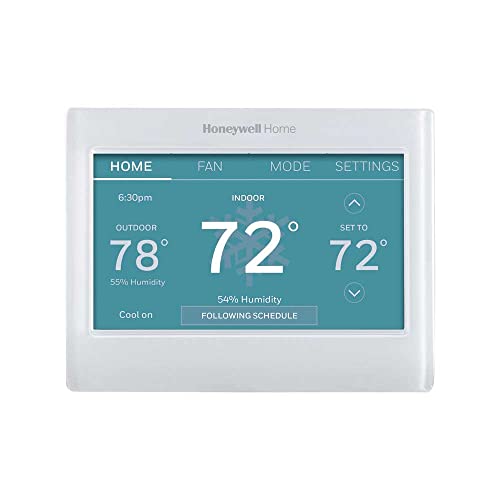
Honeywell Home Smart Color Touchscreen Thermostat
Best for: Customizable color displays with weather data
- Display Type
- Touchscreen (what this guide is about)
- System Compatibility
- Forced air, hot water, steam, heat pump
- Wiring Requirement
- C-Wire Required
- Smart Home Compatibility
- Amazon Alexa, Google Assistant, Cortana
- Programmability
- Programmable
- Sensor Support
- Humidity
View on Amazon: Honeywell Home Smart Color Touchscreen Thermostat Affiliate link
This Honeywell Home thermostat features a customizable color touchscreen that displays indoor and outdoor temperature, humidity, and daily weather forecasts. It is ENERGY STAR certified and connects via Wi-Fi to Alexa, Google Assistant, and Cortana. You get flexible programming options and remote control from anywhere. It supports forced air, hot water, steam, and heat pump systems. Note that it requires a C-wire and does not work with electric baseboard heat.
Pros
- Customizable high-definition color touchscreen display
- Shows indoor/outdoor temperature, humidity, and weather forecast
- Compatible with Alexa, Google Assistant, and Cortana
- ENERGY STAR certified for energy savings
- Works with forced air, hot water, steam, and heat pumps
Cons
- Requires a C-wire for power
- Not compatible with electric baseboard heat (120-240V)
- No mention of built-in occupancy sensors
Good fit if
- You want a customizable color display for weather and humidity data
- You have a forced air or heat pump system with a C-wire
- You use Alexa, Google Assistant, or Cortana for smart home control
Skip if
- You have electric baseboard heaters
- Your system lacks a C-wire
- You prefer a non-touchscreen interface
Verdict: Honeywell Home RTH9600WF Color Touchscreen Thermostat fits users with forced air or heat pump systems who want detailed weather and humidity data on a customizable color screen. It is a solid choice for those with C-wire access and voice assistant preferences.

Honeywell Home 7-Day Programmable Touchscreen Thermostat
Best for: local touchscreen control and humidity monitoring
- Display Type
- Touchscreen (what this guide is about)
- System Compatibility
- Single/multistage, heat pump, furnace
- Programmability
- 7-day
- Sensor Support
- Indoor humidity
- Dimensions
- 4.09 × 4.09 × 1.06 inches
- Weight
- 7.2 ounces
View on Amazon: Honeywell Home 7-Day Programmable Touchscreen Thermostat Affiliate link
The Honeywell Home RTH8560D features a backlit touchscreen display that shows indoor temperature and humidity. It supports 7-day programming for flexible scheduling. Smart Response Learning adjusts heating and cooling cycles to meet your comfort needs. The unit includes filter change reminders. It works with single, multistage, and heat pump systems. You can choose battery or hard-wired power. Settings remain saved during power outages.
Pros
- Backlit touchscreen with humidity readouts
- 7-day programmable scheduling
- Smart Response Learning technology
- Filter change reminders
- Backup memory for settings
Cons
- No Wi-Fi connectivity
- No smartphone app control
- Requires battery or hard-wiring only
Good fit if
- You want a local touchscreen interface
- You need humidity monitoring
- You prefer 7-day programming
Skip if
- You require remote app access
- You need Wi-Fi integration
- You want voice assistant support
Verdict: Honeywell Home RTH8560D Touchscreen Thermostat suits users who value local control and humidity data over remote connectivity. It delivers reliable scheduling without requiring a network connection.

Honeywell Home X8S Thermostat with Room Sensor
Best for: large display and video integration
- System Compatibility
- 3H/2C heat pump, 2H/2C conventional
- Wiring Requirement
- C-wire required
- Smart Home Compatibility
- Matter, Alexa, Google, Apple Home
- Connectivity
- 2.4 or 5.0 GHz WiFi
- Display Type
- 5" display
- Sensor Support
- Room sensor, occupancy, humidity
View on Amazon: Honeywell Home X8S Thermostat with Room Sensor Affiliate link
This Honeywell Home X8S features a 5-inch customizable touchscreen display that lets you adjust color and style. It includes a wireless room sensor for targeted comfort and supports 2.4 or 5.0 GHz Wi-Fi. The unit also offers video doorbell access and Matter certification for smart home integration. It suits users who want a large, adaptable interface with advanced connectivity options for their HVAC system.
Pros
- 5-inch customizable touchscreen display
- Includes wireless room sensor
- Matter certified for interoperability
- Video doorbell camera view and intercom
- Supports 2.4 and 5.0 GHz Wi-Fi
Cons
- Requires a C-wire for installation
- Does not work with electric baseboard heat
- No mention of built-in humidity sensor
Good fit if
- You want a large, customizable display
- You need video doorbell integration
- You have a compatible HVAC system
Skip if
- You use electric baseboard heating
- You lack a C-wire
- You prefer a smaller form factor
Verdict: Honeywell Home X8S 5-Inch Touchscreen Thermostat fits users who prioritize a large, customizable interface and smart home video features over a compact design.

Mysa V2 Smart Baseboard Thermostat
Best for: Electric baseboard and radiant heating zones
- Display Type
- Touchscreen (what this guide is about)
- System Compatibility
- Electric baseboards, fan-forced heaters
- Voltage
- 120V-240V
- Wiring Requirement
- Neutral or second live wire
- Smart Home Compatibility
- Apple Home, Alexa, Google
- Programmability
- WiFi Programmable
View on Amazon: Mysa V2 Smart Baseboard Thermostat Affiliate link
The Mysa V2 targets electric baseboard systems with 120V or 240V support. It features a touchscreen display and built-in humidity sensing. You get Wi-Fi control without a subscription fee. The unit requires four wires, meaning it will not work with existing two-wire setups. It fits homes with radiant or fan-forced electric heat that need zone-specific control.
Pros
- No monthly subscription for scheduling or energy charts
- Built-in humidity sensor for better air monitoring
- Works with Apple HomeKit, Alexa, and Google Home
- Supports 120V and 240V electric baseboard heaters
Cons
- Requires four wires, so it fails on two-wire mechanical setups
- Incompatible with 24V furnaces or central heat pumps
- Limited to electric baseboard and radiant systems only
Good fit if
- You have electric baseboard or radiant ceiling heaters
- You want to avoid monthly smart home fees
- You need zone control for specific rooms
Skip if
- You have a 24V central furnace system
- Your wall box only has two wires
- You need a thermostat for a heat pump
Verdict: Mysa V2 Electric Baseboard Thermostat suits electric baseboard owners who want detailed energy data without recurring costs. It is not suitable for central heating systems.
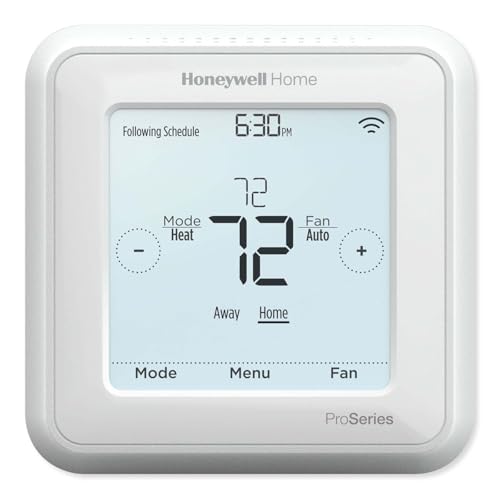
Honeywell T6 Pro Z-Wave Thermostat
Best for: Z-Wave users wanting touchscreen control
- Display Type
- Touchscreen (what this guide is about)
- System Compatibility
- 3H/2C heat pump, 2H/2C conventional
- Voltage
- Low Voltage
- Wiring Requirement
- C-wire or 3 AA batteries
- Smart Home Compatibility
- Z-Wave controls
- Programmability
- Programmable
View on Amazon: Honeywell T6 Pro Z-Wave Thermostat Affiliate link
The Honeywell T6 Pro uses a touchscreen interface for direct temperature control. It connects via Z-Wave Plus, offering improved range and bandwidth for smart home integration. You can power it with hardwired C-wire or three AA batteries. The unit supports 7-day programming and works with heat pump or conventional systems. This model suits users who prefer physical touch inputs over app-only control.
Pros
- Z-Wave Plus certified for reliable smart home connectivity
- Touchscreen display for direct manual input
- Flexible power options using C-wire or AA batteries
- Supports 7-day programming schedules
Cons
- Requires a separate Z-Wave hub for app control
- Limited to low-voltage systems only
- No built-in Wi-Fi for direct cloud connection
Good fit if
- You use a Z-Wave smart home ecosystem
- You prefer tactile touchscreen controls
- You need flexible power wiring options
Skip if
- You require direct Wi-Fi connectivity
- You have high-voltage heating systems
- You want app-only control without a hub
Verdict: The Honeywell T6 Pro Z-Wave Touchscreen Thermostat fits Z-Wave users who want a physical touchscreen interface. It provides reliable local control without needing a Wi-Fi connection.

Honeywell Vision Pro 8000 Touchscreen Thermostat
Best for: multi-stage HVAC systems needing professional install
- Display Type
- Touchscreen (what this guide is about)
- System Compatibility
- Up to 3 Heat / 2 Cool
- Wiring Requirement
- Hardwire
- Connectivity
- Wi-Fi
- Dimensions
- 4.96 × 1.14 × 4.65 inches
- Weight
- 2 pounds
View on Amazon: Honeywell Vision Pro 8000 Touchscreen Thermostat Affiliate link
This Honeywell thermostat features a touchscreen display and Wi-Fi connectivity. It supports up to 3 heat and 2 cool stages. The unit requires hardwire installation by a professional. It is designed for users who want precise control over multi-stage HVAC systems. The touchscreen interface allows for direct interaction without a remote.
Pros
- Touchscreen display for direct control
- Wi-Fi connectivity for remote access
- Supports up to 3 heat stages
- Supports up to 2 cool stages
Cons
- Requires professional hardwire installation
- No mention of included remote control
- No mention of built-in temperature sensor
Good fit if
- You need multi-stage heating and cooling support
- You prefer a touchscreen interface
- You can arrange professional installation
Skip if
- You want a DIY-friendly setup
- You require a remote control included
- You prefer a non-touch interface
Verdict: Honeywell Vision Pro 8000 Touchscreen Thermostat fits homes with complex multi-stage HVAC systems that require professional wiring. It suits users who want a touchscreen interface and Wi-Fi control without needing a separate remote.
Specifications side by side
| Spec | Honeywell Home Smart Color Touchscreen Thermostat | Honeywell Home 7-Day Programmable Touchscreen Thermostat | Honeywell Home X8S Thermostat with Room Sensor | Mysa V2 Smart Baseboard Thermostat | Honeywell T6 Pro Z-Wave Thermostat | Honeywell Vision Pro 8000 Touchscreen Thermostat |
|---|---|---|---|---|---|---|
| System Compatibility | Forced air, hot water, steam, heat pump | Single/multistage, heat pump, furnace | 3H/2C heat pump, 2H/2C conventional | Electric baseboards, fan-forced heaters | 3H/2C heat pump, 2H/2C conventional | Up to 3 Heat / 2 Cool |
| Voltage | not stated | not stated | not stated | 120V-240V | Low Voltage | not stated |
| Wiring Requirement | C-Wire Required | not stated | C-wire required | Neutral or second live wire | C-wire or 3 AA batteries | Hardwire |
| Smart Home Compatibility | Amazon Alexa, Google Assistant, Cortana | not stated | Matter, Alexa, Google, Apple Home | Apple Home, Alexa, Google | Z-Wave controls | not stated |
| Programmability | Programmable | 7-day | not stated | WiFi Programmable | Programmable | not stated |
| Connectivity | not stated | not stated | 2.4 or 5.0 GHz WiFi | WiFi | Z-Wave Plus | not stated |
| Display Type | Color touchscreen | Backlit touchscreen | 5" display | Touchscreen | Touchscreen | Touchscreen |
| Sensor Support | Humidity | Indoor humidity | Room sensor, occupancy, humidity | Humidity sensor | not stated | not stated |
| Certification | Energy Star Certified | not stated | not stated | not stated | not stated | not stated |
| Dimensions | 4.5 × 0.88 × 3.5 inches | 4.09 × 4.09 × 1.06 inches | 0.96 × 5.24 × 3.54 inches | 3.5 × 1.57 × 4.85 inches | 4.09 × 4.09 × 1.06 inches | 4.96 × 1.14 × 4.65 inches |
| Weight | 11.2 ounces | 7.2 ounces | 1.1 pounds | 1.12 pounds | 1.6 ounces | 2 pounds |
| Size | 1 | 103mm x 103mm x 103mm | 5 inch | 3.5 inches | 4.06 x 4.06 x 1.09 inches | 1 Pack |
| Color | White 1 | White | White | White | Multicolor | Arctic White |
| Model | RTH9600WF2022 | RTH8560D1002 | X8VMC9W/W | BB.2.0.01.NA | TH6320ZW2007/U | TH8321WF1001 |
Frequently asked questions
Do touchscreen thermostats require a C-wire?
Many touchscreen models need a C-wire for continuous power. The Honeywell Home RTH9600WF explicitly requires a C-wire for operation. Without it, the device may not maintain its smart features or display data. Always check the wiring requirements in the specifications before purchasing to ensure your HVAC system supports this connection.
Can I use a touchscreen thermostat without Wi-Fi?
Yes, some touchscreen units function without a network connection. The Honeywell Home RTH8560D provides local control and humidity monitoring without needing Wi-Fi. The Honeywell T6 Pro also offers reliable local control via Z-Wave. These models suit users who prioritize physical interface interaction over remote smartphone access or cloud features.
What is the largest touchscreen display available?
The Honeywell Home X8S features a five-inch touchscreen, which is notably larger than standard models. Its dimensions measure 5.24 inches wide by 3.54 inches high. This large interface supports detailed customization and video integration, making it ideal for users who want prominent visibility and advanced smart home video features on the device face.
Do touchscreen thermostats work with Alexa?
Several touchscreen models in this guide support Alexa voice control. The Honeywell Home RTH9600WF, X8S, and Mysa V2 all list Alexa compatibility. This allows you to adjust temperatures or check system status using voice commands. The Honeywell T6 Pro, however, relies on Z-Wave and does not list Alexa support.
Are touchscreen thermostats Energy Star certified?
Not all touchscreen models hold Energy Star certification. The Honeywell Home RTH9600WF and X8S are both Energy Star certified, indicating they meet specific energy efficiency guidelines. Other models, such as the RTH8560D and T6 Pro, do not list this certification. Check the attributes section to verify if energy efficiency is a priority for your purchase.
Which touchscreen thermostat is best for baseboard heating?
The Mysa V2 is designed specifically for electric baseboard and radiant heating zones. It features a touchscreen interface but is not suitable for central heating systems. Its attributes list Electric Baseboard compatibility. This makes it the only option in this guide tailored for zone-specific electric heating rather than standard forced air or heat pump systems.