Broadlink RM4 Pro IR RF vs Broadlink RM MAX IR RF (2026): Key Differences
As an Amazon Associate we earn from qualifying purchases. Links on this page are affiliate links.
This guide compares the broadlink rm4 pro ir rf universal vs rm max ir rf. Both devices control IR and RF electronics through 2.4 GHz Wi-Fi. They integrate with Alexa and Google Home. The RM4 Pro focuses on cloud-based updates and external sensor support. The RM MAX adds BLE for local control and offline scenes. You should choose based on whether you need offline reliability or cloud compatibility.
Key differences
| Aspect | Broadlink RM4 Pro IR and RF Remote | Broadlink RM MAX IR and RF Smart Hub |
|---|---|---|
| Connectivity | IR, RF (433MHz) | IR 38KHz, RF 433MHz, BLE, FastCon |
| Offline Control | Not listed | Local control via BLE; scenes stored on hub |
| External Sensors | Supports USB temperature/humidity sensor | Not listed |
| Voice Control for Learned Buttons | Compatible with Alexa and Google Home | Learned buttons require custom scenes for voice control |
| Dimensions | 4.33 x 1.18 x 4.33 inches | 4.28 x 1.44 x 4.28 inches |
Which one should you choose?
Choose Broadlink RM4 Pro IR and RF Remote if
- You want to connect an external temperature and humidity sensor.
- You prefer cloud-based device library updates without local BLE setup.
- You need simple voice control for learned buttons without creating scenes.
Choose Broadlink RM MAX IR and RF Smart Hub if
- You require offline control for scenes during network outages.
- You want faster device discovery using BLE technology.
- You plan to integrate FastCon bulbs and sensors into your hub.
Verdict: Choose the RM4 Pro if you need external sensor support and straightforward cloud integration. Select the RM MAX if offline reliability and local BLE control are priorities for your smart home setup.
RM4 Pro vs RM MAX Comparison
Connectivity
Both devices rely on 2.4 GHz Wi-Fi for network communication. The Broadlink RM4 Pro connects using standard Wi-Fi protocols. The Broadlink RM MAX adds Bluetooth Low Energy (BLE) for quick setup and local control. BLE allows the RM MAX to discover devices faster and manage them locally. This local control ensures scenes run even if the internet goes down. The RM4 Pro does not list BLE support in its specifications. If you want faster initial pairing and offline reliability, the RM MAX has a clear technical advantage. The RM4 Pro relies solely on cloud connectivity for its operations.
Smart Home Compatibility
Both hubs support Alexa and Google Home for voice control. The Broadlink RM4 Pro also lists IFTTT compatibility, allowing for more complex automation triggers through the IFTTT platform. The Broadlink RM MAX does not mention IFTTT in its provided data. You can control devices via voice assistants on both units. However, the RM MAX notes that learned buttons cannot be controlled individually by voice; you must use scenes. The RM4 Pro supports voice control for specific device types like TVs and ACs. If you need IFTTT integration for custom workflows, the RM4 Pro is the better choice. Otherwise, they are equal for basic voice commands.
Programmability
Both devices support IR and RF control. The RM4 Pro supports RF at 433MHz and IR for over 50,000 devices. It allows you to learn buttons if cloud data is unavailable. The RM MAX supports IR at 38KHz and RF at 433MHz. It also allows code learning. The RM MAX emphasizes local scene storage, keeping your custom routines on the hub itself. The RM4 Pro relies on cloud updates for its device library. Both units let you program devices. The RM MAX offers the benefit of offline scene execution. The RM4 Pro offers a larger claimed library of pre-programmed devices. Neither unit has a clear advantage in basic programmability, though their approaches differ.
System Compatibility
The Broadlink RM4 Pro supports external temperature and humidity sensors via a USB cable. You must purchase this sensor separately. The app displays the room's temperature and humidity when connected. The Broadlink RM MAX acts as a hub for FastCon-enabled sensors, including motion, door, and temperature/humidity sensors. It integrates these into the Magic Home app. The RM4 Pro does not list FastCon integration. The RM MAX supports FastCon bulbs and sensors natively. If you already use FastCon devices, the RM MAX integrates them seamlessly. If you prefer a simple external USB sensor, the RM4 Pro supports that specific hardware. Both offer environmental monitoring options.
Build
The Broadlink RM4 Pro measures 4.33 inches in width and length, with a height of 1.18 inches. It is black in color. The Broadlink RM MAX measures 4.28 inches in width and length, with a height of 1.44 inches. The RM MAX is slightly taller and narrower than the RM4 Pro. Both devices are compact and designed for placement near electronics. The size difference is minimal. The RM4 Pro is slightly flatter. The RM MAX is slightly thicker. Both fit on standard shelves or desks. There is no significant functional difference in the physical build dimensions for most users. You should choose based on fit rather than size.
Which Broadlink Universal Remote Suits You
Users wanting offline automation reliability
The RM MAX stores custom scenes directly on the hub. This allows your routines to run even during internet outages. You get local control via BLE for faster setup. If uninterrupted automation is critical, this model ensures your devices keep working without cloud dependency.
People needing external sensor data
The RM4 Pro supports an external temperature and humidity sensor via USB cable. The app displays room conditions directly. If you want to monitor environmental data alongside device control, this feature is unique to this model. It adds useful context to your smart home dashboard.
Those wanting the latest app features
The RM MAX uses the upgraded Magic Home app with FastCon integration. It manages bulbs and sensors more smoothly. You get a refined interface and performance optimizations. If you prefer modern app experiences and quick device discovery, this newer hub offers a better configuration process.
The products compared

Broadlink RM4 Pro IR and RF Remote
Best for: Controlling mixed IR and RF home devices
- Connectivity
- IR, RF (433MHz)
- Smart Home Compatibility
- Alexa, Google Home, IFTTT
- Network Interface
- 2.4 GHz Wi-Fi
- Application
- Air Conditioners, Televisions
- Dimensions
- 4.33 × 4.33 × 1.18 inches
View on Amazon: Broadlink RM4 Pro IR and RF Remote Affiliate link
The Broadlink RM4 Pro is a 2.4 GHz Wi-Fi universal remote that controls IR and 433 MHz RF devices. It supports over 50,000 IR appliances and RF items like curtain motors. You can use voice commands via Alexa or Google Home. The device includes a learning function for custom codes. It also connects to an optional temperature and humidity sensor via USB cable for room monitoring.
Pros
- Supports both IR and 433 MHz RF signals
- Compatible with Alexa, Google Home, and IFTTT
- Includes code learning for unsupported devices
- Connects to external temperature and humidity sensors
Cons
- Only supports 2.4 GHz Wi-Fi networks
- Does not work with Bluetooth devices
- Temperature and humidity sensor sold separately
Good fit if
- You need to control RF devices like shades or projectors
- You want to add voice control to non-smart appliances
- You have a 2.4 GHz Wi-Fi network available
Skip if
- You require 5 GHz Wi-Fi connectivity
- You need direct Bluetooth control for devices
- You want the temperature sensor included in the box
Verdict: Broadlink RM4 Pro Universal Remote is a practical hub for users who need to manage both infrared and radio frequency devices through a single app. It fits those who want to automate older appliances with voice commands or custom codes.
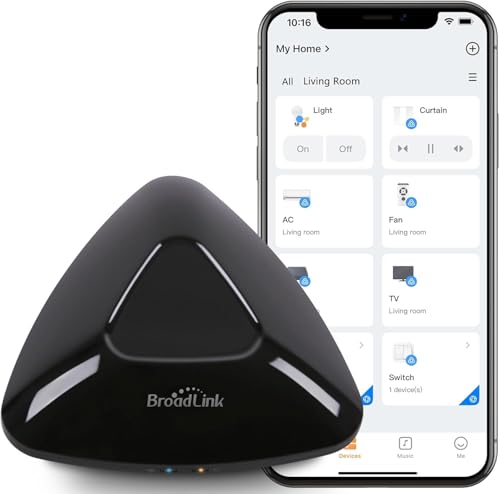
Broadlink RM MAX IR and RF Smart Hub
Best for: offline reliability and FastCon integration
- Connectivity
- IR 38KHz, RF 433MHz, BLE, FastCon
- Smart Home Compatibility
- Alexa, Google Home
- Network Interface
- 2.4GHz Wi-Fi
- Dimensions
- 4.28 × 4.28 × 1.44 inches
View on Amazon: Broadlink RM MAX IR and RF Smart Hub Affiliate link
The Broadlink RM MAX is a 2.4 GHz Wi-Fi hub with IR 38KHz and RF 433MHz support. It adds BLE for faster setup and local control during outages. You can manage devices via the Magic Home app or voice assistants like Alexa and Google Home. This unit unifies smart bulbs and sensors in the FastCon ecosystem. It suits users who want offline reliability and local scene execution without internet dependency.
Pros
- Local control via BLE ensures operation during network outages
- Supports IR 38KHz and RF 433MHz for diverse device compatibility
- Integrates FastCon bulbs and sensors for centralized automation
- Custom scenes run smoothly without internet access
Cons
- Voice assistants cannot control individually learned buttons
- Only supports 2.4 GHz Wi-Fi networks
- Requires the Magic Home app for setup
Good fit if
- You need reliable offline control for essential routines
- You use FastCon smart bulbs or sensors
- You want to unify IR and RF devices in one hub
Skip if
- You require 5 GHz Wi-Fi connectivity
- You need direct voice control for learned IR codes
- You prefer a dedicated remote over app control
Verdict: Broadlink RM MAX IR RF Smart Hub offers robust local control and FastCon integration for users prioritizing offline reliability. It fits homes with mixed IR and RF devices that need dependable automation without constant internet access.
Specifications side by side
| Spec | Broadlink RM4 Pro IR and RF Remote | Broadlink RM MAX IR and RF Smart Hub |
|---|---|---|
| Connectivity | IR, RF (433MHz) | IR 38KHz, RF 433MHz, BLE, FastCon |
| Smart Home Compatibility | Alexa, Google Home, IFTTT | Alexa, Google Home |
| Network Interface | 2.4 GHz Wi-Fi | 2.4GHz Wi-Fi |
| Application | Air Conditioners, Televisions | not stated |
| Dimensions | 4.33 × 4.33 × 1.18 inches | 4.28 × 4.28 × 1.44 inches |
| Size | RM4 PRO | not stated |
| Color | black | not stated |
| Model | RM4 Pro | RM MAX |
Frequently asked questions
Does the Broadlink RM4 Pro support Google Home?
The provided data lists Alexa as the smart home compatibility for the Broadlink RM4 Pro. It does not mention Google Home integration. You should verify if Google Home support is available through other means or updates. The RM MAX explicitly lists both Alexa and Google Home compatibility.
What are the physical dimensions of the RM4 Pro?
The Broadlink RM4 Pro measures 4.33 inches in width, 4.33 inches in length, and 1.18 inches in height. It is available in a black color. These dimensions help you determine if it fits your intended mounting location or shelf space alongside other electronics.
How does the RM MAX compare in size to the RM4 Pro?
The Broadlink RM MAX is slightly narrower and shorter than the RM4 Pro. It measures 4.28 inches in width and length, with a height of 1.44 inches. The RM4 Pro is 4.33 inches square with a height of 1.18 inches. Both are compact hubs.
Can I control air conditioners with the RM4 Pro?
Yes, the Broadlink RM4 Pro is listed for applications including air conditioners and televisions. It uses infrared and radio frequency signals to manage these devices. You can automate older appliances with custom codes or voice commands through the associated app.
Is the RM MAX better for offline use?
The Broadlink RM MAX is designed for offline reliability and local control. It stores custom scenes directly on the hub, allowing routines to run during internet outages. This makes it suitable for homes needing dependable automation without constant internet access.
What connectivity options does the RM MAX offer?
The Broadlink RM MAX uses 2.4 GHz Wi-Fi for network communication. It also adds Bluetooth Low Energy for quick setup and local control. This BLE feature allows for faster pairing and enhanced local management capabilities compared to standard Wi-Fi only connections.