Broadlink IR RF Universal Remote Review: Who It Fits and Who Should Skip It
As an Amazon Associate we earn from qualifying purchases. Links on this page are affiliate links.
This broadlink ir rf universal remote review covers the RM4 Pro hub. It bridges your legacy gear to modern smart systems. The device uses IR and RF 433/315MHz signals to control TVs, fans, and shades. It connects via 2.4 GHz Wi-Fi only. You can manage it through the BroadLink app or voice assistants like Alexa and Google Home. The unit measures 3.94 by 3.54 inches. It weighs 5.29 ounces. This compact hub sits quietly in your home while learning commands for your existing electronics.
What stands out
- Supports RF 433/315MHz fixed code for motors and projectors
- Controls 50,000+ IR 38KHz devices via cloud library
- Compatible with Alexa, Google Home, and IFTTT
- Accepts external temperature and humidity sensors via USB
- FastCon technology for automatic device discovery
Who it fits
Good fit for
You should buy this if you have older appliances that lack Wi-Fi. It works well for controlling air conditioners, TVs, and motorized shades that use fixed RF codes. The voice control integration with Alexa and Google Home adds convenience. If you want a single hub to manage diverse legacy devices, this fits your setup. The option to learn new buttons helps when cloud data is missing. It is also useful if you want to monitor room conditions by adding a separate sensor.
Who should skip it
Skip this if your RF devices use rolling codes. The RM4 Pro does not support rolling code learning or control. Many modern garage openers and gate remotes use this encryption. If your remote needs pairing for the first use, it likely uses rolling codes. Also, avoid this if you only have 5 GHz Wi-Fi. The hub requires a 2.4 GHz connection. It does not work with Bluetooth devices. Check your device manual before buying to ensure compatibility.
Verdict: The RM4 Pro is a practical hub for managing IR and fixed-code RF devices through voice assistants. It is ideal for users with legacy electronics who need a unified control point.
Key specs for Broadlink RM4 Pro
Connectivity: IR, RF 433/315MHz, Wi-Fi
This device uses infrared for standard TVs and fans, plus radio frequency for older motors like shades or projectors. It connects to your home network via Wi-Fi. You do not need a separate hub to bridge these signals. This combination lets you control a wide range of legacy electronics that lack built-in smart features. It is useful if you want to automate non-smart devices without replacing them.
Network Interface: 2.4 GHz
The hub only connects to 2.4 GHz Wi-Fi networks, not the faster 5 GHz band. This is common for smart home devices to improve range and wall penetration. You must ensure your router broadcasts a 2.4 GHz signal for setup. If your home only has a 5 GHz network, you may need to enable the 2.4 GHz band. This limitation is standard for many budget-friendly automation controllers.
Smart Home Compatibility: Alexa, Google Home, IFTTT
You can control the remote through voice commands using Alexa or Google Home. It also works with IFTTT for custom automations. This allows you to group your IR and RF devices into routines. For example, you can turn on a fan when a temperature sensor triggers. This integration is essential if you want to include legacy electronics in your broader smart home ecosystem without using a separate app for every device.
Power Source: 5V 1A adapter
The unit requires a standard 5-volt, 1-amp power adapter for operation. This is a common specification for small electronics. You need to keep it plugged in near an outlet for constant connectivity. It does not use batteries, so placement is limited by wall sockets. This power requirement is standard and does not impact performance, but you should ensure an outlet is nearby for reliable operation.
Design and build of RM4 Pro
According to the listing, the Broadlink RM4 Pro measures 3.94 inches in length, 3.54 inches in width, and 1.18 inches in height. The device weighs 5.29 ounces. These dimensions suggest a compact form factor that fits easily on a shelf or sits unobtrusively on a desk. The low profile keeps it out of the way in most living spaces.
The unit relies on a standard 5V 1A adapter for power. You must plug this into a nearby wall outlet. The listing notes that the device supports 2.4 GHz Wi-Fi only. This restriction means you need to ensure your router broadcasts on the correct frequency. The compact size does not include internal batteries, so placement is tied to your available power sources.
There are no physical buttons or dials mentioned in the specifications. Control is handled entirely through the Broadlink app on your phone or via voice commands through Alexa and Google Home. The lack of manual controls simplifies the exterior but requires you to use your mobile device for setup and adjustments. The design prioritizes seamless integration into your smart home network over tactile interaction. You place it where it can maintain a steady 2.4 GHz connection and access to power.
Setup and everyday use
You set up the RM4 Pro using the BroadLink App on your phone. The listing notes the device requires a 5V 1A power adapter. It connects only to 2.4 GHz Wi-Fi networks, so you cannot use 5 GHz bands. Initial configuration is standard, but the unit features FastCon technology. This allows zero configuration for subsequent devices. Once you add the first unit, new FastCon devices appear in the app automatically when powered on.
In daily use, you control devices through the app or voice commands. The hub supports Alexa and Google Home. You can voice control TVs, set-top boxes, air conditioners, and fans. The device also works with IFTTT for automation. It handles IR signals for over 50,000 devices at 38KHz. It also manages RF 433/315MHz fixed code signals for items like curtain motors and projectors. Note that it does not support Bluetooth or RF rolling codes. You must verify your RF devices do not use rolling codes, as these require pairing that this hub cannot handle.
You can also expand functionality by connecting an external temperature and humidity sensor via USB cable. This data appears in the app. If cloud data for a specific device is missing, you can manually program buttons. The device learns signals to fill gaps. This setup lets you centralize control of legacy gear into one smart ecosystem without replacing existing hardware.
Before you buy this hub
You need a 5V 1A adapter to power the RM4 Pro. The listing does not include one, so you must source it separately. You also need 2.4 GHz Wi-Fi access for setup. This device ignores 5 GHz networks entirely. Check your RF devices carefully. The hub supports only fixed code signals at 433/315MHz. It does not handle rolling code remotes. If your curtain motor or projector remote requires pairing, this unit will not work. You can add an external temperature and humidity sensor via USB cable, but you must buy it separately. This hub fits best in homes with mixed legacy gear. It bridges old IR and RF devices to Alexa or Google Home. It does not replace your smart thermostat. Use it for blinds, fans, or TVs. Ensure your existing smart home ecosystem can integrate with BroadLink skills. This tool complements your core climate controls rather than competing with them.
Check before you buy
- Confirm your RF devices use fixed code, not rolling code.
- Ensure you have a 5V 1A power adapter available.
- Verify your Wi-Fi network supports 2.4 GHz connections.
- Check if you need an external temperature sensor cable.
The product at a glance
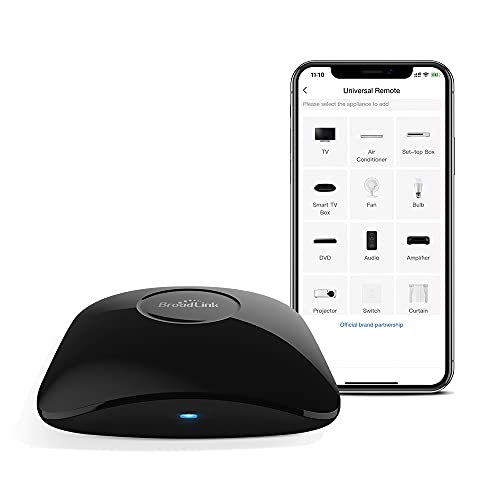
Broadlink IR and RF Universal Remote Hub
Best for: IR and fixed code RF device control
- Connectivity
- IR, RF 433/315MHz, Wi-Fi
- Smart Home Compatibility
- Alexa, Google Home, IFTTT
- Network Interface
- 2.4 GHz
- Power Source
- 5V 1A adapter
- Dimensions
- 3.94 × 3.54 × 1.18 inches
- Weight
- 5.29 ounces
View on Amazon: Broadlink IR and RF Universal Remote Hub Affiliate link
This is a WiFi universal remote that handles IR and 433/315MHz RF signals. It works with Alexa and Google Home for voice control. You can use the app to create scenes or program custom buttons. It supports 2.4 GHz Wi-Fi and connects to external temperature and humidity sensors. It does not work with Bluetooth or rolling code RF devices.
Pros
- Supports IR and 433/315MHz RF fixed code signals
- Compatible with Alexa, Google Home, and IFTTT
- Allows custom button programming and learning
- Connects to external temperature and humidity sensors
Cons
- Does not support Bluetooth connectivity
- Incompatible with RF rolling code devices
- Requires 2.4 GHz Wi-Fi network only
Good fit if
- You need to control IR and fixed code RF devices
- You want voice control via Alexa or Google Home
- You want to monitor room temperature and humidity
Skip if
- You have RF devices that use rolling codes
- You require Bluetooth control for your devices
- Your network only supports 5 GHz Wi-Fi
Verdict: Broadlink RM4 Pro WiFi Universal Remote is a practical tool for controlling IR and fixed code RF devices through voice assistants. It fits users who need to integrate legacy remotes into a smart home without Bluetooth or rolling code support.
Specifications side by side
| Spec | Broadlink IR and RF Universal Remote Hub |
|---|---|
| Connectivity | IR, RF 433/315MHz, Wi-Fi |
| Smart Home Compatibility | Alexa, Google Home, IFTTT |
| Network Interface | 2.4 GHz |
| Power Source | 5V 1A adapter |
| Dimensions | 3.94 × 3.54 × 1.18 inches |
| Weight | 5.29 ounces |
| Model | RM4 Pro |
Frequently asked questions
Does the Broadlink RM4 Pro support Bluetooth?
No, the Broadlink RM4 Pro does not feature Bluetooth connectivity. It relies exclusively on Wi-Fi for communication with your smartphone and smart home ecosystem. This means you cannot pair it via Bluetooth for local control or setup. You must have access to a 2.4 GHz Wi-Fi network to configure and operate the device effectively.
Can I use this remote with Alexa or Google Home?
Yes, the Broadlink RM4 Pro is compatible with both Alexa and Google Home. You can integrate it with these voice assistants to control your IR and RF devices using voice commands. This allows you to add legacy remotes into your existing smart home setup without needing additional hubs or complex wiring.
What types of signals does the RM4 Pro emit?
The device emits infrared (IR) and radio frequency (RF) signals at 433/315MHz. It uses IR for standard devices like TVs and fans. It uses RF for older motors, such as window shades or projectors. This dual capability helps you control a wide range of legacy electronics that typically require separate remotes.
Does it work with 5 GHz Wi-Fi networks?
No, the Broadlink RM4 Pro only connects to 2.4 GHz Wi-Fi networks. It cannot communicate with 5 GHz bands. If your home router broadcasts only on 5 GHz, you may need to enable the 2.4 GHz band to set up the device. This limitation is common for budget smart home hubs.
Is a power adapter included with the device?
The listing does not indicate that a power adapter is included. You need a 5V 1A adapter to power the RM4 Pro. You must source this separately if you do not already have a compatible USB power supply. Ensure you have one ready before attempting to set up the hub.
Who should skip this universal remote?
You should skip this hub if you need support for Bluetooth devices or rolling code RF signals. The RM4 Pro is designed for IR and fixed code RF control only. It fits users who want to integrate legacy remotes into a smart home. If you require advanced security protocols or modern wireless standards, look elsewhere.