Aqara M100 Matter Zigbee Hub or Aqara Zigbee Smart Plug Energy? Which Aqara Model to Buy
As an Amazon Associate we earn from qualifying purchases. Links on this page are affiliate links.
You are deciding between the aqara smart hub m100 home vs zigbee smart plug energy. Both devices use Zigbee to communicate with your smart home ecosystem. They also both require the Aqara Home app for initial setup and management. The main difference lies in their function. One acts as a central controller for multiple devices. The other is a single outlet that monitors power usage. Choose the hub if you need a bridge. Pick the plug if you need energy tracking for one appliance.
Key differences
| Aspect | Aqara Zigbee Smart Plug with Energy Monitoring | Aqara M100 Matter and Zigbee Hub |
|---|---|---|
| Connectivity | Zigbee | Thread, Zigbee, Matter, Wi-Fi |
| System Compatibility | Aqara Home | Apple Home, Amazon Alexa, Home Assistant |
| Device Capacity | One plug per unit | Up to 20 Zigbee and 20 Thread devices |
| Power Source | Wall outlet | USB-A |
| Network Requirement | Requires separate hub | 2.4GHz Wi-Fi 6 |
Which one should you choose?
Choose Aqara Zigbee Smart Plug with Energy Monitoring if
- You need to monitor energy consumption for a specific high-power appliance like a space heater.
- You already own a compatible Aqara hub and want to expand your outlet count.
- You want a device that also acts as a signal repeater to strengthen your Zigbee mesh network.
Choose Aqara M100 Matter and Zigbee Hub if
- You want to connect Aqara devices to Apple Home, Alexa, or Home Assistant via Matter.
- You need a central hub to manage up to 40 compatible devices locally.
- You prefer a small device that can be powered by a power bank or router USB port.
Verdict: The M100 Hub is the better choice if you are building a broader smart home system with Matter support and local automation. The Zigbee Smart Plug is the right pick if you only need to control and monitor one specific appliance and already have a hub. They serve different roles in your setup.
Hub Versus Plug Feature Breakdown
Core Functionality
The Aqara Zigbee Smart Plug with Energy Monitoring acts as a controllable outlet for high-power appliances up to 15 amps. It also strengthens your network by repeating Zigbee signals to eliminate dead zones for sensors and lights. The Aqara M100 Matter and Zigbee Hub serves as the central controller. It connects up to 20 Aqara Zigbee devices and 20 Thread devices. It bridges these local devices to Matter ecosystems like Apple Home and Home Assistant. One manages power outlets, while the other manages the entire network.
Smart Home Compatibility
The Aqara Zigbee Smart Plug with Energy Monitoring relies on the Aqara Home app for scheduling, timers, and scenes. It requires a separate Aqara Hub to function remotely. The Aqara M100 Matter and Zigbee Hub supports Apple Home, Amazon Alexa, and Home Assistant directly via Matter. It enables advanced features like facial recognition and complex automations across different platforms. The hub provides broader integration capabilities, whereas the plug is limited to the Aqara ecosystem unless paired with a compatible gateway.
Connectivity Protocols
The Aqara Zigbee Smart Plug with Energy Monitoring uses only the Zigbee protocol. It needs a secured 2.4 gigahertz Wi-Fi network connection for the hub it connects to. The Aqara M100 Matter and Zigbee Hub supports Thread, Zigbee, Matter, and 2.4GHz Wi-Fi 6. Wi-Fi 6 offers advanced WPA3 security and handles high-traffic environments better. The hub handles multiple protocols simultaneously, making it more versatile for mixed-device homes compared to the single-protocol plug.
Power Source
The Aqara Zigbee Smart Plug with Energy Monitoring plugs directly into a standard wall outlet. It does not list a specific power adapter requirement in its specs. The Aqara M100 Matter and Zigbee Hub requires a 5V⎓0.5A power adapter, which is not included. It uses a universal USB-A port for power. This allows connection to power banks, wall outlets, PCs, or routers. The hub offers more flexible placement options due to the USB-A interface.
Physical Dimensions
The Aqara Zigbee Smart Plug with Energy Monitoring measures 1.85 inches in width, 1.38 inches in height, and 2.64 inches in length. It weighs 3.04 ounces. The Aqara M100 Matter and Zigbee Hub is much smaller, measuring 0.31 inches in width, 1.18 inches in height, and 4.25 inches in length. It weighs only 0.71 ounces. The hub also features an adjustable shaft that rotates within a 210-degree range, allowing for flexible positioning that the bulky plug cannot match.
Local Automation
The Aqara Zigbee Smart Plug with Energy Monitoring supports schedules and timers set through the app. It does not explicitly mention local execution capabilities in the provided data. The Aqara M100 Matter and Zigbee Hub supports local execution of automations for Zigbee and Matter devices. This ensures smooth operation even without Wi-Fi or cloud access. It provides millisecond-level response times for stable performance. The hub offers more reliable local control for complex routines.
Which Aqara Device Fits Your Needs
You want to monitor appliance power usage
This smart plug includes built-in energy monitoring. You can track the power consumption of connected devices directly through the Aqara Home app. This feature helps you identify inefficient appliances and adjust your usage to save energy. The plug handles high-power loads up to 15 amps, making it suitable for space heaters or window air conditioners.
You need a central hub for automation
The M100 hub acts as the central controller for your smart home. It supports local automation execution, ensuring reliable performance even without an internet connection. It connects to 2.4GHz Wi-Fi 6 networks for secure communication. This device allows you to manage Zigbee and Thread devices, creating a stable foundation for your automated routines.
You use Matter-compatible ecosystems like Apple Home
This hub functions as a Matter Bridge, enabling seamless integration with Apple Home, Amazon Alexa, and Home Assistant. It allows unique Aqara features, such as facial recognition, to work across different smart home platforms. By connecting Aqara Zigbee products to other Matter ecosystems, it expands your device compatibility and simplifies control across multiple apps.
The products compared

Aqara Zigbee Smart Plug with Energy Monitoring
Best for: existing Aqara hub owners needing energy tracking
- Connectivity
- Zigbee
- Smart Home Compatibility
- Alexa, Google Assistant, Apple HomeKit
- Dimensions
- 2.64 × 1.85 × 1.38 inches
- Weight
- 3.04 ounces
View on Amazon: Aqara Zigbee Smart Plug with Energy Monitoring Affiliate link
This Aqara plug adds smart control to standard outlets using a Zigbee connection. It requires a separate Aqara Hub to function. The device monitors energy usage for connected appliances and supports loads up to 15 amps. It also acts as a signal repeater to strengthen your Zigbee mesh network. You get remote control, scheduling, and scene automation through the Aqara Home app. It fits well if you already use Aqara hubs and need to track power consumption for high-draw devices.
Pros
- Monitors real-time energy consumption of connected appliances
- Supports high-power devices up to 15 amps
- Acts as a Zigbee signal repeater to expand mesh coverage
- Enables remote control, scheduling, and scene automation via app
Cons
- Requires a separate Aqara Hub which is not included
- Limited to 2.4 GHz Wi-Fi for hub connectivity
- No local control without the hub present
Good fit if
- You already own an Aqara Hub for your smart home
- You need to monitor energy usage for specific appliances
- You want to strengthen your Zigbee mesh network range
Skip if
- You do not have an Aqara Hub to pair with it
- You want a standalone plug that works without a hub
- You need to control 5 GHz Wi-Fi devices directly
Verdict: Aqara Zigbee Smart Plug with Energy Monitoring is a practical add-on for existing Aqara ecosystems. It helps you track power draw and improve network stability, making it ideal for users who already have the required hub.
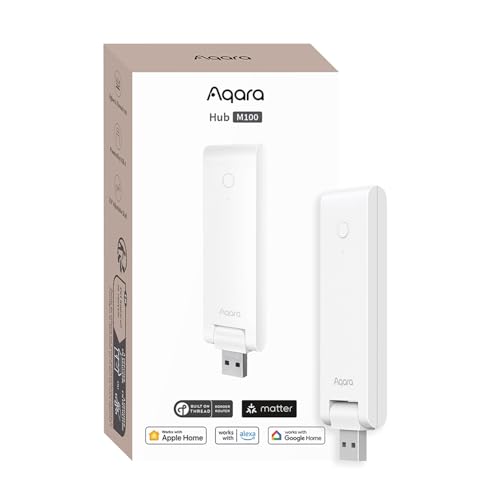
Aqara M100 Matter and Zigbee Hub
Best for: bridging Aqara Zigbee devices to Matter ecosystems
- Connectivity
- Zigbee, Thread, Wi-Fi 6, Matter
- Smart Home Compatibility
- Apple HomeKit, Alexa, Home Assistant
- Network Interface
- 2.4GHz Wi-Fi 6, USB-A
- Power Source
- 5V 0.5A USB-A
- Dimensions
- 4.25 × 0.31 × 1.18 inches
- Weight
- 0.71 ounces
View on Amazon: Aqara M100 Matter and Zigbee Hub Affiliate link
The Aqara M100 is a multi-protocol hub supporting Thread, Zigbee, and Matter. It connects up to 20 Aqara Zigbee devices and 20 Thread devices. It features 2.4GHz Wi-Fi 6 for stable connections and supports local automation for reliable performance. This hub integrates with Apple Home, Amazon Alexa, and Home Assistant. It is ideal for users building a Matter-based smart home with Aqara sensors and switches.
Pros
- Supports Thread, Zigbee, and Matter protocols
- Connects up to 20 Aqara Zigbee devices
- Enables local automation execution
- Uses 2.4GHz Wi-Fi 6 with WPA3 security
Cons
- Only supports third-party Matter devices, not third-party Zigbee devices
- Requires a separate 5V 0.5A power adapter
- Limited to 2.4GHz Wi-Fi connectivity
Good fit if
- You want to use Aqara Zigbee devices with Apple Home or Home Assistant
- You need local automation for faster response times
- You are building a Matter-compatible smart home
Skip if
- You plan to use third-party Zigbee devices directly
- You require 5GHz Wi-Fi connectivity
- You need a pre-installed power adapter
Verdict: Aqara M100 Matter Hub is the right choice for users who want to bridge Aqara Zigbee devices into Matter ecosystems like Apple Home or Home Assistant with reliable local automation.
Specifications side by side
| Spec | Aqara Zigbee Smart Plug with Energy Monitoring | Aqara M100 Matter and Zigbee Hub |
|---|---|---|
| Connectivity | Zigbee | Zigbee, Thread, Wi-Fi 6, Matter |
| Smart Home Compatibility | Alexa, Google Assistant, Apple HomeKit | Apple HomeKit, Alexa, Home Assistant |
| Network Interface | not stated | 2.4GHz Wi-Fi 6, USB-A |
| Power Source | not stated | 5V 0.5A USB-A |
| Dimensions | 2.64 × 1.85 × 1.38 inches | 4.25 × 0.31 × 1.18 inches |
| Weight | 3.04 ounces | 0.71 ounces |
| Color | White | not stated |
| Model | ZNCZ12LM | HM-G02E |
Frequently asked questions
Do I need the Aqara M100 Hub to use the Zigbee Smart Plug?
Yes, the Aqara Zigbee Smart Plug requires a compatible hub to function. It connects via Zigbee, which means it cannot pair directly with your Wi-Fi router. The Aqara M100 Matter and Zigbee Hub provides the necessary bridge to connect the plug to your home network and the Aqara Home app for control.
Can the Aqara M100 Hub connect to Apple Home?
Yes, the Aqara M100 Hub supports Matter, allowing it to bridge Aqara Zigbee devices into Matter ecosystems. This includes compatibility with Apple Home and Home Assistant. You can use this hub to integrate your existing Zigbee sensors and lights into these platforms for reliable local automation without relying solely on the cloud.
Does the Aqara Zigbee Smart Plug track energy usage?
Yes, this smart plug includes built-in energy monitoring capabilities. You can track the power consumption of connected appliances directly through the Aqara Home app. This feature helps you identify inefficient devices and adjust your usage patterns, making it a practical add-on for users who already have the required hub in their ecosystem.
What is the size difference between the M100 Hub and the Smart Plug?
The Aqara M100 Hub is significantly smaller and lighter than the Smart Plug. The hub measures 4.25 inches in length and weighs only 0.71 ounces. In contrast, the Smart Plug is larger, measuring 2.64 inches in length and weighing 3.04 ounces. The hub is designed to be discreet, while the plug is a standard outlet form factor.
Is the Smart Plug compatible with Zigbee devices only?
The Smart Plug itself uses Zigbee connectivity to communicate with your hub. It does not support Wi-Fi or Bluetooth directly. It acts as a controllable outlet for appliances up to 15 amps. It also strengthens your network by repeating Zigbee signals, which helps eliminate dead zones for other sensors and lights in your home.
Which device is better for expanding my smart home network?
If you need to add network coverage, the Aqara Zigbee Smart Plug is a practical choice. It repeats Zigbee signals to eliminate dead zones for sensors and lights. However, if you need to bridge devices to new ecosystems like Apple Home, the Aqara M100 Hub is the better option for expanding your system's reach and compatibility.