AEOTEC Z-Stick 7 Plus Z-Wave Review: Specs, Pros and Cons
As an Amazon Associate we earn from qualifying purchases. Links on this page are affiliate links.
This aeotec z stick 7 plus review covers the ZWA010 USB adapter. It lets you build a Z-Wave hub on Raspberry Pi, Windows, Mac, or Linux systems. The device uses the 700 Series chip and Z-Wave Plus protocol. These specs define its core capability. It supports SmartStart for easy pairing and S2 security for safe connections. The hardware includes an 18% faster CPU compared to older models. It also claims to transmit signals up to 250% further in open spaces. This adapter is a gateway controller for home automation software.
What stands out
- 700 Series Z-Wave chip for enhanced performance
- Z-Wave Plus connectivity with SmartStart support
- S2 security protocol for encrypted device communication
- Compatible with Home Assistant and Indigo 7 software
- USB network interface for easy hub creation
Who it fits
Good fit for
You should choose this adapter if you are building a custom home automation hub on a Raspberry Pi or a computer running Windows, Mac, or Linux. It suits users who want to integrate Z-Wave devices into Home Assistant or Indigo 7. The S2 security and SmartStart features make it a solid choice for those prioritizing secure and easy device pairing. If you need a reliable gateway controller that leverages the 700 Series technology, this unit fits your setup.
Who should skip it
You should look elsewhere if you need a standalone smart home hub with a built-in display or remote control. This device is a USB adapter that requires host software to function. It does not include any software, so you must already have a compatible platform like Home Assistant. If you want a plug-and-play solution without configuring a host system or managing network interfaces, this adapter will not meet your needs.
Verdict: This USB adapter provides a robust foundation for custom Z-Wave hubs using 700 Series technology. It is best for users who already have a compatible host system and software.
Key specs explained
Connectivity: Z-Wave, Z-Wave Plus
This means the adapter supports the standard Z-Wave protocol and the enhanced Z-Wave Plus certification. You can connect to a wide range of smart devices that use this mesh network. Z-Wave Plus often ensures better compatibility and range. This is essential if you plan to add sensors, switches, or locks to your home automation system.
Network Interface: USB
The device connects to your computer or hub via a standard USB port. You do not need a separate power brick or complex wiring. Simply plug it into a Raspberry Pi, Windows PC, Mac, or Linux machine. This makes setup straightforward and allows you to move the controller easily between different control systems.
Smart Home Compatibility: Home Assistant, Indigo 7
This adapter works directly with popular home automation software like Home Assistant and Indigo 7. You do not need to buy proprietary software from Aeotec. This gives you flexibility in choosing your control platform. If you already use these programs, this device integrates seamlessly without extra configuration hurdles or additional software purchases.
Chip: 700 Series
The 700 Series chip is a newer generation of Z-Wave technology. It offers improved performance and security compared to older chips. You benefit from faster response times and better handling of multiple devices. This spec indicates the device is modern and capable of supporting more complex smart home setups with greater reliability and range.
Design and Build Quality
According to the listing, the Aeotec Z-Stick 7 Plus is a compact USB adapter. It connects directly to your computer or hub via a standard USB interface. This form factor means you can place it near your Raspberry Pi, Windows, Mac, or Linux machine without taking up much desk space. The device relies on its internal components rather than external casing features. There is no mention of a display or physical buttons in the provided data. This suggests a set-and-forget installation where you configure settings through software on your host system.
The listing highlights German engineering for the Gen7 and 700 Series technologies. This focus on internal architecture likely contributes to the claimed 18% faster CPU performance. A quicker processor helps manage the Z-Wave mesh network more efficiently. The adapter also supports Z-Wave SmartStart and S2 security. These are software-defined features that enhance device pairing and encryption. You do not need to manipulate physical controls to enable them. Instead, you rely on the host software, such as Home Assistant or Indigo 7, to manage these protocols. The design prioritizes connectivity and processing power over external aesthetics or manual controls.
Setup And Daily Use Guide
Setup begins by connecting the ZWA010 USB adapter to your chosen host system. The listing confirms compatibility with Raspberry Pi, Windows, Mac, and Linux platforms. You install your preferred home automation software, such as Home Assistant or Indigo 7, to recognize the device. Note that no software is included in the package. You must provide your own control interface.
Once installed, the adapter acts as a gateway controller. It uses the 700 Series chip and Z-Wave Plus protocol to manage your network. This hardware foundation supports Z-Wave SmartStart and S2 security features. SmartStart simplifies adding new devices to your mesh. You do not need to manually pair each sensor or switch. The system handles the initial handshake automatically.
S2 security ensures that your commands are encrypted. This protects your home automation data from unauthorized access during transmission. The device transmits signals up to 250% further in open spaces compared to older generations. This range improvement helps maintain a stable connection for devices located farther from your hub. The 18% faster CPU processes these commands more quickly. This reduces latency when you send commands to lights or locks.
Daily use relies on the software you choose. The adapter does not control devices on its own. It bridges your smart devices to your chosen platform. You interact with your home through the software interface. The hardware simply ensures reliable, secure, and extended-range communication between your controller and your Z-Wave devices.
What You Need Before Buying
You need a host system to run this adapter. The listing confirms it works with Raspberry Pi, Windows, Mac, and Linux. You must install compatible software like Home Assistant or Indigo 7. No software is included. Check your existing hub. This device creates a Z-Wave gateway. It does not replace a full smart thermostat. You likely need Z-Wave Plus devices to benefit from the 700 Series chip. The adapter extends range by 250% in open spaces. This helps if your devices are far from the hub. Ensure your host has an available USB port. You should verify your automation platform supports SmartStart. This feature simplifies adding new devices. Keep your software updated for security. The Z-Wave mesh network requires multiple devices for stability. This adapter is the controller. It does not control devices directly without your software. Consider if your current setup already has a Z-Wave hub. If not, this is a starting point. You need to plan your device placement for optimal signal strength.
Check before you buy
- Verify your host system has an available USB port.
- Confirm your automation software supports Z-Wave SmartStart features.
- Check if you already have a Z-Wave hub.
- Ensure you have Z-Wave Plus devices to connect.
The product at a glance
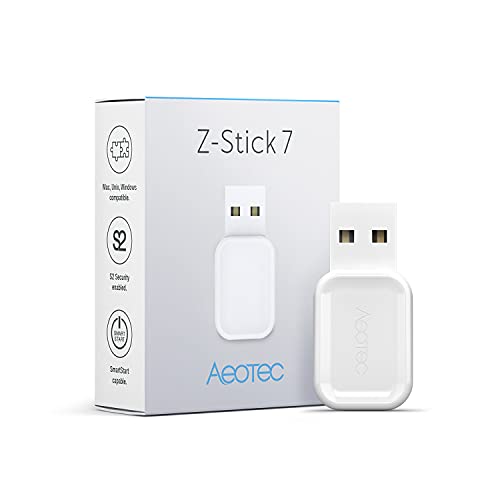
Aeotec Z-Stick 7 Plus Z-Wave USB Adapter
Best for: building custom Z-Wave hubs on Raspberry Pi
- Connectivity
- Z-Wave, Z-Wave Plus
- Smart Home Compatibility
- Home Assistant, Indigo 7
- Network Interface
- USB
View on Amazon: Aeotec Z-Stick 7 Plus Z-Wave USB Adapter Affiliate link
The Aeotec Z-Stick 7 Plus is a USB gateway controller that uses the Z-Wave 700 Series. It supports Z-Wave and Z-Wave Plus devices with S2 security and SmartStart. The device features an 18% faster CPU and transmits signals up to 250% further in open spaces. You can use it with Home Assistant, Indigo 7, Raspberry Pi, Windows, Mac, or Linux to build a Z-Wave hub.
Pros
- Uses Z-Wave 700 Series technology
- Supports Z-Wave SmartStart and S2 security
- 18% faster CPU for quicker response
- Transmits up to 250% further in open space
- Compatible with Raspberry Pi and major software
Cons
- Requires separate home automation software
- Limited to USB connectivity only
- No built-in display or remote control
Good fit if
- You want to build a Z-Wave hub on Raspberry Pi
- You need S2 security for your devices
- You use Home Assistant or Indigo 7
Skip if
- You prefer Wi-Fi or Zigbee networks
- You need a standalone hub without a computer
- You want a plug-and-play solution with no setup
Verdict: Aeotec Z-Stick 7 Plus Z-Wave USB is a powerful gateway for users building custom Z-Wave hubs. It fits those who value range and security in a flexible, software-defined setup.
Specifications side by side
| Spec | Aeotec Z-Stick 7 Plus Z-Wave USB Adapter |
|---|---|
| Connectivity | Z-Wave, Z-Wave Plus |
| Smart Home Compatibility | Home Assistant, Indigo 7 |
| Network Interface | USB |
| Color | white |
| Model | ZWA010 |
Frequently asked questions
What is the main advantage of the Aeotec Z-Stick 7 Plus for home automation?
The primary advantage is its flexibility for building custom Z-Wave hubs. It allows you to create a software-defined setup on various platforms. This is ideal for users who want full control over their smart home infrastructure. The device serves as a powerful gateway for these custom configurations.
Which operating systems are compatible with the ZWA010 adapter?
The listing confirms compatibility with Raspberry Pi, Windows, Mac, and Linux systems. You can install the adapter on any of these hosts to create a Z-Wave network. This broad support ensures you can use the device with your existing computer or single-board computer setup without major restrictions.
Does this adapter work with Home Assistant?
Yes, the product data explicitly lists Home Assistant as a compatible smart home platform. You can install Home Assistant on your host system to recognize and control Z-Wave devices through the Z-Stick 7 Plus. This makes it a suitable choice for users relying on open-source home automation software.
What Z-Wave standard does the Aeotec Z-Stick 7 Plus support?
The adapter supports the Z-Wave Plus protocol and uses the 700 Series chip. This combination ensures strong mesh networking capabilities and enhanced compatibility with a wide range of smart devices. You benefit from improved range and reliability compared to older Z-Wave generations in your home automation setup.
Is software included with the Aeotec Z-Stick 7 Plus?
No software is included with the device. You must install compatible home automation software, such as Home Assistant or Indigo 7, on your host system yourself. The listing notes that you need to set up the software to recognize the USB adapter and manage your connected Z-Wave devices.
Can I use this adapter with Indigo 7?
Yes, Indigo 7 is listed as a compatible software platform for this adapter. You can install Indigo 7 on your chosen host system to utilize the Z-Stick 7 Plus. This provides another option for managing your Z-Wave network if you prefer Indigo 7 over other home automation solutions.
What is the model number for the Aeotec Z-Stick 7 Plus?
The model number for this device is ZWA010. You can use this identifier to verify you are purchasing the correct 700 Series adapter. It distinguishes this specific USB stick from other Aeotec products or older Z-Wave adapters in your search results or technical documentation.
Who is the best audience for this Z-Wave USB adapter?
This adapter is best for users building custom Z-Wave hubs on Raspberry Pi or similar systems. It fits those who value range and security in a flexible, software-defined setup. If you prefer a pre-built hub, this may not be the right choice. It is designed for DIY enthusiasts.